Our community is getting an upgrade on July 2nd! Learn more in the FAQs →
linux
722 Topics
Support for Zen browser
Hi! There's this new browser called "Zen browser" It's based on Firefox but the 1password extension doesn't work with the desktop app 1Password Version: Not Provided Extension Version: Not Provided OS Version: Not Provided Browser: Not ProvidedSolved21KViews56likes183Comments
Authentication Required window frozen Ubuntu 20.04
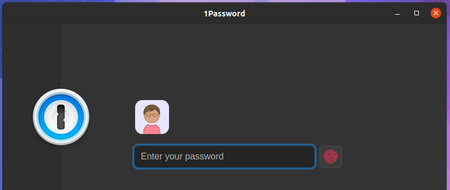
I use 1password extension with Firefox (v92.0). It has been working great. Whenever I require it I'd just press the keyboard shortcut and a window pops out (in the centre of screen) prompting to enter my password of my Ubuntu login -- lets call this authentication box. If it does this, everything should be fine. I'd put my PC (not laptop) into suspend mode and return to it normally. However, there have been a few occasions now when I have to unlock 1password extension, the 1password app launched and prompted me for my 1password password. This is not the same authentication box. The main application opens. From this point on, if I put my machine to suspend and logs back in, the above-mentioned authentication box appears frozen at the top-left of my screen. I cannot click it off -- hovering the mouse of the Cancel button highlights the button but clicking it does nothing. I can, however, click any where within the popup window and interactive with any objects or links below it even though the popup is opaque. See screenshot.. Notice the cancel button? If the Visual Code Studio icon below it is on the same row as the password field, clicking it will launch the VSCode application. The point here is that this popup window cannot be moved, removed, resized, etc. As the popup sits above all layers, it is obstructing everything else below it. The only thing I can do to is to log off Ubuntu and back in. Any tips? 1Password Version: 8.2.0 Extension Version: 2.1.2 OS Version: Ubuntu 20.046.9KViews0likes7Comments
Feature Request: 1Password on Flathub
Since the recent https://1password.community/discussion/comment/615214/#Comment_615214 would be, time to publish 1Password on https://flathub.org/home. Flathub is the best known Flatpak package store, so it would be a good idea to public 1Password on it, and it is easier to find Flatpak apps directly from it, since users expect most Flatpak apps to be there. Here is the guide on how to publish on Flathub: https://github.com/flathub/flathub/wiki/App-Submission 1Password Version: Not Provided Extension Version: Not Provided OS Version: Not ProvidedSolved6.8KViews0likes31Comments1Password Shortcuts on Wayland
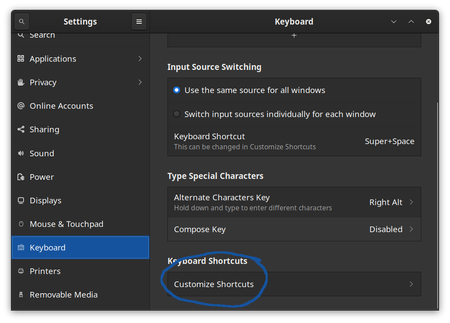
1Password is an application that works very well when users can invoke it from anywhere. Quick Access in particular is a feature that is meant to be invoked from anywhere on your desktop. However, as many of you know, the Wayland developers made a deliberate choice to not allow applications to set global shortcuts. To my knowledge, all Wayland implementations have continued to honor this choice. The reasoning is valid, though: global shortcuts make keyloggers trivial. 1Password can run as a native Wayland application, and defaults to XWayland. This, however, does not help since the primary desktop environment is itself Wayland. For a variety of reasons, we have provided command line options for several of the most useful 1Password commands. In this article, I'll describe how to use those options to set up global shortcuts for 1Password with both Gnome Shell and Sway. It is, fortunately, very easy. Gnome Shell For this example, I'm running Gnome Shell 40.4.0, Wayland mode, on Fedora Core 34. Start by finding Keyboard > Customize Shortcuts in your Settings application. Next, select Customize Shortcuts Your list of custom shortcuts may start empty, but you will want to get to something like this: Press the + button at the bottom to create a new shortcut, and you'll get a screen like this: As you create each shortcut, name each one in a way that makes sense to you. In the Command field, you will write a trivial script that invokes 1Password with the option that you want. Once you have created that invocation, set the keyboard shortcut as you desire. I recommend multiple key bindings that all work together. The following is the 1Password defaults set on other platforms, and on XOrg-based displays. Name Command Shortcut Open or Toggle 1Password 1password --toggle Ctrl + p Lock 1Password 1password --lock Ctrl + Shift + L Open Quick Access 1password --quick-access Ctrl + Shift + Space note: there is no default for Open or Toggle 1Password, so I made something up. Sway Sway does not have a GUI configurator, but instead does everything in the configuration file at ~/.config/sway/config . Fortunately, this is very easy to set up: bindsym Ctrl+Shift+l 1password --lock byndsym Ctrl+Shift+space exec 1password --quick-access KDE Plasma coming soon6.7KViews4likes16Comments
I can't start wayland-native version of 1Password.
When I try to run 1password with the well-known OzonePlatform, I get the following: ``` INFO 2023-08-07T22:51:44.006 ThreadId(14) [client:typescript] Client starting. INFO 2023-08-07T22:51:44.114 ThreadId(14) [1P:op-localization/src/lib.rs:227] system locale detected as 'en-US' INFO 2023-08-07T22:51:44.114 ThreadId(14) [1P:op-localization/src/lib.rs:253] selected translations for EN_US based on detected locale en-US INFO 2023-08-07T22:51:44.114 ThreadId(14) [status:op-app/src/app.rs:519] App::new(1Password for Linux/81009046 (EN_US), /$USER/.config/1Password/1password.sqlite) INFO 2023-08-07T22:51:44.117 ThreadId(14) [1P:data/op-db/src/db.rs:446] Table Integrity Check Succeeded INFO 2023-08-07T22:51:44.118 ThreadId(14) [1P:data/op-db/src/db.rs:462] DB Integrity Check Succeeded INFO 2023-08-07T22:51:44.118 ThreadId(14) [1P:data/op-db/src/db.rs:137] Starting DB at version: 29 INFO 2023-08-07T22:51:44.187 ThreadId(14) [1P:ssh/op-ssh-config/src/lib.rs:248] agent not configured INFO 2023-08-07T22:51:44.188 tokio-runtime-worker(ThreadId(9)) [1P:native-messaging/op-native-core-integration/src/lib.rs:281] Mute native core integration is waiting for Shared Lock State to be enabled INFO 2023-08-07T22:51:44.189 tokio-runtime-worker(ThreadId(9)) [1P:ssh/op-agent-controller/src/desktop.rs:433] Starting filesystem watcher for SSH agent configuration directories... ERROR 2023-08-07T22:51:44.189 tokio-runtime-worker(ThreadId(9)) [1P:/builds/dev/core/core/ssh/op-agent-controller/src/desktop.rs:434] Io(Os { code: 2, kind: NotFound, message: "No such file or directory" }) ERROR 2023-08-07T22:51:44.209 tokio-runtime-worker(ThreadId(1)) [1P:op-global-shortcuts/src/lib.rs:69] AppError at /builds/dev/core/core/op-global-shortcuts/src/node.rs:62:6 binding shortcut Caused by: BindRefused Stack backtrace: 0: op_global_shortcuts::node::bind::{{closure}} 1: op_executor::spawn_no_span::{{closure}} 2: tokio::loom::std::unsafe_cell::UnsafeCell ::with_mut 3: std::panicking::try 4: tokio::runtime::task::harness::Harness ::poll 5: tokio::runtime::scheduler::multi_thread::worker::Context::run_task 6: tokio::runtime::scheduler::multi_thread::worker::Context::run 7: tokio::macros::scoped_tls::ScopedKey ::set 8: tokio::runtime::scheduler::multi_thread::worker::run 9: tokio::loom::std::unsafe_cell::UnsafeCell ::with_mut 10: std::panicking::try 11: tokio::runtime::task::harness::Harness ::poll 12: tokio::runtime::blocking::pool::Inner::run 13: std::sys_common::backtrace::__rust_begin_short_backtrace 14: core::ops::function::FnOnce::call_once{{vtable.shim}} 15: alloc::boxed::Box<F,A as core::ops::function::FnOnce >::call_once at /rustc/90c541806f23a127002de5b4038be731ba1458ca/library/alloc/src/boxed.rs:1973:9 alloc::boxed::Box<F,A as core::ops::function::FnOnce >::call_once at /rustc/90c541806f23a127002de5b4038be731ba1458ca/library/alloc/src/boxed.rs:1973:9 std::sys::unix::thread::Thread::new::thread_start at /rustc/90c541806f23a127002de5b4038be731ba1458ca/library/std/src/sys/unix/thread.rs:108:17 16: 17: ERROR 2023-08-07T22:51:44.209 tokio-runtime-worker(ThreadId(10)) [1P:op-global-shortcuts/src/lib.rs:69] AppError at /builds/dev/core/core/op-global-shortcuts/src/node.rs:62:6 binding shortcut Caused by: BindRefused Stack backtrace: 0: op_global_shortcuts::node::bind::{{closure}} 1: op_executor::spawn_no_span::{{closure}} 2: tokio::loom::std::unsafe_cell::UnsafeCell ::with_mut 3: std::panicking::try 4: tokio::runtime::task::harness::Harness ::poll 5: tokio::runtime::scheduler::multi_thread::worker::Context::run_task 6: tokio::runtime::scheduler::multi_thread::worker::Context::run 7: tokio::macros::scoped_tls::ScopedKey ::set 8: tokio::runtime::scheduler::multi_thread::worker::run 9: tokio::loom::std::unsafe_cell::UnsafeCell ::with_mut 10: std::panicking::try 11: tokio::runtime::task::harness::Harness ::poll 12: tokio::runtime::blocking::pool::Inner::run 13: std::sys_common::backtrace::__rust_begin_short_backtrace 14: core::ops::function::FnOnce::call_once{{vtable.shim}} 15: alloc::boxed::Box<F,A as core::ops::function::FnOnce >::call_once at /rustc/90c541806f23a127002de5b4038be731ba1458ca/library/alloc/src/boxed.rs:1973:9 alloc::boxed::Box<F,A as core::ops::function::FnOnce >::call_once at /rustc/90c541806f23a127002de5b4038be731ba1458ca/library/alloc/src/boxed.rs:1973:9 std::sys::unix::thread::Thread::new::thread_start at /rustc/90c541806f23a127002de5b4038be731ba1458ca/library/std/src/sys/unix/thread.rs:108:17 16: 17: INFO 2023-08-07T22:51:44.479 invocation_loop(ThreadId(21)) [1P:op-app/src/app/backend/lock_screen.rs:72] System unlock is enabled: true INFO 2023-08-07T22:51:44.487 tokio-runtime-worker(ThreadId(10)) [1P:op-app/src/app/backend/lock_screen.rs:88] Sys auth status NotSetup ``` X11 version (via Xwayland) works fine. What should I do to get a wayland-native version running? 1Password Version: 8.10.9 Extension Version: Not Provided OS Version: Not Provided Browser: Not Provided5.8KViews3likes40Comments
Linux desktop client crashes on startup
Since updating to the latest version of the client, the Linux desktop client consistently crashes on first startup, and sometimes crashes again after already running. I have the browser extension and desktop app integration enabled, and I use my system unlock method as the unlock option for the desktop app (local account password popup instead of biometrics). This crash happens regardless of triggering unlock via the extension, launching the desktop app directly, or triggering the app's global search shortcut (ctrl-alt-space for me). This happens on both Kubuntu 24.04.1 LTS and Pop!_OS 22.04 LTS. In both cases, the desktop app is installed via apt. Quick edit: I originally wrote this for desktop client version 8.10.48. I updated to version 8.10.50 and the issue does still exist.Solved5.1KViews13likes105CommentsInstalling 1Password for Linux on Steam Deck / Steam OS
Hello, Curious if anyone here has successfully gone through the steps of installing 1Password for Steam Deck / Steam OS? Complete newbie to Linux which Steam OS is based off so I don't even know which Linux distribution it uses let alone how to complete the steps listed on the 1Password Linux page (https://support.1password.com/install-linux/) 1Password Version: Not Provided Extension Version: Not Provided OS Version: Not Provided Browser: Not Provided4.9KViews0likes4Comments
'one-time password' field has warning saying "The one-time password URL is incorrect: check the....
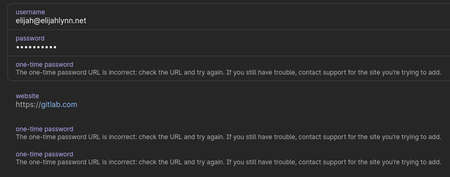
The one-time password field has warning saying, "The one-time password URL is incorrect: check the URL and try again.". My use case is that I am using these for MFA recovery code fields. If the field is actually for a URL, the field name should reflect that I think. I would like guidance on how to store MFA recovery code fields attached to a password entity and not have to create a secure note entity. Thanks! 1Password Version: 8.2.0 Extension Version: Not Provided OS Version: Arch Linux4.4KViews0likes2Comments
Integration between Linux app and Snap Firefox
Some days ago it was released the support for Native Messaging (still experimental) with Snap Firefox. I checked, but the integration between Linux app and Snap Firefox still doesn't work. I was wondering if the integration uses Native Messaging or other way to implement, and if it is using other way, if it could be ported to use Native Messaging, so Linux app could work with Snap Firefox. We are discussing this matter here 1Password Version: 8.9.0~1.BETA Extension Version: 2.3.7 OS Version: Ubuntu Kinetic Browser:_ Firefox3.9KViews6likes44CommentsSandboxed application can't communicate with browser extension
I have installed 1Password from the Ubuntu Software Center and installed the accompanying Chromium browser extension. When I launch 1Password, then go to Settings > Browser, I see the following text: 1Password detected that it is a sandboxed application. It won't be able to communicate with 1Password in the browser. Is this expected and normal? I understand that Snap packages are sandboxed; it's how I installed both 1Password and Chromium. And I get that 1Password for Linux is still somewhat new (grateful that it exists at all!) so I'm really just looking to find out what the intended experience is supposed to be. Thanks! 1Password Version: 8.2.1 Extension Version: 2.1.3 OS Version: Ubuntu 20.04.23.9KViews0likes31Comments