Level up your business security with free, on-demand training and certification. Explore 1Password Academy today →
macos
82 Topics
ssh agent and ansible 12 prompting incessantly
I've been using the SSH Agent in 1Password for a couple of years now, with very little trouble. This includes lots of SSH to individual machines as well as a fair amount of ansible scripting using versions prior to 12 and run directly from Terminal. Recently, I did a `brew upgrade` and ended up with Ansible 12. After that, it has become commonplace that ansible scripts run on my local machine and talking to nearby devices over the network result in 1passwd SSH agent prompting for every...single...command. I rolled back to ansible 10 (11 not available directly in Brew any longer) and the behavior returned to normal: prompting at the outset of my ansible script and not again until the next time I run a script. Running Ansible (as opposed to directly sshing in Terminal) has always prompted at the run, and usually for each individual destination machine, but that has been it. With the change to Ansible 12, the prompting from the SSH agent in 1password is now such that it is not usable. For the time being, I can roll back to ansible 10, but that won't be the case forever. Does anyone else have experience with this? Any recommendations for either diagnostics or solutions other than just disabling 1password's otherwise-highly-useful SSH Agent?Solved225Views0likes4Comments
Strange Issue with environments (failure)
I have multiple environments, with local destinations set up in 1Password. A/.env B/.env Both worked fine for a while. For some reason since a couple of days, A/.env was not accessible, in the sense that any process trying to access it, simply hangs. cat A/.env #hangs indefinitely Same happens when starting docker containers that use the .env file. It does not popup the authorization dialog at all. I tried restarting the 1Pass app, quitting from the menubar icon, force quitting, etc. I've also tried disabling and enabling the destination, setting up a different destination, setting up an entirely new test environment, etc. Now, as part of the testing, I noticed something else very strange. B/.env loads up fine. In fact, when I restart 1Pass using any of the methods mentioned above, as soon as it starts, the authorization dialog shows up for the B/.env Now, I also noticed another thing very strange: cat A/.env #hangs Now, as I soon as I run "cat B/.env" from another Terminal, the previously hanging "cat A/.env" returns. I've tested this with docker containers too. If I start a docker-container that depends on A/.env, it will hang, until I do "cat B/.env" and then it will work. Note that the authorization dialog never popped up (as far as I remember). Not sure where to go from here. Is there some logging or something I can check to figure out what the issue is? 1Password for Mac 8.12.12 (81212044) MacOS 26.3 (25D125)Solved64Views0likes2Comments1password locks within 10 seconds on High Performance or Dynamic resolution screen share on macOS
As the subject notes, I've noticed 1password locks itself within about 10 seconds regardless of what I've set the auto-lock setting to. This makes copying and grabbing passwords, otp codes etc very difficult as I need to do it within 10 seconds of opening 1password. This has been happening for quite some time (6+ months at least) when I run screen shares with a remote macOS host via the screen share app using High Performance or Dynamic Resolution. The issue does not occur if I change from High Performance to standard in the macOS screen share app. High Performance is useful as it adjusts the remote display to match the display I'm using on my local machine. Which makes needing to switch back to standard - not ideal. The remote machine display does not scale nicely if in standard screen share type mode. I was wondering if anyone else has seen this issue? Remote Mac is running MacOS 15.6.1 1password ver. 8.11.6655Views3likes33Comments
Feature request: Path-aware login suggestions for multiple credentials on the same domain
I'd like to file a feature request and share a use case where the current "domain-only" matching makes day-to-day autofill noticeably worse, and to ask whether path-aware matching could be reconsidered as an opt-in option Up front: I can see from a quick search that this is clearly a much-requested feature, with threads going back what feels like several presidential administrations. Normally I'd just add a thumbs-up to the canonical request rather than start a new thread - but without a feature-request tracker (more on that at the end), I genuinely couldn't tell which of the many overlapping discussions is the "live" one the team is actually watching, vs. the ones now being slowly reclaimed by the forum equivalent of moss. So I'm posting fresh rather than guessing wrong and shouting into a tomb. Apologies for the duplication; please feel free to merge this into whichever discussion is currently canonical. ## The situation I have multiple distinct logins on the same domain, distinguished only by path. For example: - https://[example.com]/[teamA]/login -> Login A - https://[example.com]/[teamB]/login -> Login B - https://[example.com]/[admin]/login -> Login C Because 1Password matches on eTLD+1 and ignores the path for suggestions, all three credentials surface every time I land on any of these pages. There is no way to tell 1Password "when the URL path starts with /teamA, prefer Login A," which means every login attempt is a small multiple-choice quiz I am demonstrably bad at. ## Why this matters The "pick from a list" flow is fine for an occasional ambiguity, but in this scenario it happens on every single login. I autofill the wrong credential maybe 1 in 3 times, which - and I cannot stress this enough - triggers the account lockout flow on at least one of these systems. My password manager and I are, in effect, collaborating to lock me out of my own accounts. Favoriting helps for exactly one of them; the others remain a coin flip with worse odds. I understand from past forum threads that 1Password removed path matching some years ago because it complicated things for typical users, and that the team is (rightly) conservative about adding options. I'm not asking for the old behavior back as a default - I'm asking whether a per-item, opt-in path constraint could fit the existing model: - Today's "Fill anywhere on this website" -> unchanged default - Today's "Only fill on this exact host" -> already path-blind - New: "Only fill when URL path starts with ..." (per Website entry) That mirrors the existing exact-host option, just one level deeper. No regex, no globs, no Turing-complete URL DSL - just a path-prefix string on the Website field when the user explicitly opts in. Items without the new option behave exactly as they do today, so there's no impact on users who don't need this. ## Alternatives I've tried - Favoriting: only helps one of N items. - Exact-host: doesn't help because the host is identical. - Splitting into separate Website entries: doesn't help because the path is dropped from matching. - Open-and-fill from the 1Password app: works, but defeats the purpose of an in-browser password manager for daily logins - at that point I'm essentially using 1Password as a fancy bookmarks menu. ## A small meta note This connects to the situation I described at the top. I understand the team's reasoning for not running a formal voting system - that vote counts don't capture the "why" behind a request, and that discussion surfaces better signal. Both of those things are true. But the current setup also means there's no way for users with the same underlying problem to converge on a single canonical request, no visible signal of how widespread an issue is, and no acknowledgement loop telling requesters whether something is even on the radar. The current incentive structure rewards starting yet another duplicate thread (hi!) over piling onto an older one nobody can confirm is still being read. A lightweight feature-request tracker - even one without public vote counts, if that's the concern - would make it easier for users like me to contribute signal without worrying we're duplicating a thread buried three pages deep. Worth considering alongside the substantive request above. Happy to discuss the use case further or test a beta if this is something the team is open to exploring. Thanks for considering it, and apologies again to whichever poor soul at 1Password has to read the seventeenth version of this request.45Views1like2Comments
Loading 1Password credentials inside a Docker Container from an Environment.
I have a Docker container that runs a server application, and I’m using 1Password Environments to store all of the credentials for this service. What I’d like to do is load all secrets from a specific 1Password Environment into the container’s runtime environment only when I start the server, not at build time and not as long‑lived plain env vars on the host. In other words, I want something like: Start command (or entrypoint) pulls secrets from a given 1Password Environment Those secrets are exposed as environment variables inside the container The server process then reads them as normal env vars Once the server stops, the secrets are no longer present I’ve seen references to using op run to inject env vars for a command, and also to using 1Password Environments / Connect for runtime secret delivery, but I’m not sure what the recommended pattern is for a simple Docker container scenario.68Views0likes1CommentSSH Agent should support host-to-key mapping to avoid MaxAuthTries exhaustion
The 1Password SSH agent currently offers all keys in the vault sequentially for every SSH connection, regardless of which key is relevant to the target host. This triggers an error for a number of hosts: Too many authentication failures Servers configured with MaxAuthTries below the number of SSH certs on in 1Password run the risk of being unreachable thanks to the way that the agent presents the keys. Best practice (https://linuxize.com/post/ssh-hardening-best-practices/) suggests 3-4 for the setting, and according to the man page for sshd indicates that the default is 6 (https://unix.stackexchange.com/questions/418582/in-sshd-config-maxauthtries-limits-the-number-of-auth-failures-per-connection) To reproduce: Have 6+ SSH keys in your 1Password vault Connect to a server with MaxAuthTries 3 (or default) configured The correct key in vault order is greater in count to the setting on the host Result: Received disconnect from [host]: Too many authentication failures Evidence from verbose SSH output: debug1: Offering public key: GitHub ED25519 ... agent debug1: Offering public key: GitLab ED25519 ... agent debug1: Offering public key: K8sFrontEnd ED25519 ... agent Received disconnect: Too many authentication failures The correct key (4th in vault) was never reached since the MaxAuthRetry was set to 3. Workaround: Save the relevant public key to disk and use IdentitiesOnly yes + IdentityFile in ~/.ssh/config to pin a specific key to a host. This works but defeats much of the convenience of the agent. Feature request(if the devs are looking here): Allow users to associate a key with one or more hostnames directly in the 1Password vault item or SSH Agent UI. The Bookmarks tab suggests this infrastructure may already be in progress. If bookmarked hosts could drive key selection, that would solve this entirely. This is a natural extension of what 1Password already does well: matching credentials to their intended destination.20Views0likes0CommentsNew getting-started guides, AI search, and LLM-ready docs for 1Password dev tools at 1password.dev
Hi everyone! We've been investing in making 1Password's developer documentation genuinely useful from the first click, and we wanted to share what's now live over at 1password.dev. 📖 New getting-started guides We've published workflow-based getting-started guides across every major tool area: SSH & Git, 1Password CLI, SDKs (Go, JavaScript, Python), Environments, integrations, and more. Instead of jumping between reference pages, you can follow a clear path from setup to working integration, organized around how you actually build. 🔍 AI-powered search across the docs You can hit Ctrl+K on any page and ask a question in plain language. The built-in AI assistant searches the full documentation set and gives you a direct answer with links to the relevant pages. It’s a much faster way to find what you need, especially if you’re not sure which tool or section to look in. Try it: open 1password.dev, hit ⌘+K, and type “How do I set up git commit signing with multiple GitHub accounts?” 🤖 Docs built for AI dev workflows If you use AI coding assistants like Cursor, Copilot, Windsurf, or Claude, our docs are now natively consumable. Every page is available as Markdown (append .md to any URL), and we serve llms.txt and llms-full.txt at the site root so your tools can reference 1Password docs directly. Details here: Build with LLMs 🏗️ Refreshed docs structure The documentation is now organized around the way developers work, with clearer navigation across SSH & Git, CLI, SDKs, Environments, secrets management, and integrations. If you've found our docs hard to navigate in the past, it's worth another look. 📌 One practical note: our developer docs now live at 1password.dev. All your existing developer.1password.com links and bookmarks redirect automatically, so nothing breaks. We'd love your feedback If you run into any issues or have suggestions, let us know in this thread. You can also reach us in the 1Password Developers Slack. Happy building! 🔐71Views1like0Comments.env files inaccessible in macos
I have a .env file mounted in MacOS (Sequoia). I'm able to access it in the terminal and it behaves as expected, but I cannot get it to show up in Finder or file dialogs. This matters because I'm trying to use it in an Intellij Idea run configuration, which uses the OS file selection dialog to select environment files and doesn't allow specifying those file locations explicitly. Even if I save it without the `.` prefix, it still doesn't show up. Other ".whatever` files are visible, as well as zero length files, so I gather that named pipes are just generally not supported...? I hope that I'm missing something, because this does not seem to be niche use of this technology, but I haven't run across any indication that anyone else experiencing this problem. Is there a workaround I've missed? Is no one actually using .env files for development in this very popular IDE on this reasonably popular OS?43Views0likes1CommentBug: Secure Note silently URL-encodes non-pretty JSON content between detected URLs
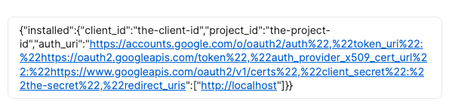
Reproduction: Create a new Secure Note. Paste a JSON blob that contains two or more URLs separated by other JSON content. For example, a Google OAuth credentials.json file, make sure it's not the "pretty" version Save the note Copy the note contents back out Here's a specific case: {"installed":{"client_id":"the-client-id","project_id":"the-project-id","auth_uri":"https://accounts.google.com/o/oauth2/auth","token_uri":"https://oauth2.googleapis.com/token","auth_provider_x509_cert_url":"https://www.googleapis.com/oauth2/v1/certs","client_secret":"the-secret","redirect_uris":["http://localhost"]}} Yields: Interestingly, the "pretty" version of the JSON round-trips just fine, though it looks weird in the 1Password UI: { "installed": { "client_id": "the-client-id", "project_id": "the-project-id", "auth_uri": "https://accounts.google.com/o/oauth2/auth", "token_uri": "https://oauth2.googleapis.com/token", "auth_provider_x509_cert_url": "https://www.googleapis.com/oauth2/v1/certs", "client_secret": "the-secret", "redirect_uris": [ "http://localhost" ] } } Yields: Version:11Views0likes0CommentsFrustrations with .env File Handling and Environments in 1Password
To whom it may concern, I just tried to add some basic .env files to 1Password and was honestly surprised at how difficult and unsatisfying the experience was. I’ve always considered 1Password a premium, polished product, and I’ve really enjoyed using it so far. But in this case, the lack of functionality is pretty disappointing. I know you recently launched the Environments beta, which seems like a step in the right direction, but it’s clearly not fully fleshed out. Most programming projects of mine include multiple environment files, not just one. Some values in these files are sensitive, and others aren’t, so we should be able to choose which fields are masked (as passwords) and which are shown normally. Importing and exporting environment files should also be seamless, currently, it’s anything but. But the biggest issue with Environments right now is that they apparently don’t belong to vaults. That means I can’t share them with coworkers, which makes them basically useless for team projects. What’s the point of having them at all if they can’t be shared? So I tried workarounds: First, I attempted to store the variables in a secure note. While you can manually add fields, that’s clunky and time-consuming. Then I tried uploading the .env file to the note, but on macOS, the file picker doesn’t show hidden files, and apparently there’s no way to make it do so. This made it impossible to upload the file with its original name, a really basic oversight, and one that shouldn’t exist in a premium product. Next, I tried using a Document item. At least the drag-and-drop upload worked (unlike Secure Notes), but now I’m locked into a document type that only allows a single file. That’s just not workable when a project has multiple secret environment files. Even worse, if I want to replace the file, the drag-and-drop UI disappears entirely, so I can’t upload a hidden file again. I’d have to delete the entire document and start over. That’s absurd. I genuinely respect the work you’ve done on 1Password; it’s one of the few tools I’ve used that felt reliable and trustworthy out of the box. But these gaps in functionality around something as basic as handling environment files are frustrating. And for a product at this price point, I expect this sort of workflow to just work. It’s hard to believe these limitations haven’t already been addressed. On top of that, it was surprisingly difficult to even find a proper way to give feedback like this. That feels like a mistake, if users can’t easily tell you where the product falls short, you miss the chance to improve it. Anyway, I needed to get this off my chest. I hope this feedback is helpful, and that we’ll see improvements to these features soon. Best regards, Joël Grosjean1.6KViews1like7Comments