Our community is getting an upgrade on July 2nd! Learn more in the FAQs →
policies
18 Topics
Don't merge *.company.com. Treat company.com as a top level domain.
We've purchased 1password business to help employees manage internal passwords. Many of these systems are on the same *.company.com domain. 1Password keeps linking these different systems into the same record. Creating records and then manually changing the "Only fill on this exact host" option is extremely clunky. How can we: Set a default option for all our users for 1Password to always match on exact host? or Make 1Password treat our internal domains (e.g. company.com, company.local) as top level domains - ideally this would be a policy we can configure?Solved44Views0likes1Comment
Show the requested credential
I'm heavily using 1password now for agentic usage. All of my business is set up on it now, and all of my credentials are locally using op://, or service accounts. I've put in a lot of effort to try and isolate systems using least privilege, but one problem is that when agents (or applications) request a credential from the system, it doesn't say WHAT credential is being requested. Half the time it doesn't even say the correct name for the application making the request, either. This is a big problem, because I'm starting to get into the habit of just spamming "Accept" blindly. But the whole reason I have set up this whole pipeline is so I can catch malicious programs trying to gain access - for example, supply chain attack infections. Without seeing what credential is being requested, and the process information that is requesting it, I'm finding it's not actually adding much protection at all, because it's putting me into a false sense of security and promoting bad habits. If I'm running multiple agents in parallel, which is often the case, it might just say "Terminal requests access to your vault" or something similar. Which terminal is that? What is the underlying entity being requested? What credential? What is the process ID or terminal title, so I can isolate it to a terminal/agent? Etc. I think this is something that urgently needs to be added. Otherwise, as it stands, it's not really offering much protection because users will just go "oh, it's probably just that agent running - I'm sure it's fine" and accept everything. If that agent happened to have installed a malicious npm package, you'd probably catch it too late.61Views0likes3Comments
Feature Request - Step Up Auth Geo-restrictions
We are starting to have more users working overseas temporarily from locations outside our usual allow list. We'd like a middle ground option to allow these locations but only with an additional authentication factor, or allow them for a small number of users.29Views0likes1Comment
Domain Migration/Merge
I am not sure if there was an option, may of the settings became unavailable once 1P was connected to an IDP(Rippling). 1- We are rebranding and migrating from domain W to domain A, is there a way to rename users from user @ w.com to user @ a.org while keeping their access and accounts? 2-I've also seen a few users having both a.org and w.com accounts, is there a way to merge the two under a.org? 3-When a user is offboarded they may have passwords not saved in a shared vault, I would manually login as the user to access those. Is there an admin tool/function to transfer those vault items to their manager? Thanks!40Views0likes2Comments
Group Policy Intune ADMX Ingestion Error
Hi 1Password Community, We've been looking at managing 1Password policies through the generated ADMX+ADML files. The files themselves upload to Intune fine, but when the client is attempting to ingest the file(s) we receive the following error: MDM ConfigurationManager: Command failure status. Configuration Source ID: (5B33F6A6-E59D-4384-8CB2-6858C3CCF0CD), Enrollment Name: (MDMDeviceWithAAD), Provider Name: (Policy), Command Type: (Add: from Replace or Add), CSP URI: (./Device/Vendor/MSFT/Policy/ConfigOperations/ADMXInstall/OnePassword82518298-c5ba-4142-b473-7d937e4105c6/Policy/OnePassword82518298-c5ba-4142-b473-7d937e4105c6), Result: (Catastrophic failure). See image 1 Originally, this was thought of as a bug as the feature was still fairly recently implemented. After a couple of months of waiting, I tried generating the files again earlier this week (currently using app version "1Password for Windows 8.11.20 (81120039)") and discovered the same error is still present. The patch notes for January 19th mention that this should have been fixed, but when trying again these past couple of days the error persisted. https://releases.1password.com/windows/stable/#1password-for-windows-8.12.0 See image 2 Doing some research, I came across the following GitHub-repo: https://github.com/Micke-K/IntuneManagement/blob/master/ADMXImport.md, which mentions that QWORD-values are unsupported and will generate a catastrophic failure on the clients - exactly the same as we've been experiencing on our clients. See image 3 Based on this revelation, I started to manually edit the ADMX and ADML-files to remove all entries for "longDecimal", which equals to these two policies: security_authenticatedUnlock_deviceBasedUnlock_askUnlockAfter security.autolock.minutes Once these entries were removed from both files and reuploaded to Intune - it started working without any further errors: ADMX Ingestion: MDM PolicyManager: ADMX Ingestion: EnrollmentId (8BE04C50-54DF-4B0D-AA1C-9A79C476C468), app name (OnePassword975d1c63-2406-4643-8f93-cb4034eb3382), setting type (Policy), unique Id (OnePassword975d1c63-2406-4643-8f93-cb4034eb3382), area (NULL). Policy Creation: MDM PolicyManager: Set policy string, Policy: (ManagedInstall), Area: (OnePassword975d1c63-2406-4643-8f93-cb4034eb3382~Policy~onepassword), EnrollmentID requesting merge: (8BE04C50-54DF-4B0D-AA1C-9A79C476C468), Current User: (Device), String: (<enabled/><data id="ManagedInstall" value="X" />), Enrollment Type: (0x6), Scope: (0x0). See image 4 and 5 As the error appears to be related to the ADMX Ingestion not being able to handle QWORD-values, the root cause of the problem may lie with Microsoft. Would it be possible from 1Passwords side to look into having the two policies be handled through either a DWORD or a String instead of a QWORD?269Views1like4Comments
Employee Vaults - Access?
Hello all, our business environment requires that all passwords should be visible and reclaimable in the event that the employee leaves. This is fine with a shared vault, as other users have access as they may share them, or for redundancy. However we have a particular team where a shared vault isn't suitable, as each user has their own access to certain data. So in this case the Employee vault would be perfect. Except that I'm almost certain that these vaults can't be accessed by Overwatch roles, like Administrators or Owners, even though I've seen language on various docs from 1password that users with the right permissions can access them. Problem is I can't find these permissions to enable them to be visible when needed. What do you suggest is the best solution for this? Accounts are locked to business email addresses but reclaiming an account just because someone is on holiday and something important is stored in the Employee Vault sounds excessive...Solved1.1KViews0likes2CommentsPassword expirations
I would like to know if it is possible to do the following on 1password business: Force users to periodically change their 1password account key. The other thing is to force or have a report of the elements of the users to know how old or when they changed their passwords from other logins or configured MFA to know if they are complying with the policies . Any idea? Thank you!34Views0likes1Comment
Permit/block access to vault by IP?
I have a situation where we want to allow access to a specific vault when they're using a given source IP. When coming from that same IP, we would want to block access to all other vaults. When using other IPs, we would want to grant full access. It doesn't appear to be doable now, but I would like to put in a feature request.116Views0likes5Comments
Managed Browser Extension
Hey all, New to 1Password for Business, long time 1Password personal user. I've just kicked off migration of legacy password manager (on-prem) for about 500 users in a Microsoft Intune full cloud environment. Our org has strict management over our Windows 11 devices... (you know, any HR opportunity to educate staff starts with I.T doing all the work with tech removing any need to teach users how to do something) I need to manage the browser extension, the usual default save vault location and watchtower etc. i thought i was on a winner with MDM ADMX - https://support.1password.com/mobile-device-management/?windows#appendix-set-the-default-vault-for-saving-new-items but this looks to be the full app rather that anything for the extension? How can i directly manage the extension via Intune?71Views0likes0CommentsMicrosoft Entra ID SSO issue
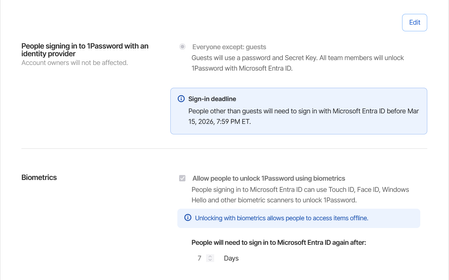
We have recently migrated all our users over to using Microsoft Entra ID SSO. It works fine except every time they close the app or shutdown their computer, it asks them to login using SSO. We have a set of employees who do not always have a connection available. They go from site to site and some basements where they need to go don't have network or wi-fi. When that happens, they are unable to use 1password. Keep in mind that most of the time when they access these places they are escorted by security to go down in the basements and it's wasting their time as well as the security employee. We have it set to ask the Entra password every 7 days. Expected behavior: if I close the app or restart the computer, the token should still be valid. Current behavior: Every time I close the app or restart the computer, I have to login to the microsoft account again.148Views1like1Comment