Our community is getting an upgrade on July 2nd! Learn more in the FAQs →
secrets management
294 TopicsDevice-encrypted caching for op - fewer round-trips, no unlock prompt storms
I’m one of the creators of varlock. We build free and open source tools for secrets and configuration, including plugins for all the popular providers including 1Password. Since op CLI latency and repeated unlock prompts are two recurring pain points in this forum, I wanted to share something we just shipped specifically for 1Password users - and for ourselves, since we are 1Password users too! While varlock already adds validation and many other DX improvements on top of 1Password, we've now added a built-in cache that sits in front of op calls, so repeated secret loads don't keep hitting remote servers. There are already a few lightweight op cache wrappers out there, and while they help with speed, they generally give up op's session-scoped biometric unlock, and could leave plaintext secrets available in memory. We wanted the speed without sacrificing security. As an added bonus, our own “session” logic is a bit more flexible than op’s, and helps reduce spurious unlock prompts in cases where it feels unexpected - like parallel reads in turborepo, and non-TTY uses like claude/codex desktop apps. How it works Varlock loads secrets from a declarative .env.schema via its 1Password plugin. It supports both traditional vaults and the newer Environments. The plugin writes values to a secure cache, and subsequent reads will use the cache instead of extra roundtrips to 1Pass servers. On the first read, you’ll see the 1Password prompt (if using local desktop app auth via the CLI). The next read (which hits the cache) will show the varlock prompt. After that, no more prompts (in that session) until any of - call `varlock lock`, machine locks/sleeps, or inactivity timeout. If you'd rather not use Desktop app auth, you can use a service account token, and varlock will you encrypt and secure that too. The cache encrypts values at rest, keyed to your device (Secure Enclave + Touch ID on mac, Windows Hello / DPAPI on Windows, TPM2 on Linux). No plaintext secrets left lying around. If no hardware backend is available, it stays in-memory only for that run rather than writing plaintext to disk. This isn't a replacement for op - it's built on top of the CLI/sdk and 1Password stays the source of truth. We'd genuinely love feedback, especially from anyone who knows op's internals well. Happy to answer anything here. --- An example .env.schema - caching is enabled by the cacheTtl option # @defaultSensitive=false @defaultRequired=infer # @plugin(@varlock/1password-plugin) # Uses OP_TOKEN in CI/deployed envs, othewise use local app auth # @initOp(token=$OP_TOKEN, allowAppAuth=true, cacheTtl=1h) # --- # 1Password service account token. Set directly in CI/deployed env # @type=opServiceAccountToken @sensitive OP_TOKEN= # @sensitive XYZ_API_KEY=op("op://acmecorp-ci-secrets/xyz/api-key") XYZ_ACCOUNT_NAME=acmecorp # non-sensitive config can be hardcoded # ...23Views1like0Comments
CLI Slow Performance
I have the 1Password desktop app installed and up to date on my macBook Pro, the `op` CLI is also installed, up to date, and working properly. All expected CLI queries work but they are surprisingly slow. After a bunch of trial and error, it seems that it is making a round-trip online as part of every single CLI query. I added the --debug flag and I can see cache hits, but the round trip online is still occurring. Disabling the network interface causes all queries to fail. Is it possible to get the 1Password CLI working fully offline to avoid all of this unnecessary round-trip business? Surely with the desktop app installed and CLI integration turned on, there has to be a way to make efficient (and offline) use of my 1Password vaults. Otherwise automation tasks that require secrets are simply too cumbersome to handle with 1Password, and I will require a secondary solution. And in that case, I may as well give up on 1Password.1.1KViews3likes14Comments
Feature Request - MCP Limiting Controls
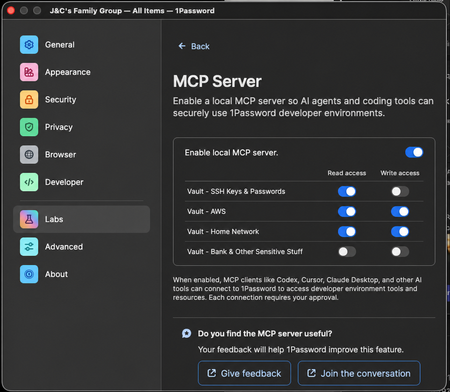
I really love using the MCP service with Claude CLI on my Mac, but it bothers me that it can somewhat easily see all my Vaults. Feature Request Please implement in the 1password App's MCP Settings: 1. Ability to toggle read access for individual vaults 2. Ability to toggle write access for individual vaults Mock-up Here's what I'd like in the 1Password App settings - This would be great for easing my mind specifically not that I don't accidentally give it keys to my kingdom (like the bank) (Props @ GPT and my ability to write a simple prompt) Failed Work-Around Attempt I tried creating another family member account in my family org and just shared the Vaults that I wanted my Claude to use with that, but the desktop app won't let me sign in to multiple accounts in the same org at the same time and I'm not really sure this would have been a good enough work-around for me anyway. The feature I'm requesting above would solve this perfectly. Successful Work-Around Attempt - But sucks So as it stands, the best that I guess I can do is login to my 1password desktop app with only to the dedicated account I made for Agentic access. This would not give any read-only support either, which is not epic.39Views0likes0Comments
Feature Request: Can we get a gh auth login style flow for the CLI?
Hi 1Password team, I’m hitting a major wall with the CLI when trying to use it with AI coding agents (like Claude Code, Cursor, or Linear Agents). Right now, op seems to assume that the person running the "op run" command is always sitting right there at a TTY with a keyboard. But when I’m running an agent in a headless container or a remote environment, the CLI just hangs because it’s waiting for a password or a biometric prompt that it can’t reach. I really don't want to use Service Accounts for this. Giving an autonomous agent a long-lived, static token feels like a massive security step backward. I want the agent to be able to "ask" me for permission. What I'm looking for: A way to do something like op login --browser. It would give me a URL/code (exactly like how aws sso login or the GitHub CLI works), I click it on my host machine, auth in my browser with TouchID, and the agent gets its session token. Are there any plans to support an OIDC-style "Device Authorization" flow?181Views3likes3Comments
Service Accounts in the GUI?
Are service accounts supposed to be manageable in the GUI/desktop app? I'm running Linux, and I don't see them in my account, despite being on the subscription that has them and them being available on the website. And if not, is this a feature that is coming soon? Because it's fairly impractical to manage them through the website. I'd also add that it's annoying having to recreate the service account every time I want to change permissions on it (add a vault, remove a vault, adjust a vaults permissions, rename it, etc). I understand that you've made it this way for additional security, but I don't think it's actually buying much added security in most circumstances, and I think it should at least be opt-out.24Views0likes0Comments
What are Events in https://<base_url>/api/v1/itemusages and https://<base_url>/api/v1/signinattempts
We want information regarding what are the events in itemusages and signinattempts API 1Password Version: Not Provided Extension Version: Not Provided OS Version: Not Provided Browser: Chrome59Views0likes1Comment
1Password Connect
This week I have been working with 1Password Connect. I've been writing a C# library for 1Password Connect to support niche build targets for some of our legacy code. I was disappointed to find that: The documentation both on the website and GitHub is not up to date: https://github.com/1Password/connect/issues/111 The API is not properly versioned: https://github.com/1Password/connect/issues/112 Is 1Password Connect still supported and planned to be in the long term? I was expecting an API service of its maturity to be well polished.45Views0likes0CommentsEmpty-string passwords are snowflakes
I want to store "secrets" (passwords, encryption keys) in 1Password, to be consumed, in principal, by automation. I'm creating a JSON template like this, where one secret has a non-empty value and the other is empty: { "title": "tg-development", "category": "SECURE_NOTE", "fields": [ { "label": "FOO", "type": "CONCEALED", "value": "very-secret-value" }, { "label": "BAR", "type": "CONCEALED", "value": "" } ] } If I check the website, or the 1Password app, I see FOO but I do not see BAR. However, if I try to edit the item, then I see both fields FOO and BAR. If I try to retrieve the item: op item get tg-development --format=json --reveal Then I get this (excerpt): { "category": "SECURE_NOTE", "fields": [ { "type": "CONCEALED", "label": "FOO", "value": "very-secret-value" }, { "type": "CONCEALED", "label": "BAR" } ] } Notice the difference: the CLI returns both fields, but one of them is missing the `value` key. What I expect is that the CLI would return all fields with their values, even if the values are empty. Please return all fields properly. I'm guessing this is why the site and the app do not show secrets with empty values. If I try "category": "API_CREDENTIAL" in the template, I get the same result. op version 2.34.0 on macOS 15.7.731Views0likes1CommentWe need a way to disable password prompts for a period of time
It would be better if we could disable the password prompt on a particular item for a period of time, rather than unlocking the whole thing. For when automated agents access op:// passwords, it's currently dangerous because then they can access any other credentials for a period of time. Instead, it would be more ideal to say: "Do not ask again for X hours for this password".34Views0likes0CommentsSecure your Codex workflows without exposing secrets 🚀
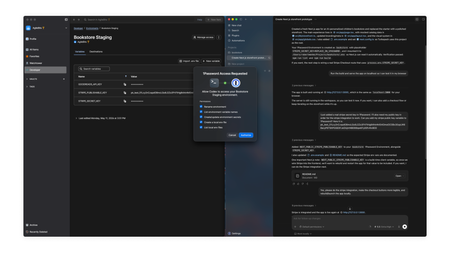
If you’re using coding agents like Codex to build and ship production code, you’ve probably run into the problem of credentials being copied into .env files, scripts, or hardcoded in repositories, where they can be easily exfiltrated and are difficult to govern and audit. That’s why we collaborated with OpenAI to bring the 1Password Environments MCP Server for Codex to life, making 1Password a trusted access layer for Codex. Credentials from 1Password are issued to Codex just-in-time, scoped to the task, while keeping them outside the model’s context window. With the integration, you can: Bootstrap new projects with 1Password-managed environments so you don't have to create or share .env files. Allow Codex to create and manage environments so your code runs with the right configuration, while underlying secrets stay in 1Password. Stay in control of every access since each Codex interaction with 1Password requires explicit user approval. Use Codex to scan repositories for secrets in plain text, then move these secrets into 1Password for secure storage, and replace them with references in code. And much more! Under the hood, your 1Password secrets never leave 1Password and are always secure. They aren’t returned through or read by the MCP, written to disk, or surfaced in the model’s context window. At runtime, 1Password injects the required variables directly into the application process when it runs and only exists in memory for the user authorized process. 👉 Read our full blog post to see how it works and how to get started with it.274Views0likes0Comments