Our community is getting an upgrade on July 2nd! Learn more in the FAQs →
secrets management
294 Topics
1Password Environments Beta is awesome
Just wanted to drop some feedback after playing around with the new Environments Beta in 1Password. Honestly, I’m loving it so far. The local .env file mounting is just brilliant. Secrets are easy to access without having to run extra commands, but still secure – exactly what I want. Makes switching between machines seamless, too. A couple of things I’d really like to see next: 1. CLI Integration - being able to create/edit/list environments and variables from the terminal would make this so much more useful, right now, having to click around in the desktop app is a bit of a pain for dev workflows. 2. More integrations: AWS Secrets Manager is a great start, but would love to see GCP and other major providers such as GitHub, etc. A plugin system for integrations would be awesome also to help cover more niche players like Modal.com Overall, this is a huge step in the right direction for 1Password. Can’t wait to see where this goes next!721Views4likes3CommentsFeature Request: Can we get a gh auth login style flow for the CLI?
Hi 1Password team, I’m hitting a major wall with the CLI when trying to use it with AI coding agents (like Claude Code, Cursor, or Linear Agents). Right now, op seems to assume that the person running the "op run" command is always sitting right there at a TTY with a keyboard. But when I’m running an agent in a headless container or a remote environment, the CLI just hangs because it’s waiting for a password or a biometric prompt that it can’t reach. I really don't want to use Service Accounts for this. Giving an autonomous agent a long-lived, static token feels like a massive security step backward. I want the agent to be able to "ask" me for permission. What I'm looking for: A way to do something like op login --browser. It would give me a URL/code (exactly like how aws sso login or the GitHub CLI works), I click it on my host machine, auth in my browser with TouchID, and the agent gets its session token. Are there any plans to support an OIDC-style "Device Authorization" flow?181Views3likes3Comments
CLI Slow Performance
I have the 1Password desktop app installed and up to date on my macBook Pro, the `op` CLI is also installed, up to date, and working properly. All expected CLI queries work but they are surprisingly slow. After a bunch of trial and error, it seems that it is making a round-trip online as part of every single CLI query. I added the --debug flag and I can see cache hits, but the round trip online is still occurring. Disabling the network interface causes all queries to fail. Is it possible to get the 1Password CLI working fully offline to avoid all of this unnecessary round-trip business? Surely with the desktop app installed and CLI integration turned on, there has to be a way to make efficient (and offline) use of my 1Password vaults. Otherwise automation tasks that require secrets are simply too cumbersome to handle with 1Password, and I will require a secondary solution. And in that case, I may as well give up on 1Password.1.1KViews3likes14Comments[new tool] varlock: schema-driven env vars
TL;DR: We've launched something new, it's called varlock. It's like DMNO but simpler and easier to get started. It's built on top of the .env files you're already using. It makes them safer to use and share. We'd love your feedback. >> 🧙♂️https://varlock.dev --- We've been heads down working on the next evolution of secrets and configuration tooling building on what we've learned so far creating DMNO. If you've used DMNO, varlock will feel familiar. But instead of writing schemas in TypeScript, we've created a lightweight DSL that sits on top of your .env files. We think this allows for much simpler onboarding (and offboarding!). And because it's all based on decorators in comments, it should play nice with your existing tools. For any tools that would like to make use of this new syntax, we've also created an open specification, we call it @env-spec, and there's an active RFC if you would like to get involved. >> RFC: https://github.com/dmno-dev/varlock/discussions/17 —- So why varlock? Varlock is a suite of tools built to improve the experience of working with environment variables, both in terms of security and developer experience. It provides: Validation - catch errors in development instead of production Type-safety - improved DX via detailed IntelliSense Security - secret redaction in stdout and global console methods Environments - Compose defaults, environment-specific .env files, and local git-ignored overrides Secrets - use any third party provider that has a CLI to load values What next? We're just getting started and we have big plans to expand the feature set of varlock. Coming soon you'll see: Local override encryption via a desktop app using biometrics Shared team vaults with trustless cloud storage GitHub App to track config changes with audit trails Deeper integration with providers like 1Password If you've read this far, thank you. Please check out varlock and let us know what you think by replying to this post, or joining us on Discord. Tools like this are only as good as the community that shapes them. >> 🧙♂️https://varlock.dev Thanks ✌️Solved413Views3likes1Comment
Masked Email API - integrate my own masked email generation service
I love the idea of masked emails and I briefly trialled FastMail in order to get that behaviour built-in to 1Password, but I ended up choosing not to continue with FM (for reasons). So, because I own a throwaway domain (let's call it flubber.fish), instead I hacked together a quick web page that I can hit which will generate a gibberish email (i.e. mailto:d09uiy2@flubber.fish) which I can copy and paste into 1Password and any account I have and I get the same effect (with some aliasing/mail rules in the background to redirect it to me, obviously). However, this feels a bit frustrating - getting out of the 1Password flow in order to get this new address each time - and I wish there was a better way. So I'm wondering if you could somehow provide an API spec and hooks which power-users like me could use to integrate our own services into. It might also make it possible for third-parties to offer integrations with Google etc. utilising their . and + aliasing techniques (although arguably less "masked" than random words/characters as it still contains your root address but I digress...). Obviously you'd need to solve some security concerns around that and integration authors might need to jump through some hoops. But if the hoops aren't too big and too many then I'd love to have 1Password using my code to auto-generate masked emails on my own domain for me. 1Password Version: Not Provided Extension Version: Not Provided OS Version: Not Provided Browser: Not Provided133Views2likes0Comments
Generate limited time share link through API
Sorry ahead of time if this was asked or shown somewhere. I have searched the site and the internet for a way to create a temporary link that shares a password to guests (non 1password users) but I could not find anything on the site. Is there a way to do that? 1Password Version: Not Provided Extension Version: Not Provided OS Version: Not Provided Referrer: forum-search:https://1password.community/search?Search=Generate%20limited%20time%20share%20link%20through%20API1.9KViews2likes14Comments
Local .env file option not available
The "Local .env file" options is not shown in my destination options for environments. The only options I have is AWS Secrets Manager. I tried with both my Business and Personal accounts and I have the same behaviour. Am I missing something here ? Do I have to enable a certain setting so that this option is available ? Thank you for your help!Solved274Views2likes5CommentsEnv var loading and validation for 1Password (open source!)
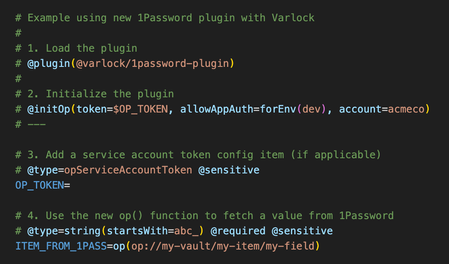
If you are using 1Password to manage any dev/application secrets, you might be interested in our open source tool - https://varlock.dev We just released a new update that introduces a plugin system and our first plugin is for 1Password (of course) - see https://varlock.dev/plugins/1password/ Our tool lets you define a .env.schema file, which can contain decorator style comments to add additional metadata to your env. This is then used to do validation, generate types, etc. The tool also introduces a new function call syntax, and while you can talk to any external cli using the exec() function, the new 1Pass plugin also adds a new op() function which fetches items from 1Password. So how is this different from using `op run`? Uses the SDK and service account tokens for deployed environments, and (optionally) uses op CLI for local dev (with biometric auth via the desktop app) Adds validation and coercion Automatic type generation (right now just for TypeScript, more to come) Understands which items are sensitive, and adds leak detection when possible Supports loading multiple env-specific files (.env.local, .env.production, etc) Supports explicit imports to break up files however you like Drop in integrations for many frameworks You can also use Varlock alongside the new environments beta by syncing your environment to a local file (such as `.env.local`) and varlock will automatically load those values, and apply its validation on top. Would love for y'all to take a look, and to hear what you think! Oh and please give us a ⭐ on GitHub @ https://github.com/dmno-dev/varlock --- An example .env.schema file using the new 1Password plugin107Views2likes0Comments
Automated Connect server token rotation
I've been evaluating whether I can use 1Password Connect for configuration/secrets management for my company's services. 1Password Connect looks very appealing for several reasons: No rate limits. No usage limits. As a 1Password customer, we have unlimited access to this offering. Uniform UI. We already use 1Password for managing passwords and various secrets used during local development. It would be very nice to use the same interface to manage lifecycle of configurations and secrets that are used by production services. Pretty straightforward REST API and SDKs in languages that we use allows getting the latest config/secret values at runtime. I am not very interested in using 1Password Connect Operator (or using k8s Secrets in general) since this provides secrets to the service at deploy time. I appreciate the ability to automatically redeploy the service when the underlying 1Password item changes but this works well only for stateless services. I prefer getting configurations/secrets at runtime over an API. I started experimenting with this offering and working out how to integrate it into our systems. The docs recommend creating a Connect server token for every service which makes a lot of sense. And the docs strongly suggest setting an expiration on this token which also makes sense. After all, it's a static credential not tied to the identity of the service that uses it; so frequent rotation should reduce the risk of a leaked token causing damage. But the issue is that I don't see a way to automate this rotation given the permission model that is in use today. Is it possible for either a Service Account or a Connect client to manage connect tokens (create/delete tokens)? I was thinking of integrating 1Password connect as follows: Our deployment pipeline is high trust. It would use either Service Account or Connect client credentials that expire infrequently. It's OK for a human to ensure this credential doesn't expire and rotate it when necessary. When a service deployment is kicked off, the deployment pipeline creates a new Connect token. The pipeline ensures that the newly created Connect token is accessible to the service as an environment variable. Once the service is deployed and is considered healthy, the old Connect token (used by the previous deployment of the service) is deleted. In this setup, the deployment pipeline can create the new Connect token with a relatively short expiry and we can assume that every service gets redeployed more often than this expiration period. I think this setup is pretty reasonable but I don't see a way of giving the deployment pipeline access to create/delete Connect tokens. I tried using a Service Account to create a Connect token via the CLI and got 403. I see that it's possible to give a group access to manage Secrets Automation, but I don't think it's possible to make a Service Account a member of some group. Correct me if I am wrong. I also tried using a Connect client to create a new Connect token and this didn't work: "op connect token create" doesn't work with Connect. https://developer.1password.com/docs/connect/manage-connect of your docs mentions: "You can use 1Password.com or the https://developer.1password.com/docs/connect/api-reference/ to: ... https://developer.1password.com/docs/connect/manage-connect#create-a-token and https://developer.1password.com/docs/connect/manage-connect#revoke-a-token Connect server tokens." but I think it's a typo. As things stand today, Connect server token rotation can only be done by a human user which doesn't scale beyond a handful of services. If I were to go down that path, I would have to set expiration to a longer period which affects security. This makes 1Password Connect a lot less appealing. Please let me know if I am missing something and if there is a way to automate token rotation.450Views2likes0Comments
Secrets Automation in Azure DevOps
There is already a GitHub action called 'Load secrets from 1Password'. Will 1Password also support Azure DevOps pipelines in future? 1Password Version: Not Provided Extension Version: Not Provided OS Version: Not Provided Browser: Not Provided160Views1like0Comments