Level up your business security with free, on-demand training and certification. Explore 1Password Academy today →
troubleshooting
94 Topics
1Password-CLI not working
I'm installing 1Password-CLI on a new computer and I'm getting this error: [ERROR] 2025/05/09 15:34:50 connecting to desktop app: write: The pipe is being closed. Looking at the previous thread here: CLI can not connect to desktop app | 1Password CommunitySolved1.9KViews7likes16Comments
Win11 -> WSL2 -> devcontainer ssh-add not accessible anymore
Hi all, I'm working on Windows 11 Pro, where 1 Password in the latest stable version is installed. I have WSL2 enabled with Ubuntu 24.04 installed and inside there I have docker installed to run devcontainers for VS Code. In 1Password I have all my ssh keys to interact with git and I have the ssh-agent option enabled. On Windows I can see all my keys in a terminal when executing ssh-add -l. In WSL I can also see all keys when executing ssh-add.exe -l and when opening a cloned repository in WSL in VS Code, the authentication works fine. (I love it). Now up until a couple days ago, I could also open a repository which has been cloned into WSL inside a devcontainer and the ssh agent forwarding was working like a charm, I could even sign commits, I have no clue how this magic works, but I loved it. Then it stopped working and I can't figure out why. Of course, all involved tools (Windows, WSL, VSCode, 1Password, etc.) install updates in the background, so it could be due to this. I disabled and enabled the 1Password ssh agent in the settings, no difference. I recreated the WSL instance, no difference. I reinstalled 1Password. In the VSCode devcontainer extension is the option to forward services, that is still checked, I tried toggling that as well. In WSL I still see the keys via ssh-add -l, but when I do the same inside a devcontainer I only see: Could not open a connection to your authentication agent. When I check the value of $SSH_AUTH_SOCK it is empty in both WSL and devcontainer, should it have a value? In the 1Password help around this topic I couldn't find it mentioned anymore. If this setup is still working for someone else, could you please check the value of this variable and post it?Solved1.5KViews3likes14Comments
How to Use 1Password Connect with Docker Compose workloads?
I can't find a guide on how do I integrate 1Password Connect server (that I deployed in kubernetes) with docker compose workload. Something as simple as not hardcoding passwords `POSTGRES_PASSWORD: "op://stuff/pgdb/password"` . I know there are `op run/inject/read` but these are a part of Connect.Solved838Views0likes1CommentSSH agent isn't working (Windows 11)
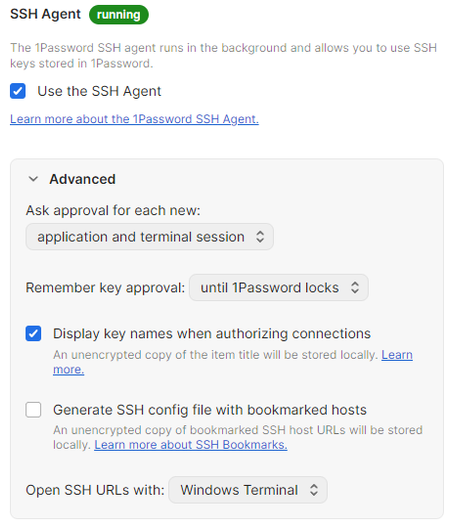
I can't use my vault's SSH keys on my terminal. I've reinstalled multiple times and followed the https://developer.1password.com/docs/ssh/get-started/, but I can't make it work correctly. My 1Password config is set up as follows: I've disabled the OpenSSH Authentication Agent (the screenshot is in spanish) My ~/.ssh/config file: Host * IdentityAgent "~/.1password/agent.sock" My ~/.gitconfig file: [core] sshCommand = ssh.exe autocrlf = input [user] email = {email} name = {user} signingkey = ssh-ed25519 AAA[...] [gpg] format = ssh [gpg "ssh"] program = C:\\Users\\{user}\\AppData\\Local\\1Password\\app\\8\\op-ssh-sign.exe [commit] gpgsign = true Whenever I run ssh-add -L my vault's SSH keys are shown, but I can't seem to make it work with GitHub or connect to any SSH connection. ❯ ssh-add -L ssh-ed25519 AA[...] Authentication & Signing (Git) ssh-ed25519 AA[...] Authentication ❯ ssh -Tv git@github.com OpenSSH_for_Windows_9.5p1, LibreSSL 3.8.2 debug1: Reading configuration data C:\\Users\\{user}/.ssh/config debug1: C:\\Users\\{user}/.ssh/config line 1: Applying options for * debug1: Connecting to github.com [140.82.116.4] port 22. debug1: Connection established. debug1: identity file C:\\Users\\{user}/.ssh/id_rsa type -1 debug1: identity file C:\\Users\\{user}/.ssh/id_rsa-cert type -1 debug1: identity file C:\\Users\\{user}/.ssh/id_ecdsa type -1 debug1: identity file C:\\Users\\{user}/.ssh/id_ecdsa-cert type -1 debug1: identity file C:\\Users\\{user}/.ssh/id_ecdsa_sk type -1 debug1: identity file C:\\Users\\{user}/.ssh/id_ecdsa_sk-cert type -1 debug1: identity file C:\\Users\\{user}/.ssh/id_ed25519 type -1 debug1: identity file C:\\Users\\{user}/.ssh/id_ed25519-cert type -1 debug1: identity file C:\\Users\\{user}/.ssh/id_ed25519_sk type -1 debug1: identity file C:\\Users\\{user}/.ssh/id_ed25519_sk-cert type -1 debug1: identity file C:\\Users\\{user}/.ssh/id_xmss type -1 debug1: identity file C:\\Users\\{user}/.ssh/id_xmss-cert type -1 debug1: identity file C:\\Users\\{user}/.ssh/id_dsa type -1 debug1: identity file C:\\Users\\{user}/.ssh/id_dsa-cert type -1 debug1: Local version string SSH-2.0-OpenSSH_for_Windows_9.5 debug1: Remote protocol version 2.0, remote software version 133e47a51 debug1: compat_banner: no match: 133e47a51 debug1: Authenticating to github.com:22 as 'git' debug1: load_hostkeys: fopen C:\\Users\\{user}/.ssh/known_hosts2: No such file or directory debug1: load_hostkeys: fopen __PROGRAMDATA__\\ssh/ssh_known_hosts: No such file or directory debug1: load_hostkeys: fopen __PROGRAMDATA__\\ssh/ssh_known_hosts2: No such file or directory debug1: SSH2_MSG_KEXINIT sent debug1: SSH2_MSG_KEXINIT received debug1: kex: algorithm: curve25519-sha256 debug1: kex: host key algorithm: ssh-ed25519 debug1: kex: server->client cipher: chacha20-poly1305@openssh.com MAC: <implicit> compression: none debug1: kex: client->server cipher: chacha20-poly1305@openssh.com MAC: <implicit> compression: none debug1: expecting SSH2_MSG_KEX_ECDH_REPLY debug1: SSH2_MSG_KEX_ECDH_REPLY received debug1: Server host key: ssh-ed25519 SHA256:+DiY3wvvV6TuJJhbpZisF/zLDA0zPMSvHdkr4UvCOqU debug1: load_hostkeys: fopen C:\\Users\\{user}/.ssh/known_hosts2: No such file or directory debug1: load_hostkeys: fopen __PROGRAMDATA__\\ssh/ssh_known_hosts: No such file or directory debug1: load_hostkeys: fopen __PROGRAMDATA__\\ssh/ssh_known_hosts2: No such file or directory debug1: Host 'github.com' is known and matches the ED25519 host key. debug1: Found key in C:\\Users\\{user}/.ssh/known_hosts:3 debug1: ssh_packet_send2_wrapped: resetting send seqnr 3 debug1: rekey out after 134217728 blocks debug1: SSH2_MSG_NEWKEYS sent debug1: expecting SSH2_MSG_NEWKEYS debug1: ssh_packet_read_poll2: resetting read seqnr 3 debug1: SSH2_MSG_NEWKEYS received debug1: rekey in after 134217728 blocks debug1: get_agent_identities: ssh_get_authentication_socket: No such file or directory debug1: Will attempt key: C:\\Users\\{user}/.ssh/id_rsa debug1: Will attempt key: C:\\Users\\{user}/.ssh/id_ecdsa debug1: Will attempt key: C:\\Users\\{user}/.ssh/id_ecdsa_sk debug1: Will attempt key: C:\\Users\\{user}/.ssh/id_ed25519 debug1: Will attempt key: C:\\Users\\{user}/.ssh/id_ed25519_sk debug1: Will attempt key: C:\\Users\\{user}/.ssh/id_xmss debug1: Will attempt key: C:\\Users\\{user}/.ssh/id_dsa debug1: SSH2_MSG_EXT_INFO received debug1: kex_input_ext_info: server-sig-algs=<ssh-ed25519-cert-v01@openssh.com,ecdsa-sha2-nistp521-cert-v01@openssh.com,ecdsa-sha2-nistp384-cert-v01@openssh.com,ecdsa-sha2-nistp256-cert-v01@openssh.com,sk-ssh-ed25519-cert-v01@openssh.com,sk-ecdsa-sha2-nistp256-cert-v01@openssh.com,rsa-sha2-512-cert-v01@openssh.com,rsa-sha2-256-cert-v01@openssh.com,ssh-rsa-cert-v01@openssh.com,sk-ssh-ed25519@openssh.com,sk-ecdsa-sha2-nistp256@openssh.com,ssh-ed25519,ecdsa-sha2-nistp521,ecdsa-sha2-nistp384,ecdsa-sha2-nistp256,rsa-sha2-512,rsa-sha2-256,ssh-rsa> debug1: SSH2_MSG_SERVICE_ACCEPT received debug1: Authentications that can continue: publickey debug1: Next authentication method: publickey debug1: Trying private key: C:\\Users\\{user}/.ssh/id_rsa debug1: Trying private key: C:\\Users\\{user}/.ssh/id_ecdsa debug1: Trying private key: C:\\Users\\{user}/.ssh/id_ecdsa_sk debug1: Trying private key: C:\\Users\\{user}/.ssh/id_ed25519 debug1: Trying private key: C:\\Users\\{user}/.ssh/id_ed25519_sk debug1: Trying private key: C:\\Users\\{user}/.ssh/id_xmss debug1: Trying private key: C:\\Users\\{user}/.ssh/id_dsa debug1: No more authentication methods to try. git@github.com: Permission denied (publickey). One thing I noticed is that the folder .1password with the agent.sock file is not being created on my %USERPROFILE% folder. ❯ cd ~ && lsd -la | findstr ".1password" {empty} I installed lsd (chocolatey) on windows btw800Views0likes6Comments
How do I use the SSH agent in headless Linux?
I want to clone a Git repository that needs SSH authorization. On my desktop this is straightforward: I have the 1Password app installed and the SSH agent enabled in its settings. git clone with an SSH URL makes the desktop app prompt me for approval and I get connected properly. However I want to clone a repository in a Debian Linux LXC. It does not have any GUI installed; I can only connect to it via a shell. I have the 1Password CLI app op installed and connected properly because op vault list works. However I cannot use the SSH agent: # ssh-add -l Could not open a connection to your authentication agent. My ~/.ssh/config looks like: Host * IdentityAgent ~/.1password/agent.sock More context about my CLI installation which is installed from the 1Password Debian repository: # apt info 1password-cli Package: 1password-cli Version: 2.31.1-2 Maintainer: 1Password <support@1password.com> Installed-Size: unknown Homepage: https://agilebits.com/ Vendor: 1Password <support@1password.com> Download-Size: 6729 kB APT-Manual-Installed: yes APT-Sources: https://downloads.1password.com/linux/debian/amd64 stable/main amd64 Packages Description: The official 1Password command-line tool. # op --version 2.31.1 I don't have a ~/.1password directory so the agent is not set up or not running. How can I get it running without a GUI to approve its use?Solved599Views0likes6Comments
"Connection Refused" when accessing 1Password ssh-agent within DevContainer
I've been trying to get this to work for a few hours and I'm at a loss for what to do next, so asking for ideas about what the problem could be. My software stack is macOS 26/Tahoe, 1Password 8.11.16, Orbstack (for containers), and VSCode w/DevContainers. I have my SSH keys in 1Password and when executed from the host system, the keys are visible (and SSH works): % SSH_AUTH_SOCK="${HOME}/Library/Group Containers/2BUA8C4S2C.com.1password/t/agent.sock" ssh-add -l 256 SHA256:... (ED25519) % ssh -T git@github.com Hi <username>! You've successfully authenticated, but GitHub does not provide shell access. I have the DevContainer configuration to bind-mount the socket into the container and set a proper `SSH_AUTH_SOCK` value: "mounts": [ "source=${env:HOME}/Library/Group Containers/2BUA8C4S2C.com.1password/t/agent.sock,target=/tmp/ssh-agent-1password.sock,type=bind" ], "remoteEnv": { "SSH_AUTH_SOCK": "/tmp/ssh-agent-1password.sock" }, ... when I am in the container, the socket looks right, `SSH_AUTH_SOCK` is correct, but `ssh-add` fails to connect with an error: root@5a53d7e1c685:/tmp# ls -la ssh-agent-1password.sock srw------- 1 root root 0 Nov 2 16:36 ssh-agent-1password.sock root@5a53d7e1c685:/tmp# echo $SSH_AUTH_SOCK /tmp/ssh-agent-1password.sock root@5a53d7e1c685:/tmp# ssh-add -l Error connecting to agent: Connection refused I've verified that the directory itself IS accessible to docker by changing `source=${env:HOME}/Library/Group Containers/2BUA8C4S2C.com.1password/t/agent.sock` to be `source=${env:HOME}/Library/Group Containers/2BUA8C4S2C.com.1password/t/agent.sockk` and restarting the container -- when I do that, the directory `agent.sockk` is created within the directory as expected (which I am interpreting as evidence that Docker can traverse all the way to the directory and create a sub-folder within it). I suspect what is happening is that 1Password is blocking the connection entirely (meaning it isn't a filesystem permissions error or otherwise), but I'm not sure how to prove that is the case or how to fix it if it IS the case. Any ideas for diagnostic steps to take next?500Views0likes3Comments
Severe slowdown in Chrome with 1Password extension 8.11.12.27 on pages with many inputs
Since updating to 1Password extension 8.11.12.27 in Chrome, pages with forms containing thousands of inputs freeze on load. The problem also occurs with many hidden inputs, which should not be processed by the extension. We run an application that makes heavy use of hidden inputs. With earlier versions of the extension this was not a problem. Profiling shows high CPU use in openOrClosedShadowRoot(), especially when called on the form element containing many inputs. After load, the function runs instantly, so the slowdown is tied to the extension’s initial DOM scan. Steps to Reproduce: Install 1Password extension v8.11.12.27 in Chrome. Open a form with thousands of inputs, including hidden ones. Example: https://inputs-1password.netlify.app/ On load, clicking buttons or opening the context menu is impossible. Chrome stays frozen until the extension finishes scanning. Expected Result: Pages should load normally, regardless of number or type of inputs. Actual Result: Pages freeze during load due to heavy time spent in openOrClosedShadowRoot(). Impact: Severe slowdown in apps with large forms. Users blocked from working with affected pages. Disabling Autofill options does not help. Using "Hide on this page" does not help. Adding data-1p-ignore to every input is not feasible for us. Rolling back the extension is not practical. Workarounds: None viable for production. Proposed fixes: Optimize DOM traversal or revert to the previous methods. Support a parent-level attribute to exclude all children from scanning. Ensure that when the extension is disabled for a page, it truly does not inject or process elements on that page.Solved461Views2likes10Comments
authorization timeout when using CLI
I'm trying to use the 1password CLI to automate some password retrieval tasks etc, however, I'm noticing that after the first couple of auths I start receiving authorization timeout errors. Debug mode output: op vault list --debug 10:15AM | DEBUG | Session delegation enabled 10:15AM | DEBUG | NM request: NmRequestAccounts 10:15AM | DEBUG | NM response: Success 10:15AM | DEBUG | NM request: NmRequestAccounts 10:15AM | DEBUG | NM response: Success 10:15AM | DEBUG | account not signed in, filter= latest_signin_user= 10:15AM | DEBUG | NM request: NmRequestAccounts 10:15AM | DEBUG | NM response: Success 10:15AM | DEBUG | NM request: NmRequestAuthorization [ERROR] 2025/07/11 10:16:41 authorization timeout We use Okta SSO for authentication for 1password; when I first connect I get prompted to open the 1Password app, and auth as normal, and then the cli behaves ok. If I wait a few minutes after doing this and open a new terminal and try to run these commands again I get the authorization timeout. Any ideas what the issue might be and next steps to troubleshoot?447Views0likes3Comments
Service Account Permissions Issue: Vault Access Restricted to Read-Only
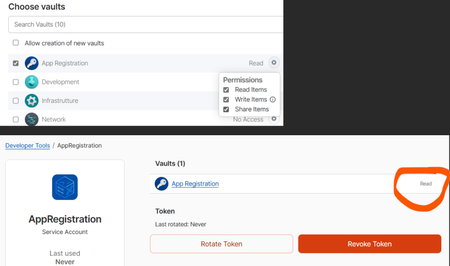
Hi all, I'm having trouble with the permissions of the service account. Even though I grant it read, write and share permissions on a vault when creating the service account, the account is actually created with read-only permissions. This is evident both from the attached image and from the code I am running (Python SDK) which can access the vault for reading, but not for writing. The error I am getting is: you do not have the right permissions to perform this action: not sufficient permissions for the item update operation I also tried to create the service account again with all the necessary permissions, but the problem persists, even though I grant it permission to create vaults. I have no idea what it could be or what else I could try. ThanksSolved405Views0likes5CommentsConsole flooded with errors when clicking links during 1Password passkey selection dialog
Hi, I’m experiencing an issue with the 1Password browser extension when testing WebAuthn API integration on my own website. Environment macOS Chrome (latest version) 1Password browser extension Issue I’ve successfully implemented WebAuthn API functionality for login on my website. However, the 1Password extension behaves unexpectedly: When the 1Password passkey selection dialog is open, if I click a link on the page, the page transition happens, but the Chrome DevTools console gets flooded with a large number of log, warn, and error messages. This feels like a bug. Steps to Reproduce Register a passkey in 1Password for the test site. Open the login page, which triggers the 1Password passkey selection dialog. While the dialog is open, click any link on the page. The navigation works, but the console outputs a large number of log, warn, and error messages. Expected Behavior Page navigation should happen without producing unnecessary console output. Actual Behavior Console is flooded with log, warn, and error messages. Additional Information I will attach/paste the console output below for reference. background.js:80 📤 Sending <NmLockState> message to native core <740716061> background.js:80 📥 Received message <NmLockState> from native core <740716061>. Duration: 4.8ms background.js:80 DeviceTrust: access denied: [ missing backoffice permission, missing admin permission ] - aborting (anonymous) @ background.js:80 background.js:80 📤 Sending <NmOfflineStatus> message to native core <3907478951> background.js:80 📥 Received message <NmOfflineStatus> from native core <3907478951>. Duration: 1.7ms background.js:80 Could not complete _handleGetCredential: disconnected (anonymous) @ background.js:80 background.js:80 📤 Sending <NmLockState> message to native core <3923595490> background.js:80 📥 Received message <NmLockState> from native core <3923595490>. Duration: 4.1ms background.js:80 📤 Sending <NmLockState> message to native core <2088568031> background.js:80 📥 Received message <NmLockState> from native core <2088568031>. Duration: 4.3ms background.js:80 📤 Sending <NmLockState> message to native core <780253718> background.js:80 📥 Received message <NmLockState> from native core <780253718>. Duration: 4ms background.js:80 📤 Sending <NmLockState> message to native core <3199044829> background.js:80 📥 Received message <NmLockState> from native core <3199044829>. Duration: 3.8ms background.js:80 📤 Sending <NmOfflineStatus> message to native core <469136938> background.js:80 📥 Received message <NmOfflineStatus> from native core <469136938>. Duration: 6ms background.js:80 Loaded page details in 2 ms. background.js:80 Analyzed the page in 0.4000000059604645 ms. background.js:80 📤 Sending <NmOfflineStatus> message to native core <2269321457> background.js:80 📥 Received message <NmOfflineStatus> from native core <2269321457>. Duration: 3.3ms background.js:80 [popup] Not attempting to connect to desktop app: already connected or connecting to desktop app background.js:80 Decided not to attempt reconnection to the desktop app. background.js:80 📤 Sending <NmLockState> message to native core <2789903974> background.js:80 📥 Received message <NmLockState> from native core <2789903974>. Duration: 2.7ms background.js:80 DeviceTrust: access denied: [ missing backoffice permission, missing admin permission ] - aborting (anonymous) @ background.js:80 background.js:80 📤 Sending <NmOfflineStatus> message to native core <3819754395> background.js:80 📥 Received message <NmOfflineStatus> from native core <3819754395>. Duration: 3.6ms background.js:80 📤 Sending <NmLockState> message to native core <1861163921> background.js:80 📥 Received message <NmLockState> from native core <1861163921>. Duration: 3.1ms background.js:80 📤 Sending <NmLockState> message to native core <2199877840> background.js:80 📥 Received message <NmLockState> from native core <2199877840>. Duration: 4ms background.js:80 Failed to refresh keysets <redacted> (anonymous) @ background.js:80 background.js:80 📥 Sync started for account xxxxxxxx - syncing all background.js:80 Failed to refresh keysets <redacted> (anonymous) @ background.js:80 background.js:80 Failed to refresh keysets <redacted> (anonymous) @ background.js:80 background.js:80 Failed to refresh keysets <redacted> (anonymous) @ background.js:80 background.js:80 Failed to refresh keysets <redacted> (anonymous) @ background.js:80 background.js:80 Managed Apps - Feature flag is NOT enabled background.js:80 ✅ Sync completed for account xxxxxxxx - took 969ms background.js:80 📤 Sending <NmOfflineStatus> message to native core <335039426> background.js:80 📥 Received message <NmOfflineStatus> from native core <335039426>. Duration: 8.1ms background.js:80 Failed to refresh keysets <redacted> (anonymous) @ background.js:80 background.js:80 📥 Sync started for account xxxxxxxx - syncing all background.js:80 Failed to refresh keysets <redacted> (anonymous) @ background.js:80 background.js:80 Failed to refresh keysets <redacted> (anonymous) @ background.js:80 background.js:80 Failed to refresh keysets <redacted> (anonymous) @ background.js:80 background.js:80 Failed to refresh keysets <redacted> (anonymous) @ background.js:80 background.js:80 Managed Apps - Feature flag is NOT enabled ✅ Sync completed for account xxxxxxxx - took 935ms 📤 Sending <NmOfflineStatus> message to native core <228318852> 📥 Received message <NmOfflineStatus> from native core <228318852>. Duration: 1.9ms Failed to refresh keysets <redacted> (anonymous) @ background.js:80 📥 Sync started for account xxxxxxxx - syncing all Failed to refresh keysets <redacted> (anonymous) @ background.js:80 Failed to refresh keysets <redacted> (anonymous) @ background.js:80 Failed to refresh keysets <redacted> (anonymous) @ background.js:80 Failed to refresh keysets <redacted> (anonymous) @ background.js:80 📤 Sending <NmLockState> message to native core <3763395867> 📥 Received message <NmLockState> from native core <3763395867>. Duration: 3.1ms Managed Apps - Feature flag is NOT enabled ✅ Sync completed for account xxxxxxxx - took 900ms 📤 Sending <NmOfflineStatus> message to native core <527828929> 📥 Received message <NmOfflineStatus> from native core <527828929>. Duration: 3.3ms Could not complete _handleGetCredential: disconnected (anonymous) @ background.js:80 DeviceTrust: access denied: [ missing backoffice permission, missing admin permission ] - aborting (anonymous) @ background.js:80 📤 Sending <NmOfflineStatus> message to native core <3893879316> 📥 Received message <NmOfflineStatus> from native core <3893879316>. Duration: 1.7ms 📤 Sending <NmLockState> message to native core <2484059834> 📥 Received message <NmLockState> from native core <2484059834>. Duration: 4.3ms 📤 Sending <NmLockState> message to native core <567699292> 📥 Received message <NmLockState> from native core <567699292>. Duration: 3.8ms 📤 Sending <NmLockState> message to native core <2496790293> 📥 Received message <NmLockState> from native core <2496790293>. Duration: 3.6ms Failed to refresh keysets <redacted> (anonymous) @ background.js:80 📥 Sync started for account xxxxxxxx - syncing all Failed to refresh keysets <redacted> (anonymous) @ background.js:80 Failed to refresh keysets <redacted> (anonymous) @ background.js:80 Failed to refresh keysets <redacted> (anonymous) @ background.js:80 Failed to refresh keysets <redacted> (anonymous) @ background.js:80 Managed Apps - Feature flag is NOT enabled ✅ Sync completed for account xxxxxxxx - took 1264ms 📤 Sending <NmOfflineStatus> message to native core <2459928279> 📥 Received message <NmOfflineStatus> from native core <2459928279>. Duration: 3.1ms Failed to refresh keysets <redacted> (anonymous) @ background.js:80 📥 Sync started for account xxxxxxxx - syncing all Failed to refresh keysets <redacted> (anonymous) @ background.js:80 Failed to refresh keysets <redacted> (anonymous) @ background.js:80 Failed to refresh keysets <redacted> (anonymous) @ background.js:80 Failed to refresh keysets <redacted> (anonymous) @ background.js:80 Managed Apps - Feature flag is NOT enabled ✅ Sync completed for account xxxxxxxx - took 891ms 📤 Sending <NmOfflineStatus> message to native core <346739443> 📥 Received message <NmOfflineStatus> from native core <346739443>. Duration: 4.3ms 📤 Sending <NmLockState> message to native core <1926301438> 📥 Received message <NmLockState> from native core <1926301438>. Duration: 3.9ms Failed to refresh keysets <redacted> (anonymous) @ background.js:80 📥 Sync started for account xxxxxxxx - syncing all Failed to refresh keysets <redacted> (anonymous) @ background.js:80 Failed to refresh keysets <redacted> (anonymous) @ background.js:80 Failed to refresh keysets <redacted> (anonymous) @ background.js:80 Failed to refresh keysets <redacted> (anonymous) @ background.js:80 Managed Apps - Feature flag is NOT enabled ✅ Sync completed for account xxxxxxxx - took 974ms 📤 Sending <NmOfflineStatus> message to native core <4246935782> 📥 Received message <NmOfflineStatus> from native core <4246935782>. Duration: 3.7ms Failed to refresh keysets <redacted> (anonymous) @ background.js:80 📥 Sync started for account xxxxxxxx - syncing all Failed to refresh keysets <redacted> (anonymous) @ background.js:80 Failed to refresh keysets <redacted> (anonymous) @ background.js:80 Failed to refresh keysets <redacted> (anonymous) @ background.js:80 Failed to refresh keysets <redacted> (anonymous) @ background.js:80 Managed Apps - Feature flag is NOT enabled ✅ Sync completed for account xxxxxxxx - took 871ms 📤 Sending <NmOfflineStatus> message to native core <969923831> 📥 Received message <NmOfflineStatus> from native core <969923831>. Duration: 3.2ms 📤 Sending <NmLockState> message to native core <2384356258> 📥 Received message <NmLockState> from native core <2384356258>. Duration: 4.1ms Failed to refresh keysets <redacted> (anonymous) @ background.js:80 📥 Sync started for account xxxxxxxx - syncing all Failed to refresh keysets <redacted> (anonymous) @ background.js:80 Failed to refresh keysets <redacted> (anonymous) @ background.js:80 Failed to refresh keysets <redacted> (anonymous) @ background.js:80 Failed to refresh keysets <redacted> (anonymous) @ background.js:80 Managed Apps - Feature flag is NOT enabled ✅ Sync completed for account xxxxxxxx - took 865ms 📤 Sending <NmOfflineStatus> message to native core <1380548022> 📥 Received message <NmOfflineStatus> from native core <1380548022>. Duration: 1.7ms 📤 Sending <NmLockState> message to native core <2946571035> 📥 Received message <NmLockState> from native core <2946571035>. Duration: 3.1ms 📤 Sending <NmLockState> message to native core <2259480419> 📥 Received message <NmLockState> from native core <2259480419>. Duration: 2.4ms 📤 Sending <NmLockState> message to native core <2244117207> 📥 Received message <NmLockState> from native core <2244117207>. Duration: 4ms Could not complete _handleGetCredential: disconnected332Views0likes3Comments