Level up your business security with free, on-demand training and certification. Explore 1Password Academy today →
Forum Discussion

Anonymous
4 years ago1Password 8 (beta) – Redesign edit button
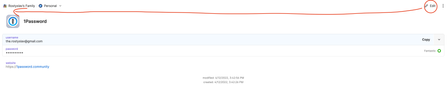
What do you think if you will redesign the edit button to have macOS style when window buttons are on the left side instead of the right side. As an experienced macOS user, every time I reach the lef...

volts
4 years agoSuper Contributor
Huh. I'll complain all day when 1Password 8 doesn't "feel" like a macOS app. It's getting better and better at pretending to be one, and 1Password 8 is possibly the best Electron app on macOS, but Electron apps always feel like raccoons in a trench coat.
And I hate that New Item is blue (wtf?) and obviously a button, while Edit just looks like text (wtf?) until you mouse over it. That's a lame combination of things.
But! the placement of the Edit button doesn't bother me at all! It actually seems like a reasonable place to me. I don't think there's much of a standard for an Edit button.
Compare it to Contacts.app. The Edit button is in the bottom right, and the New Item button is insanely located at the bottom-left, inside the contact display area.
Paprika.app puts Edit in the top right, and it "feels" pretty good to me.
I can't think of any examples that put Edit where you're describing - can you share some?





