Level up your business security with free, on-demand training and certification. Explore 1Password Academy today →
Forum Discussion

Former Member
4 years ago1Password Mini Not Copying Shown Password
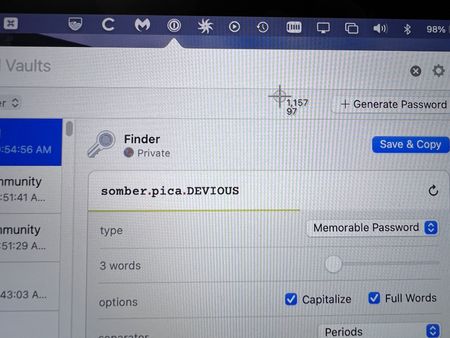
For a while I thought I was loosing my mind, but I just caught 1Password Mini not copying the generated password it shows.
For example, I just clicked on the 1Password Mini icon (Mac, running Mon...
Former Member
3 years agoHey @Kirkvan ! Let me see if I can speak to some more of your comments/questions.
...why doesn't the "Check for Updates" in 1Password 7 announce that 1Password 8 is available ...
We are trying roll out the update over time for folks. Everyone should see the update in the coming weeks.
Wow. OK, 1Password 8 is definitely prettier. Well done.
Thank you! As one of the designers on the team that's really good to hear :)
What happened to the "Password Generator" in 1Password Mini? ...
The new Quick Access feature does not currently have a password generator, you can either create a new item in the main app and use the generator linked to the password fields there, or use the browser extension popover to get a password generator without needing to create a new item. With Quick Access we rethought a lot around what people were looking for in an interface designed around quickly getting in and out of 1Password to get what is needed without taking a person away from their current tasks. A lot of folks found the interface and use cases around 1Password mini confusing, and unclear in places, and we wanted to really look at it from ground zero and work to make it's UI clear and focused while still exposing the power behind it for folks to find. After a ton of user interviews, a number of user tests, and a bunch of other research, Quick Access was born. You can see a lot around our thinking there in the new https://1password.com/mac/, or in the https://support.1password.com/quick-access/.
All of that said, we're actively looking at feedback like yours and working out how to continue to make it even better! So thanks a lot for writing in with some of your pain points.
If you enable the setting to reveal passwords when the Option key is down, it doesn't seem to work in the Password History for an item
I'm seeing this too, I will make sure to get an issue filed with our dev team and hopefully we can get that fixed soon. Thanks!
1Password 8 doesn't seem to lock upon quit ...
We simplified our auto-lock options a bit in version 8 due to confusion around some points that we were seeing and wanting to make them as clear as possible. With 1Password running from the menu bar, in the browser extensions, and the main app, having it "lock on quit" meant a lot of different things to different people and whichever we chose ended up not being what a lot of folks expected. Locking when the computer went to sleep, or after a specific amount of idle time is what we saw as the most beneficial, and least confusing. You can also lock manually at any time with the menu bar command, or with the Shift+Command+L keyboard shortcut. Is locking when you close the main app window ("quit") something you are missing?
Thanks again for taking the time!
- Dan, Staff Designer at 1Password