Protect what matters – even after you're gone. Make a plan for your digital legacy today.
Forum Discussion

CoopersDad
1 year agoNew Contributor
1Password popup hides login button/doesn't close after auto-filling username or password
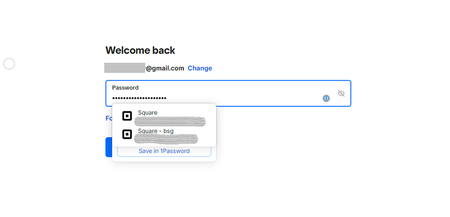
In Chrome on both Windows and Mac desktops, the autofill popup from 1Password correctly fills the respective field on a login screen, but after doing so it does not disappear, leaving the "Enter"/"Su...

CoopersDad
1 year agoNew Contributor
Thanks for sticking with me on this. If you look at the screenshot from my first post, you'll see that the password has already been filled by 1Password (b/c I clicked on the inline popup). Yet that inline popup is still displaying on top of the Submit button to continue the login process. (When I'm presented with a login page, I usually choose to click on the suggested 1Password login to "trigger" it to populate the username or password field. At other times, I'll search for the entry in 1Password and let 1Password navigate to the website for me and then begin the sign-in process.)


