Our community is getting an upgrade on July 2nd! Learn more in the FAQs →
Forum Discussion

lysander
3 years agoDedicated Contributor
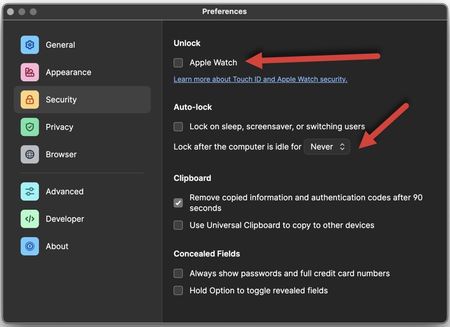
Auto-Lock set to Never, Apple Watch Unlock set to ON = LOCK
Can someone please explain how the security settings work because I think there is a bug.
Look at this screen:
My understanding is if** Auto-Lock** = NEVER then UNLOCK would have no funct...

GreyM1P 1Password Team
3 years ago1Password TeamUsing the red 🔴 close window button in the top-left corner of the window won't (by itself) cause 1Password to lock. It would only auto-lock in line with your preferences, although in this case, that's Never.
To fully quit 1Password, you need to right-click the 1Password icon in the menu bar and click Quit. Then, when you open 1Password again, you'd need to unlock it.


