Level up your business security with free, on-demand training and certification. Explore 1Password Academy today →
Forum Discussion

pakman
1 year agoNew Contributor
Cannot enable TouchID on 1Password Mac 8.10.40
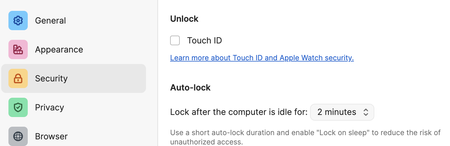
I cannot click the TouchID check box on the security tab of 1Password any more.
1Password Version: 8.10.40
Extension Version: Not Provided
OS Version: 14.6.1
Browser: Arc

1P_Dave Moderator
1 year agoModeratorHello pakman! 👋
I'm sorry that you're unable to turn on Touch ID unlock for 1Password on your Mac. It sounds like you're running into an issue that our developers are aware of and are working on a fix for. Can you try the following steps:
- Right-click on the 1Password icon in your menubar and click Quit.
- Click the Finder icon in the Dock.
- From the menu bar, choose Go > Go to Folder.
- Copy and paste the following, then press Return:
- ~/Library/Group Containers/2BUA8C4S2C.com.1password/Library/Application Support/1Password/Data/settings
- Right-click on settings.json and choose Open With > TextEdit.
- Remove all of the following lines, if you see them:
- "security.authenticatedUnlock.appleTouchId": true,
- "security.authenticatedUnlock.appleWatchUnlock": true,
- Save settings.json and close TextEdit.
- Open and unlock 1Password for Mac from your Applications folder using your account password.
- Click on 1Password next to the in the menu bar.
- Click Settings.
- Click Security.
- Turn Touch ID / Apple Watch unlock back on.
If that doesn't work then please let me know and I can help further.
-Dave
ref: dev/core/core#31979


