Our community is getting an upgrade on July 2nd! Learn more in the FAQs →
Forum Discussion

ptab
2 years agoNew Contributor
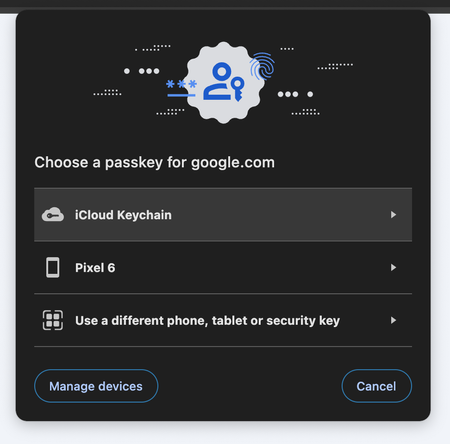
Chrome passkey dialog shows up instead of 1Password one
Using Chrome desktop, when I try to login to any of my passkey-enabled accounts (e.g. Google) using a passkey, I only get offered the standard Chrome dialog:
If I do the exact same thing on...

1P_Dave Moderator
2 years agoModeratorHello ptab! 👋
I'm sorry that 1Password isn't showing a prompt to help you sign in to a website with a passkey when using Chrome. As a first step, make sure that the built-in password manager in Chrome is turned off and that 1Password is set as the default password manager: Turn off the built-in password manager in your browser
Then, make sure that saving and signing in with passkeys is turned on:
- Open your browser.
- Right-click on the 1Password icon in your browser's toolbar and click Settings.
- Click Autofill & save.
- Make sure that "Offer to save and sign in with passkeys" is turned on.
Then close Chrome and reopen it and try to sign in using a passkey again. Let me know if you still see the prompt from Chrome.
-Dave


