Our community is getting an upgrade on July 2nd! Learn more in the FAQs →
Forum Discussion

adriancarlson
1 year agoNew Contributor
Disable 1Password for Specific Websites
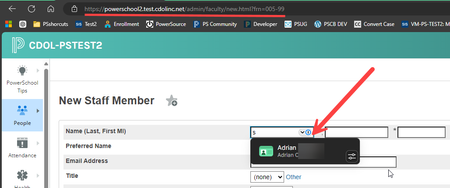
I am the School Information Systems Manager for a district overseeing 30 schools. As part of my responsibilities, I frequently create new staff and student accounts in our Student Information System ...

dangit
3 days agoNew Contributor
I think they said hiding it on a specific page wasn't effective, because each staff member accessed has a unique page.
I am experiencing the same issue when working on a Genealogy site. Click the wrong button and all my information is entered for that new ancestor. It makes for a very strange, inbred family tree.
Has any fix been found?

1P_Dave Moderator
2 days agoModeratorCurrently, the best option is to use the Hide on this page feature by right-clicking on the page that you'd like to hide 1Password on and then choosing 1Password > Hide on this page.
However, you're right that this only applies on the specific page that you use the feature on, not the entire website. I've let our product team know that you'd also like the ability to hide 1Password on an entire website and they'll look into adding this feature in the future.
-Dave
CFP-20151


