Level up your business security with free, on-demand training and certification. Explore 1Password Academy today →
Forum Discussion

Former Member
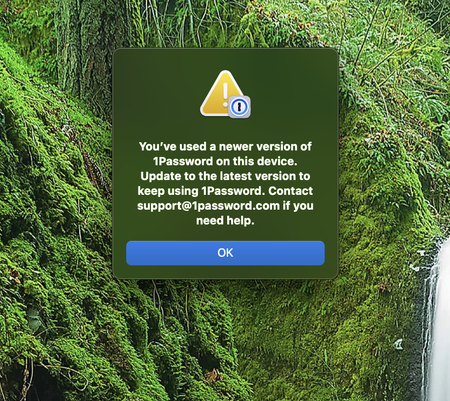
3 years agoError: "You've used a newer version of 1Password on this device." (See Approved Answer)
https://1password.community/discussion/comment/683383/#Comment_683383
.
Hi
Just started my Mac up this morning and I got the following message, I have tried uninstalling and rein...
Former Member
3 years agoUpdate: The solution posted by @AlexanderZ above worked for me as well. I also had to launch 1P twice after deleting the Data file. The first time I launched 1P a new Data file was created but 1P did not open. The second time 1P launched to the setup process.
That was scary.
Here is the complete solution (with updates from me) for everyone else:
=============================
To solve this, you simply need to move 1Password's Data folder out of the way so that it can make a new one.
Here's what to do:
Right-click the 1Password icon in the menu bar (if it's there) and click Quit.
Open Finder, and click the Go menu > Go to Folder...
In the box that appears, copy and paste the following exactly:
~/Library/Group Containers/2BUA8C4S2C.com.1password/Library/Application Support/1Password/
and press Return.
You'll see a folder called Data - right-click on the folder and select Compress "Data".
Drag the original Data folder to the Trash.
Wait a few moments and then open 1Password 8. Nothing will happen except that a new Data folder will be created.
Open 1Password a second time. You'll now be taken through the original setup process and all your original data should be present.
===============================