Level up your business security with free, on-demand training and certification. Explore 1Password Academy today →
Forum Discussion

Former Member
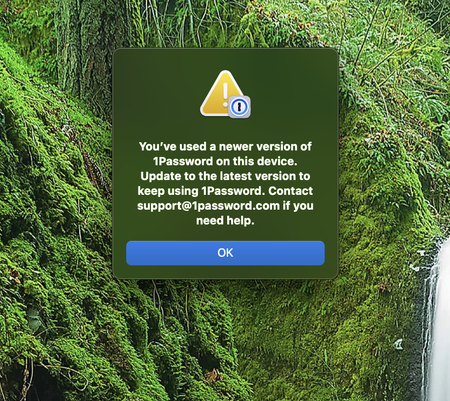
3 years agoError: "You've used a newer version of 1Password on this device." (See Approved Answer)
https://1password.community/discussion/comment/683383/#Comment_683383
.
Hi
Just started my Mac up this morning and I got the following message, I have tried uninstalling and rein...

1P_Dave Moderator
3 years agoModerator
.
Hello everyone,
Our developers are currently investigating the issue and I recommend that you send in a diagnostics report to the team before resetting the app so that we can confirm the specific cause of the issue on your device and advise on the best path forward. Instructions on how to send in a diagnostics report:
- Open Finder.
- Click Go in the menubar at the top of the screen.
- Click Go To Folder...
- In the new pop-up that appears paste:
~/Library/Group Containers/2BUA8C4S2C.com.1password/Library/Application Support/1Password/Dataand then press return on your keyboard. - Right-click on the folder titled
logsand selectCompress "logs".
Attach the newly created logs.zip file to an email message addressed to support+forum@1password.com.
With your email please include:
- A link to this thread: https://1password.community/discussion/139434/youve-used-a-newer-version-of-1-password-on-this-device-update-to-the-latest-version-to-keep
- Your forum username:
username - Please do not post your diagnostic report to the forum. This is for your privacy and security.
The report will be in zip format. Please send the entire file.
You should receive an automated reply from our BitBot assistant with a Support ID number. Please post that number here. Thanks very much!
-Dave
ref: dev/core/core#21214