Level up your business security with free, on-demand training and certification. Explore 1Password Academy today →
Forum Discussion

Former Member
3 years ago"Hide on this page" does not work
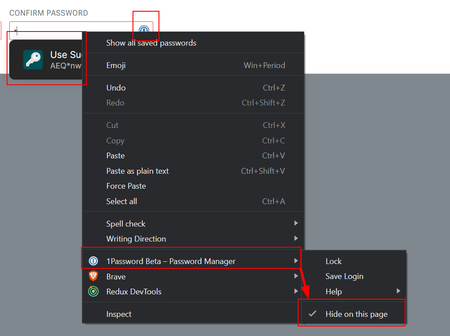
I use 1Password and work as a software developer primarily on web applications. I prefer to disable 1Password when working on something because of the code injected into forms (and the "network" requ...
Former Member
3 years agoHey @rage8885, we have been a bit busy, but that isn't an excuse. I'm very sorry for the delay in getting back to you.
Can an option be added to disable 1Password on specific domains? Or even just on localhost? Or on non-HTTP sites? Any of these options would work for me and I'm sure many others. Unfortunately, Chrome only lets me set an "allow" list on the extension so I cannot blacklist 1Password for any one domain.
This feature does not yet exist. However, we do know that it is a popular request, and we have brought it up to our developers. We will continue to let them know about any and all feedback that we get. We will won't stop advocating for it on your behalf.
As for the "hide on this page" option, I tested it out and it works pretty consistently for me. That said, I only tested via Safari as it's the only browser that I'm able to fully close at the moment to disable "hide on this page". The only other way to disable "hide on this page" is to open the menu and de-select it. The "hide on this page" option should not be disabled if you refresh the page.
Although I have not been able to reproduce the inconsistency that you mentioned, I do want to learn more about your environment and the steps you took. Could you let me know what browser you're seeing this with? Does it happen on a specific website? What is the website from the screenshot that you shared? How long do you keep your browser open before you see 1Password's suggestion come back?
Please let us know about the above and we will look into things further!
IDEA-I-293


