Level up your business security with free, on-demand training and certification. Explore 1Password Academy today →
Forum Discussion

Zorak
6 months agoNew Contributor
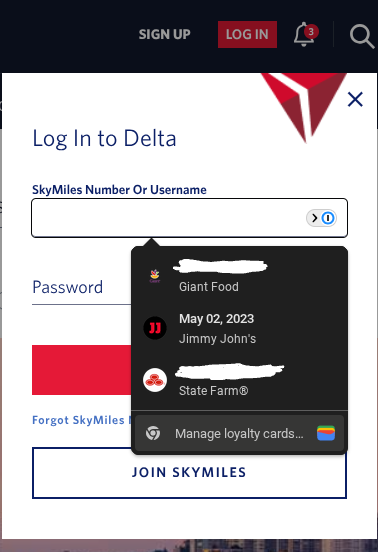
in Chrome how do I disable autofill of Google Wallet items?
I have some passes, loyalty cards, etc. saved in my Google Wallet. Rather annoyingly, some recent change has caused a Wallet autofill menu to start popping up where it is not wanted, specifically, o...
 5 months ago
Zorak wrote:
I have also looked all over https://wallet.google.com/ and https://payments.google.com/ and related pages and cannot find any setting that would control this
So, I'm still not sure why turning 1P off would fix it, but I found the "right" way to disable this: https://wallet.google.com/wallet/settings/managepassesdata
Toggle off the "Use passes across Google" setting.
I guess if you use 1P _and_ you want that setting "on" then this doesn't help you, but at least for now this solves my problem.

1P_Timothy Community Manager
6 months agoCommunity ManagerHi Zorak! Thanks for writing in.
Browser's built in credential managers tend to be quite persistent in offering to fill saved data, even when another credential manager is in use. I'm not sure if a recent update to your browser has caused this for you, but I suspect that's the root of the issue.
If I disable 1P and reload the Delta website then that popup does not appear. This would seem to imply it is either under 1P's direct control, or a result of how 1P interacts in combination with Google Wallet.
1Password doesn't control Chrome's credential manager, and it doesn't ingest that information, but there could be some mixed signals the browser is getting regarding which should be displayed.
If you're not using Chrome's credential manager to enter your passes or cards I would suggest adding that information to 1Password, then deleting it from Chrome. To my knowledge you can't export card data from Chrome so that may be a bit of a manual process unfortunately. Let us know if you have any questions and thanks again.
- Zorak5 months agoNew Contributor
If you're not using Chrome's credential manager to enter your passes or cards I would suggest adding that information to 1Password, then deleting it from Chrome.
I don't want to add it to 1Password either -- I don't want this autofilled at all! I have never added it into Chrome in any way, this popup just suddenly started appearing several weeks ago on its own. It may happen on fields that are tagged as numeric in some way, e.g. it comes up on the Marriott login page as well.




