Forum Discussion

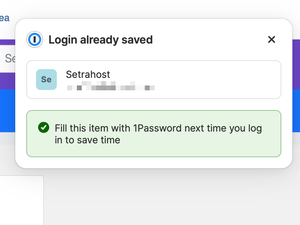
"Login Already Saved" constant message
- 8 months ago
Hello courtneya! 👋
I'm sorry that you're seeing a prompt that says that a login is already saved when you fill that login using Universal Autofill (Command-Backslash). This is a known issue that our development team is already tracking and I've added your report to the internal work item open for the issue.
I've done some testing and I'd like to suggest the following workaround:
- Open your browser.
- Right-click the 1Password icon in the toolbar, then choose "Settings".
- In the "Notifications" section, turn off "Allow 1Password to show unlock notifications".
Let me know if the workaround doesn't help and you continue see the same behavior.-Dave
#36567

 Moderator
Hello courtneya! 👋
I'm sorry that you're seeing a prompt that says that a login is already saved when you fill that login using Universal Autofill (Command-Backslash). This is a known issue that our development team is already tracking and I've added your report to the internal work item open for the issue.
I've done some testing and I'd like to suggest the following workaround:
- Open your browser.
- Right-click the 1Password icon in the toolbar, then choose "Settings".
- In the "Notifications" section, turn off "Allow 1Password to show unlock notifications".
Let me know if the workaround doesn't help and you continue see the same behavior.
-Dave
#36567


