Level up your business security with free, on-demand training and certification. Explore 1Password Academy today →
Forum Discussion

nostink
3 years agoOccasional Contributor
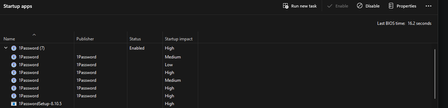
Multiple 1Password Startup apps entries in Task Manager
I just found multiple 1Password Startup Apps entries in Task Manager:
Is this normal? If not, please help me with how do I correct?
1Password Version: 8.10.5
Extension Version: ...

GreyM1P 1Password Team
3 years ago1Password TeamHi there nostink
I wouldn't normally expect to see multiple entries for 1Password in the Startup tab of Task Manager. If you haven't already, try completely quitting 1Password by right-clicking it in the system tray next to the clock and choosing Quit. Then open it again and see how things go.
If you still see multiple entries, restart your computer.
And, if restarting doesn't help, open the Settings app (note: Windows Settings, not 1Password's Settings), then choose Apps in the sidebar, and Startup at the bottom of the list that appears. If there is more than one entry for 1Password, remove any extras.
Let me know how you get on. I'll be here if you need any more help. :)
— Grey




