Level up your business security with free, on-demand training and certification. Explore 1Password Academy today →
Forum Discussion

Anonymous
3 years ago[New Subscriber] Questions about 1Password
I have been a 1Password4 user for quite awhile, and finally made the jump to the latest 1Password.
Ran into a few questions as I was importing and setting everything up.
I know we are given ...
Anonymous
2 years agoTerribly sorry for the late reply
You also mentioned a login filling all three fields just fine. It sounds like you are referring to a login item that fills a total of three credential fields such as an account number, username and password. Am I understanding correctly? If this is the case when reviewing the item in the 1Password 8 for Windows app verses on 1Password.com, do you see a difference there? Any screenshots you can provide would be helpful for understanding what fields you are not seeing.
https://i.imgur.com/ZIrlnpV.png
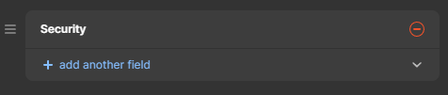
that is all it shows. And the security questions below that. that is it
When I check the app, or on 1password.com, it does not list the 3rd field that it fills in. It is not part of the options, doesn't show in the extra settings below the user/pwd fields (where you can add custom fields, etc). But yet, when I go to fill out the user/pwd with 1P, it fills in all 3 fields.
I think something carried over from when I upgraded (I used to be on 1password4 or something like that). I remember it showing the 3rd field as part of the options.
So this makes it hard to update if I were to change the PIN or whatever. Or if I want to add a new login for a site that also has a 3rd field that needs to be filled in. or I have to manually enter in the 3rd field.
Do you see the same behaviour when following our guide to, Use 1Password as an authenticator for sites with two-factor authentication?
Could you provide a list steps you use when adding 2fa (or and One-time Password field) to an item and the Security field appears? We'd like to investigate further.
I literally take those steps mentioned in the link. I bring up the QR window, go to browser extension (or even the windows app), then click the scan window, then save.


