Level up your business security with free, on-demand training and certification. Explore 1Password Academy today →
Forum Discussion

deprimer
7 months agoNew Contributor
Passkeys not working on the Mac
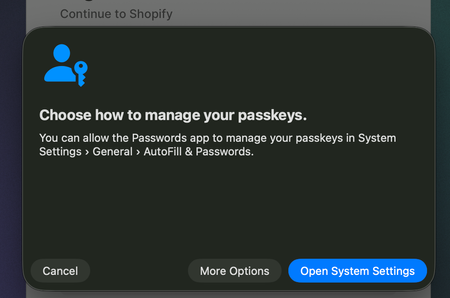
On iOS 26, I'm able to select 1Password as an AutoFill provider in the AutoFill & Passwords panel under Settings > General > AutoFill & Passwords. On macOS 26.0.1, I'm unable to select 1Password as...

deprimer
7 months agoNew Contributor
I have done both of these things and they DO not allow me to use passkeys from 1Password on my Mac. This is a new issue in macOS 26.0.1

1P_Dave Moderator
7 months agoModeratorI'm sorry that passkeys still aren't working, I'm using macOS 26.0.1 and passkeys are working for me in Safari so I'll need to investigate further to see what isn't working on your end. Are you using a personal 1Password account or an account associated with your employer?
If you're using a personal account then check the following:
- Open your browser.
- Right-click on the 1Password icon in your browser's toolbar and click Settings.
- Make sure that "Offer to save and fill logins and other items" and "Offer to save and sign in with passkeys" is turned on.
If those options are already on then can you check to see if you can save and sign in using a passkey on this test website: https://webauthn.io/
If that works then on which websites is saving and signing in with a passkey not working?
-Dave
 unverbraucht10 days agoNew Contributor
I have exactly this problem with logging into any Atlassian Cloud product (Bitbucket, Jira, Confluence) from either Chrome, Brave or Vivaldi. I have a passkey as second factor. Once I click on "Log in" the 1password passkey popup displays for a split second and is then replaced by the macOS keychain selector, which doesn't help me. Autofill is disabled in MacOS system settings. The webauthn.io sample you mentioned works (as do some other websites), so I assume it's something specific to what Atlassian is doing - but now I cannot use 1password for my main work tools.
 RufusWinther1 month agoNew Contributor
Hi 1P_Dave, I got the same issue as deprimer.
For me the toggle in 1P Browser settings in Safari are grayed out. (MacOS 26.4.1)I honestly don't know why it says "Disabled settings are managed by administrator. It's my personal account. On the other hand in Firefox it just works.
I did reinstall the Safari extension but no change. I also disabled the autofill system stuff.
Any idea what I can try?


