Level up your business security with free, on-demand training and certification. Explore 1Password Academy today →
passkeys
277 Topics
Invalid Passkey Notification for Fairfax County Public Library
I was going through my passkey notifications in Watchtower, and I have a notification for https://fcplcat.fairfaxcounty.gov/logon.aspx . I logged in and went into my account security settings to enable a passkey, but there is no mention of one. I can only change my password. Is there a way to correct the notification ? AFAIK, passkeys are not supported. Support info: 1Password for Mac 8.12.22 (81222017)10Views0likes0Comments
Android Chrome Native passkey popup
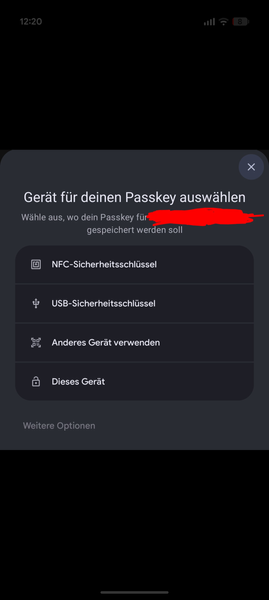
Hi, I'm using Google Pixel with mainly chrome browser. I noticed on some websites, that in some cases instead of 1password popup that OS popup appears when either logging in with passkey or when creating a passkey. I attached a screenshot of one example when creating a passkey. I can't share URL with you. For login I noticed that problem with German website "Computerbase". For normal password login the 1password autofill works most of time so I assume my 1pw settings are more or less good. Also passkeys work on many websites flawless. Hope you have any idea to cope with it :)44Views0likes1Comment
How are passkey login for 1Password going
I remember about 2 years ago you OPW guys are talking about adding passkey as a single authencation factor in place of password+secret key and even launched a beta test. But I can't find further on-going discussion now (maybe due to I'm not famaliar to this new fourm system, idk) So I wonder how is this project going, if it still hasn't been abandoned?53Views0likes1Comment
I Generate my 1pw Password by misstake
I am facing a issue accessing my personal account. By mistake, I changed my account password using the password generator inside the app, which logged me out of all devices. Currently, I do not have the new password or the recovery code, but I do have my Secret Key and my Emergency Kit. This account contains all of my important email and service passwords, so losing access is a major problem. Could you please advise me on the official steps I can take to restore access, or confirm if there are any recovery options available given that I have the Emergency Kit and Secret Key? I’ve tried every possible method, but unfortunately I still can’t access my 1Password account. I don’t have the Recovery Code, and I logged out of my phone because it was asking for the new password that was generated through your app and saved inside it — which I can no longer access. I’m fine with deleting the account. However, I want to keep the subscription I already paid for on my old account and have it transferred to the new one after deletion. Thank you very much for your support.53Views0likes2Comments
Unable to create and save a passkey in Costco android app
I am getting the error message when trying to create a passkey in the Costco android app on my Samsung S22 Ultra phone: "Unable to save passkey. For security reasons, 1Password did not save this passkey. The associated URL for this passkey does not match the selected app."Solved1.5KViews7likes19CommentsPasskeys not working on the Mac
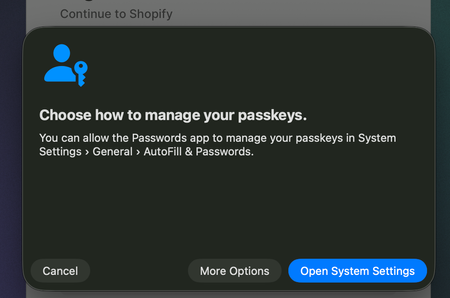
On iOS 26, I'm able to select 1Password as an AutoFill provider in the AutoFill & Passwords panel under Settings > General > AutoFill & Passwords. On macOS 26.0.1, I'm unable to select 1Password as an AutoFill provider under System Settings and this is preventing me from using passkeys in 1Password in Safari. I have tried disabling AutoFill entirely in System Settings but that didn't help at all. Instead, I get this extremely unhelpful "Choose how to manage your passkeys" dialog (see below) which gets me absolutely nowhere. How can I fix this? What can I do to allow 1Password to automatically handle all passkey and autofill requests correctly? iOS 26 - no issues with choosing 1Password macOS 26.0.1 - no way to select 1Password668Views0likes10CommentsWhen using PassKeys: Have to sometimes scan phone QR code unlike Apple passkeys
Hello! When I used Apple for Passkeys, I was able to use my iPhone or iMac with just one Passkey. But now, when using Quickbooks for example, I'm being asked to scan the Passkey that's present on another device even when the Passkey is in 1Password on my Mac. I am using 1Password Beta and using the beta browser extension for the Chrome browser as well. Usually, I don't have issues with 1Password and passkeys as it can usually handle multiple devices just fine with one passkey, just like Apple and the passkeys saved to Apple Passwords. Here's version information: 1Password (Desktop): 1Password for Mac 8.12.12 It put me back on PRODUCTION even though I'm on Beta for channel releases, but I'll deal with that soon, once again. 1Password Chrome Extension (Beta): 8.12.20.9 These both are working together well and there are no other issues that have come up. Google Chrome: Version 148.0.7778.168 (Official Build) (arm64) Computer: iMac M1 (silicon chip) with MacOS Tahoe 26.3.1 with update soon to take place for Tahoe 26.5, but I doubt that's causing anything. I realize Passkeys are held on device, but Apple Passwords' Passkeys allowed them to be used across Apple devices and my passkeys for the most part do not require me to use another device to scan the Passkey, like the QuickBooks Online website does (Intuit). Thank you! Patrick26Views0likes1Comment1Password Not Able To Log In To Gmail With Passkey
This is on Samsung S23. I am trying to log into gmail with a passkey stored in 1password but it does not work. This passkey works perfectly on my desktop. My understanding is that passkeys stored in 1password are supposed to be usable across devices. I have 1password set as my preferred autofill service and I have autofill with chrome enabled. When I try to log in, it only checks the Google password manager vault, and the option to autofill the passkey from 1password is never given. For my org, I am unable to log in to my email with a password, so I MUST use a passkey from 1password to log into my device. I see a lot of complaints about 1password autofill on Samsung devices on this community as well as on reddit. Is passkey autofill from 1password fully supported on Samsung devices? Please advise. Thank you68Views1like2CommentsUnable to complete account recovery – repeated “Recent attempt was cancelled'
I am unable to access my 1Password Family account despite multiple recovery attempts. Issue details: I have regenerated my Secret Key as part of the recovery steps. I am unable to log in using my credentials on any device. All devices have been signed out, and no active sessions are available to me. Family members only have Member access and no Organizer/admin permissions. Recovery attempts consistently fail with the message: “Recent attempt was cancelled." This occurs across multiple devices and browsers. Impact: I am fully locked out of my account. No Family Organizer is available to approve recovery. This is blocking access to stored credentials and operational access. Already sent a couple of emails to the support team and received only the ticket number. This is frustrating and not the service we expect from 1Password. Ticket number: 594065 Account type: Family subscription75Views0likes5Comments