Level up your business security with free, on-demand training and certification. Explore 1Password Academy today →
Forum Discussion

tmakaro
4 years agoFrequent Contributor
Quick access not releasing memory after close?
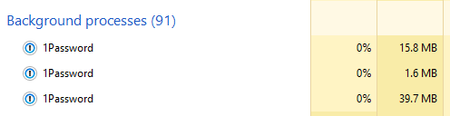
Firstly, I must say that I am very impressed by the memory usage of 1P8 especially when the program is in the background. However, I was looking at task manager to get some data to convince my friend...

1P_PeterG Community Manager
4 years agoCommunity ManagerHi tmakaro, I'm back again sooner than expected. I checked in with our development team about this, and they confirmed that this is actually working as intended. To explain a bit 👇
Quick Access keeps itself ready to go at all times - unlike the other apps with their attendant UIs, which as you saw, drop any memory they're using right upon close.
This is a bit of a performance vs. resource-usage judgment: Quick Access is designed to be the thing that you call up when you just need a login that very second (perhaps while you're in the middle of some other workflow, too), so there's a good case to be made that it's worth it to reserve that relatively small amount of RAM in order to make Quick Access as instantly useful at all times as people would expect it to be.
With that said:
- Quick Access is designed not to use CPU when idle and invisible,
- and it does reset the process upon lock, as you'd expect.
And I should also say that while this specific behavior may not change, we're always looking to net any efficiencies we can in order to make the app perform nimbly and with a minimal impact on your system resources. I hope this post has provided some insight into the design thinking behind Quick Access - and thank you for bringing up the question!




