Level up your business security with free, on-demand training and certification. Explore 1Password Academy today →
Forum Discussion

tmakaro
4 years agoFrequent Contributor
Quick access not releasing memory after close?
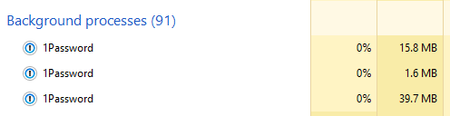
Firstly, I must say that I am very impressed by the memory usage of 1P8 especially when the program is in the background. However, I was looking at task manager to get some data to convince my friend...

tmakaro
4 years agoFrequent Contributor
Oh wait a second. Ignore my last comment. It looks like Quick Access isn't releasing the memory at all. It's just that the process was named differently (starting with an "m" for the first letter of the vault name). So it wasn't appearing with the others processes in alphabetical order. Only when I opened and closed quick access did the process name get changed (sometimes appearing blank and sometimes as "1Password". If blank, the name appears as "1Password" if I close and reopen task manager). Then I opened the main 1P8 window, the process was getting renamed again and moving down in task manager so I didn't see it.
So, everytime in my original post when I said it was about 60MB it wasn't because this process just moved in task manager, so it's about 95MB the whole time in the background. Definitely a little less impressed with the background memory usage now, but hey, Quick Access is undeniably better than Mini was in 1P7, so I guess I can't really complain.
Thank you again for taking a look at this with me.




