Protect what matters – even after you're gone. Make a plan for your digital legacy today.
Forum Discussion

casmithva
1 year agoNew Contributor
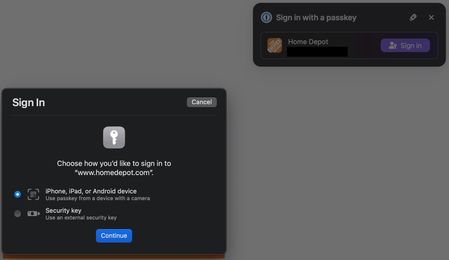
Revisiting iCloud vs. 1Password Passkeys in Mac OS Safari
This topic originally came up in July, 2024, in https://1password.community/discussion/147223/keychain-passkey-prompt-keeps-popping-up-safari, where Mac OS overrides/overrules 1Password's passkey pro...

1P_Dave Moderator
1 year agoModeratorkuchkovsky and OAW
I'm sorry that you're both seeing a passkey prompt from macOS. Make sure that you have the built-in password manager turned off:
- Click on the Apple icon in the menu bar.
- Click System Settings.
- Click General, and then AutoFill & Passwords.
- Turn off "AutoFill Passwords and Passkeys".
Then check to make sure that 1Password is set as the default:
- Open your browser.
- Right-click on the 1Password icon in your browser's toolbar and click Settings.
- Make sure that "Make 1Password the default password manager in this browser" is turned on.
Let me know if you still see the issue after going through these steps. If you do then, specifically on PayPal, do you need to wait for the macOS prompt to appear? Or does it appear immediately?
-Dave
ref: dev/core/core#31888




