Level up your business security with free, on-demand training and certification. Explore 1Password Academy today →
Forum Discussion

alcyone7
3 months agoOccasional Contributor
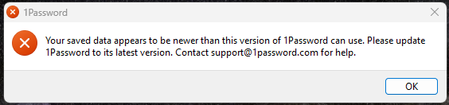
Saved data appears to be newer
Keep getting this message after every reboot. I am running the latest nightly version so not sure how this could even be possible. Is there anything I can do to clear this "error"? ...
- 3 months ago
Okay, seems there are two versions running. Not sure why the app would allow an older version to remain when a newer version was installed via the UPDATE button. But manually removing the old version seems to have resolved the issue. Why the app moved from a ~200Mb EXE to a bloated ~500Mb MSIX app is just a bizarre choice. Likely the root cause for the dual installation?

1P_Gem Moderator
3 months agoModeratorHi alcyone7, I'm glad to hear that uninstalling the old version got things working!
The older version should have been removed automatically during the migration from the EXE to the MSIX build. In a small number of cases, something on the system can prevent that clean-up from completing, which leaves both versions installed and causes the kind of conflict you saw.
Now that only the MSIX version is installed, you shouldn’t see this issue again going forward.
If you have any questions, let me know!
alcyone7
3 months agoOccasional Contributor
Since I resolved the issue, the only question I have is, as posted, why move from a relatively lightweight installer in the standard application model, to the new APP based version that is literally twice the size - at 0.5Gb?
That's an insane uplift in size (to have to download regularly as well as store). What was the rationale behind offering only the bloatware installer (and yes, the M$ architecture is most definitely to blame for the doubling of size - and not the question)?
- 1P_Gem3 months ago
Hi alcyone7, thanks for your question.
The MSIX installer combines capabilities that were previously split between the EXE and MSI installers. In practical terms, that means support for Windows on ARM and a more protected installation model - it installs into a directory that requires admin privileges to modify, and has improved tamper detection capabilities, notifying the user and giving them the option to repair or reset the installation.
I understand that the larger download size can be frustrating. If that's a concern in your environment, feel free to share a bit more detail about why that is, and I can pass your feedback along to the team.
- alcyone73 months agoOccasional Contributor
I know of the architectual changes afforded by the MSIXbundle apps, but ~500Mb for a password manager, which may have to be downloaded several times, is excessive. M$ MSIX packages carry bloat - but 250Mb of bloat (effectively 100% bigger than the previous installer) isn't typical.
Nonetheless, the question wasn't "what are the benefits of the MSIXbundle apps", rather why it was the only download offered - considering the EXE modules were considered perfectly acceptable/secure for years (and the switch was made long after the MSIX architecture was developed/available from MS)?- 1P_Gem3 months ago
alcyone7,
The EXE installer was deprecated primarily for security reasons. While it served customers well for many years, it doesn't use a protected installation location on Windows. As security expectations and threats evolve, we standardised on the MSIX packaging model, which supports a system-protected install.
For most setups, the MSIX build is the recommended option going forward. The MSI package also remains available, but it's primarily intended for managed multi-user environments, or devices that don't meet the system requirements for the MSIX.
I understand that the larger download size and lack of other options is a concern for you. I don't have any additional information to share on the installer decision beyond what I've already said, but I can certainly pass your feedback on to the team.




