Level up your business security with free, on-demand training and certification. Explore 1Password Academy today →
Forum Discussion

Meeshkah
5 months agoNew Contributor
Suggestion enhancement: customize password field name
Hi folks, I’d like to suggest an enhancement because the current workarounds I know of are a bit clunky. When creating a Login (using the Chrome extension in my case), I can enter the username, pas...

MarceloFinki
5 months agoNew Contributor
Hello,
Could you please let me know how to apply this workaround?
Thanks.

Meeshkah
5 months agoNew Contributor
Hi Marcelo,
Here is what usually works for me.
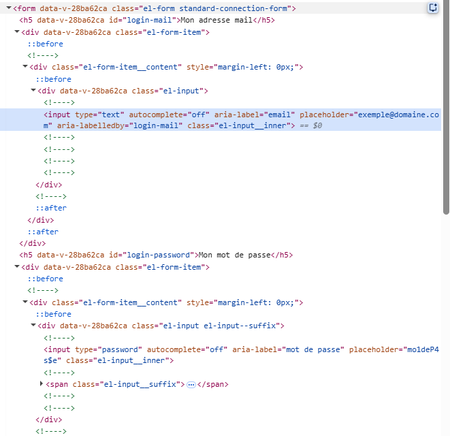
- On the field which is not auto-filling, right-click > Inspect (on chrome, should be similar with other browsers).
- In the inspector pane, locate the `id` or `aria-label` property of the `form` item for that field, and retain its value. The screenshot I added in my original post shows this.
- In your 1password Login item, add a password item, use the value from step 2 as its title, and your actual password as its value.
- Save. Refresh the page and it should auto-fill correctly.
Hope that helps!




