Level up your business security with free, on-demand training and certification. Explore 1Password Academy today →
Forum Discussion

solarizde
3 years agoFrequent Contributor
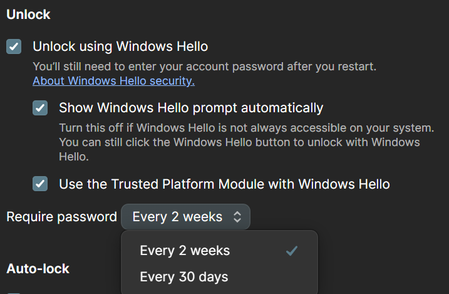
Windows Hello - Require password Options
Hey,
due to the fact that I want to use the SSH Agent I have to use the Windows Hello function, which I'm actually not a big fan of.
Currently you can only set it to require a reauth by password...

ag_mike_d 1Password Team
3 years ago1Password TeamHello solarizde,
Thanks for your feedback. I'll include our developer documentation that discusses the requirement of Windows Hello to unlock 1Password: SSH agent Developer Documentation
The require password every 2 weeks or 30 days is not related to the SSH agent but rather how often you need to reauthenticate 1Password with your account password when Windows Hello is in use. This is to help users to remember their account password when primarily relying on biometrics or a Windows PIN.
With regard to the warning when enabling the Trusted Platform Module (TPM), I wanted to provide you with a link to another discussion that explains the reasoning behind this messaging.
I would prefer to have a Win Hello confirmation but require a password verification every day and after each Account logout / reboot.
If you'd like to use both Windows Hello and require account password authentication, leaving the (TPM setting) disabled will allow for Windows Hello unlock prompts only after you've used your password for that initial sign-in for the day or after 1Password has been completely terminated or your device restarted.
Please let us know if this information helps, but if you if you have any additional questions, just let us know.


