Level up your business security with free, on-demand training and certification. Explore 1Password Academy today →
android
1310 Topics
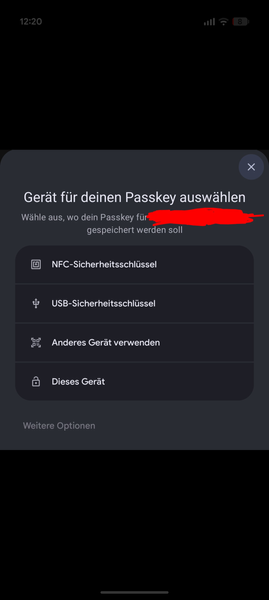
Android Chrome Native passkey popup
Hi, I'm using Google Pixel with mainly chrome browser. I noticed on some websites, that in some cases instead of 1password popup that OS popup appears when either logging in with passkey or when creating a passkey. I attached a screenshot of one example when creating a passkey. I can't share URL with you. For login I noticed that problem with German website "Computerbase". For normal password login the 1password autofill works most of time so I assume my 1pw settings are more or less good. Also passkeys work on many websites flawless. Hope you have any idea to cope with it :)31Views0likes1Comment
Credentials not saving when using 1Password in Google Chrome on Android
I am experiencing an issue with the 1Password Android app (version 8.12.21) while using Google Chrome (version 148.0.7778.180)(OS: Android 15; 2312DRA50G Build/AQ3A.240912.001). When I log into a website and click "Save" when 1Password asks "Save username and password in 1Password?", nothing happens. There is no error message displayed, but the credentials are not saved to my 1Password vault either. I have already tried this on multiple different websites in Google Chrome, and the issue persists across all of them. I have also already run the Autofill Health Check within the 1Password app, and it doesn't show any issues or configuration errors.18Views0likes1Comment
If Android is offline: 1Password app misbehaves
I have the latest version of the 1Password app on my Samsung Galaxy S23. When the phone is online the app works as expected. But when the phone is offline (e.g. on a plane, or without coverage) then the app has misbehaved several times now: The app either shows a blank screen after opening, or only shows partial matches on search, or it is extremly slow to display data. I am aware that making changes when offline has limitations, but I just need to look up a password (read). I am worried that 1Password will fail me in a situation where I need a password urgently but my phone has no connectivity. Any insights are appreciated. Thanks24Views0likes2Comments
Unable to create and save a passkey in Costco android app
I am getting the error message when trying to create a passkey in the Costco android app on my Samsung S22 Ultra phone: "Unable to save passkey. For security reasons, 1Password did not save this passkey. The associated URL for this passkey does not match the selected app."Solved1.5KViews7likes19CommentsMay 2026 at 1Password: Native macOS AutoFill, a new developer site, and more!
In May, we introduced new features for Autofill on macOS and Android, as well import/export enhancements, and a way to create items more efficiently. We also relaunched our developer documentation hub with new quick start guides, powerful search features and a fresh domain change to match. In case you missed it macOS native AutoFill in beta We know you've been waiting for this one! In the latest 1Password for Mac beta release (version 8.12.22) we've integrated 1Password with Apple's native Passwords API. This allows your password manager to act as a system-level Credential Provider on macOS. Using the native Passwords API, alongside Universal Autofill and 1Password in the browser, will give you a more consistent filling experience across macOS. This is one of our most requested features, and we’re working hard to bring it to the production channel after the beta release. Follow these steps to try macOS AutoFill for yourself: Install the latest version of the 1Password for Mac beta. Navigate to 1Password Settings > Autofill > Set up macOS AutoFill. Select “Turn On” from the macOS permission prompt. If you’re using Safari, confirm Safari Settings > AutoFill > User names and passwords is enabled. * This feature requires macOS 14 Sonoma on Apple silicon. We’d love to hear your feedback on the update in our announcement post! Updated developer documentation Interested in setting up a service account for your AI agent, securely provisioning secrets, or managing your project’s environment variables? You’ll find in-depth guides covering all this and more on 1Password.dev, our new developer documentation hub. Our team has refreshed and reorganized the documentation to make it even easier to get started with our developer tools. We’ve also added some new get-started guides for developers, admins, and partners, as well as enhanced search functionality that lets you ask questions in plain language. 👉Read the full announcement in the Developer Community. More product updates announced this quarter If the macOS update wasn’t enough, May also brought a number of product updates including: the Autofill health check, Credential Exchange Protocol (CXP), and smarter login creation. You often need to tweak multiple system settings in multiple menus to ensure a consistent autofill experience on Android. If you miss a setting, or your device changes something without telling you, it can be tough to track down and fix the issue. Our new Autofill health check brings these settings into one place and highlights any settings that need to be changed. You might recall that we’ve been working on a new way to import and export data. This work is part of an industry wide effort to better facilitate credential migration across different systems with the CXP. That new process is now live in iOS and Android, making it easier to move everything including passkeys (yes, you can now export passkeys!) between different password managers. Last but not least: instead of starting with a blank login item, you can now type the name of widely used websites, like Reddit or Steam, into the title to prefill key fields. This not only means you can create items faster, but also helps ensure your items are filled where you use them. Random but Memorable May 7th was World Password Day! To mark this special day, we sat down with 1Password CISO Jacob DePriest to talk about the future of identity security. If you want to know where the cybersecurity industry is going, this one's for you!". In our latest episode, Gerald Auger, founder of Simply Cyber, shares his tips to stay secure during the summer travel season. The future of identity security | World Password Day special! Cybersecurity tips for the modern traveler Don’t forget to subscribe to the Random but Memorable YouTube channel! Release note highlights Browser Extension Creating a new item in the 1Password browser extension now opens a pop-up window instead of opening the full 1Password app window. Fixed an issue where you weren’t prompted to update a saved login after you changed your username on a site but kept the same password. Fixed an issue where the 1Password could lock unexpectedly after you switched tabs. Fixed an issue where 1Password in Safari could show an endless loading state when it couldn’t connect to the desktop app. Mac, Windows, and Linux You can now use Codex to interact directly with 1Password Environments using a local MCP server (currently in beta). We’ve improved support for importing your data from Bitwarden using CSV files. Secondary windows of the 1Password app will now open on your active display instead of your primary display. You’ll no longer see the option to share an item if item sharing is turned off for your 1Password account. iOS, and Android [iOS only] You can now control whether or not you’re prompted to unlock 1Password when you see prompts to save items in 1Password for Safari. [iOS only] Fixed an issue where you could see two prompts to unlock with Face ID when you selected a login to fill above your keyboard. [Android only] Fixed an issue where dates wouldn’t be localized according to your system locale settings if your in-app language was set to “Use system defaults”. [Android only] Fixed an issue where similar Identity items would be hidden from Autofill suggestions.106Views1like0Comments
Merging Duplicates
I know that the general response is to manually do this, but doing this with 1000+ objects is impractical to say the least. Some were created because when I migrated to 1Password, some duplicate/corrupt entries already existed in my profiles on Avast, Google, etc, which I did not notice at the time. Unfortunately, some have been created since then by either less tech-savvy family members on their own accounts or how 1Password is asking more often regarding site/app trust & permissions ("Allow fill once") and is thus creating duplicates of its own accord. The fact that merging wasn't already added a while back, considering how many people have asked about it over the years, is interesting to say the least. And yes, I have been attempting to create my own tool for quite some time, but it is difficult to find time to work on it lately, on top of not being successful in general.152Views1like4Comments
android cell phone won't fill fields that windows pc does fill
I'm trying to send an email to Senator Merkley. His office has a web form to fill out that includes the common identity fields -- name, address, phone, email -- plus some unique ones. On my android phone, phone and email do not populate using my 1password profile (name and address populate properly), but when I go to my windows pc, all the identity fields populate. If I could create a login for Sen. Merkley (or whoever) to use on the cell phone, that would be acceptable, but I can't figure out how to do that.61Views0likes5CommentsAndroid版 8.12.21:タグ入力時に日本語入力が正しく機能しない不具合について
環境: 1Password for Android: 8.12.21 Device: Pixel 10 Pro Fold OS: Android 16 現象: 1Password for Androidのパスワード登録/編集画面において、タグを登録する際に日本語入力で不具合が発生しています。 詳細: 日本語テンキーを使用してタグを入力しようとすると、ひらがなを1文字入力した時点で強制的に確定されてしまいます。そのため、「ひらがなを入力→漢字に変換→確定」という通常の日本語入力プロセスが行えず、意図した通りの文字を入力することができません。 この問題が発生し始めたバージョンは定かではありませんが、私が認識している限りでは数か月前から続いています。 実質的に日本語でのタグ登録が行えず、非常に不便ですので早急に修正していただけないでしょうか。ご確認をお願いいたします。21Views0likes0CommentsBring Back the Standalone Password Generator in Android – Not Just Hidden in Login Creation
Hello 1Password team and fellow users, I'd like to revisit a long-standing feature request that I’ve found repeated in several older threads — but never fully addressed: the ability to use the password generator independently in the Android app, without being forced to create a new login item first. I’ve seen past posts where this was requested , and most responses follow a pattern: Users didn’t realize the password generator appears during login creation. A moderator kindly explains how to trigger it by creating a new item. The user says thanks, and the thread ends. However, that’s not the whole story. Many of us — myself included — already know this workaround. But the problem isn’t ignorance — it’s that it’s a poor user experience. In real-world usage, we often encounter modern and fragmented sign-up processes: Email-first → verify → redirected to create password SMS-based onboarding → password setup comes much later Multi-step captchas, in-app flows, or jumping between tabs or apps These flows don’t align neatly with creating a login item upfront. We often need a password generator midway through a process, without any context where a login makes sense yet. And faking a dummy item just to access the generator feels like a workaround that no longer fits the sophistication of 1Password’s overall design. Yes, there are third-party password generators online — but I’ve come to really trust and rely on 1Password’s generator and its history tracking, like in the browser extension. It’s streamlined, consistent, and secure — everything a good UX should be. All I’m asking is for 1Password to bring that same level of elegance and independence to the Android app. A standalone generator (like on desktop and browser) would make the mobile experience complete — and remove a daily point of friction for many loyal users. What do you think? Have you run into similar situations where the current flow just doesn't work well? Would a dedicated password generator make your Android experience smoother? Let’s hear your thoughts — I’d love to know how widespread this frustration is, and whether others would support this idea as well.223Views2likes10Comments
Expiration report
I'm using the date field (new) and the alert expiration. But there is no view or report to list by this fields. and no pop up or something to have visibility of alerts. That means I have to go one by one entry to see that field. My question is if there is a expiration or alert report and how to access this?62Views0likes2Comments