REMINDER: the community is in read-only mode until July 2nd. This is part of our platform upgrade! Learn more in the FAQs →
community feedback
69 Topics
Password Generator used a character i do not recognize
Hi Everyone, I used the Password Generator to create a new password for my 1Password account. I then took a screen shot of the password and assumed id just type it in the next time and be on my way. however, there is a character in the password that i cannot for the life of me figure out what it is? i dont know why they would use such a random character or its just a font issue? ive tried a "7" and a lower case "L", but im worried im going to get locked out of my account if i keep trying. what is the character and what buttons do i push on the mac keyboard to find it? desperate for help. thanks143Views0likes1Comment
Considering upgrading to Family
Hi folks I have used 1Password for many years to manage my passwords. I am from an IT security background and am very comfortable with this technology. However, my wife is not; she struggles with IT in general, and passwords in particular. She also accesses some financial websites which use what I consider to be archaic means of logging in, for example, "1st, 5th and 8th" letter of a password that she struggles to remember, when the password has been formulated by Safari (to my way of thinking, this encourages very poor password practices in those who are already vulnerable). Does anyone here have similar experience, and can anyone offer guidance as to how useful the Family upgrade would be to those in our situation?130Views0likes1Comment
I would like to inquire about payment.
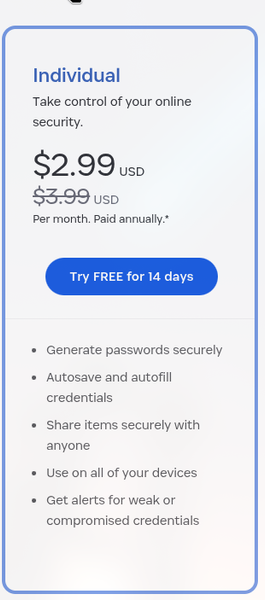
I saw a discount of $2.99 USD for a one-year initial subscription when I signed up. However, after the 8-9 day free trial, I realized I didn't receive the discount. I've contacted several places, but haven't received a response. This is the only place left, so I'm asking here. As you can see in the image, the payment processed was a full amount.38Views0likes2CommentsiOS 26.2 AutoSave Incorporation Possibility?
Recently, other password managers like NordPass have https://nordpass.com/blog/nordpass-ios-update-notes/#nordpass-4101-latest, which acts the same way the 1Password Browser Extension does, where it automatically saves login info upon logging into an app or website. In theory, 1Password should be able to mimic this capability, correct? It's only available on iOS 26.2 and above, but this capability SHOULD make the hassle of saving passwords & logins on iOS & iPadOS practically non-existent. I've seen that in the https://releases.1password.com/ios/beta/#1password-for-ios-8.12.6-31, there was a patch note that read... It’s now easier to generate and save passwords when you use Autofill. ...but that doesn't specify whether autosave is incorporated yet or not, and the Testflight beta is at full capacity, so I wanted to see if I could possibly get some clarification.128Views0likes7Comments
How to increase biometric auth attempts in the app?
Hi everyone, Ive been having a recurring issue with biometric authentication (fingerprint) in the 1Password app. Sometimes my finger is slightly wet, or I don't place it correctly on the first try, and the app immediately locks me out and asks for the master password From a usability standpoint, this feels a bit counterproductive. The whole point of enabling biometrics is to make authentication faster and more convenient, but having only one attempt before being forced to type the full password can be frustrating. Is there any way to increase the number of allowed biometric attempts (for example, 3–5 tries) before the app falls back to requiring the master password? Or is this behavior fixed for security reasons? Id love to know if there's a setting I'm missing, or if this could be considered as a feature request Thanks!88Views0likes6Comments
Enhanced Secret Sharing with "View-Only Access & Direct Launch"
Problem Statement: Organizations often need to share credentials with third-party vendors, contractors, or internal teams for specific tasks. Current sharing methods in 1Password typically grant full access to the secret, including the ability to view and copy the username and password. This poses a security risk, as it exposes sensitive credentials to individuals who only require access to the service, not the underlying login details. There is a clear need for a feature that allows users to use shared credentials without seeing them. Proposed Feature Name: "Direct Launch & View-Only Access" or "Secret Tunneling" Core Concept: This feature would enable users to share credentials in a way that allows the recipient to directly launch an application (RDP, SSH, Web App) using those credentials, without ever exposing the username or password. The recipient would essentially be "tunneling" through 1Password to access the target service. Detailed Feature Proposal: Sharing Configuration for the Sender: When a user initiates sharing of an item, a new set of options will be presented: Standard Sharing: (Existing functionality) Allows recipient to view and copy all details. Direct Launch (View-Only) Sharing: (New Feature) Select Launch Type: The sender will specify the intended use case for the shared secret: Remote Desktop (RDP): For Windows servers. Secure Shell (SSH): For Linux/Unix servers. Website/Web Application: For web-based services. Pre-requisite Notification (Optional): The sender can include a custom message to the recipient, e.g., "Ensure you have an RDP client installed." Usage Limit: Single Use: The link/access expires after the first successful launch. Multiple Uses: The sender can specify a fixed number of launches (e.g., 5 uses). Time-Based Expiration: The sender can set a specific date and time for the access to expire (e.g., "Expires in 24 hours," "Expires on 2024-12-31"). Permissions: The core permission for this type of sharing would be "Launch Only" . This explicitly denies viewing or copying of the username and password fields. Other fields like notes or URLs (if not used for direct launch) could still be viewable if the sender chooses. Bulk Credential Support: For RDP/SSH, the sharing mechanism should intelligently parse credentials saved in 1Password items that contain: Username Password IP Address/Hostname (for RDP/SSH) (Optional) Port Number (for SSH/RDP if non-standard) (Optional) SSH Key (for SSH, if applicable) - the feature should be able to utilize the key directly without exposing it. Recipient Experience: Notification: The recipient receives a notification within 1Password (or via a secure share link, if outside 1Password Teams/Business) indicating a "Direct Launch" secret has been shared. Launch Interface: RDP/SSH: Upon clicking the shared item, 1Password will: Check for Prerequisite: (If configured by sender) Display the prerequisite notification. Prompt for Confirmation: "This will launch a connection to [hostname/IP address]. Do you want to proceed?" Auto-Launch: If confirmed, 1Password will initiate the appropriate client (e.g., mstsc.exe for RDP, ssh command for SSH, or configured third-party tools like mRemoteNG, Termius) with the pre-filled credentials and connection details. The username and password will be passed securely to the client without being displayed to the user. Website/Web Application: Upon clicking the shared item, 1Password will: Open Browser: Launch the default web browser. Auto-Fill (Securely): Navigate to the URL and securely inject the username and password into the login fields. The user will see the login page, but the credentials themselves will not be visible in the browser's form fields or developer tools. This might require a browser extension integration for seamless secure auto-filling without displaying credentials. No Copy/View Option: For "Direct Launch" items, the "Copy" and "Reveal" (eye icon) options for username and password fields will be entirely absent or greyed out. Usage Tracking (for Sender): The sender will be able to see how many times the shared secret has been launched and its current expiration status within their 1Password sharing history. Technical Considerations & Implementation Details: Secure Credential Handling: The core challenge is securely passing credentials to external applications without exposing them. This would likely involve: Temporary Tokenization: 1Password could generate short-lived, single-use tokens that represent the credentials, which the launching client would then use to authenticate with a secure 1Password backend that in turn authenticates with the target service. Local Process Injection: For RDP/SSH, 1Password could directly inject the credentials into the command-line arguments or standard input of the client process, or use secure APIs if available, without displaying them on the screen or in process memory that is easily accessible. Browser Extension Enhancement: For web applications, the existing 1Password browser extension would need to be enhanced to perform an "invisible" autofill where the credentials are not populated into the HTML input fields in a way that can be inspected, but rather submitted directly. Client Compatibility: The feature would need to support common RDP/SSH clients across Windows, macOS, and Linux. This might involve a configurable list of client executables or common command-line patterns. Auditing: All "Direct Launch" activities (who launched, what was launched, when) should be fully auditable within 1Password Business/Teams. Error Handling: Clear error messages should be provided if a launch fails (e.g., incorrect credentials, network issue, client not found). Security Disclaimer: A clear disclaimer should be provided to the sender that while 1Password prevents viewing/copying, the target application/service itself might log the login attempt, and the connection itself is subject to the security of the target system. User Stories: As a System Administrator , I want to grant a third-party vendor temporary RDP access to a specific server without them ever seeing the server's administrator password, so I can ensure confidentiality. As a Developer , I want to share SSH access to a staging server with a new team member for a limited time, allowing them to connect directly without knowing the SSH password or private key passphrase, to simplify onboarding and maintain security. As a Project Manager , I need to provide a contractor with access to a SaaS project management tool for a specific task, ensuring they can log in but cannot view or store the login credentials for future unauthorized access. As a Security Auditor , I want to allow an external auditor to access a specific web application for their review, but prevent them from copying the credentials, ensuring compliance with our least privilege policy. Benefits: Enhanced Security: Prevents credential exposure, reducing the risk of unauthorized access, credential stuffing, and phishing. Improved Compliance: Helps organizations meet compliance requirements by enforcing "least privilege" access to sensitive systems. Streamlined Collaboration: Simplifies sharing with external parties and internal teams, reducing friction while maintaining security. Reduced Administrative Overhead: Eliminates the need for temporary password creation, sharing via insecure methods, and subsequent password rotation. Better Audit Trails: Provides clear records of who accessed what and when, even without exposing the underlying credentials. Potential Challenges: Client Integration Complexity: Ensuring broad compatibility with various RDP/SSH clients and web application login flows. Security of Injection: The method of injecting credentials needs to be robust against various attack vectors (e.g., memory sniffing, process inspection). User Education: Clearly communicating the "view-only" nature and usage limitations to both senders and recipients. Community Decision: This feature addresses a critical security and usability gap in current secret management. We believe implementing "Direct Launch & View-Only Access" would significantly enhance 1Password's value proposition for businesses and teams dealing with third-party access and internal credential sharing. We urge the 1Password team to consider this proposal for future development.38Views0likes1CommentIs there a 1Password Referral Program?
I'm aware of the formal Affiliate Program on CJ Affiliate, however CJ is a high threshold affiliate program with a tax ID, etc. I'm wondering if 1 Password has a simple referral code I can send to people to sign up. I sign up clients, friends, and followers weekly. 1Password is easy for tech people but the majority of non-tech people can't be bothered by this stuff and the conversion of direct personal referrals is higher than posting on social media via an official program like CJ. I use CJ for my formal social media partnerships and it's not a great match for 1Password. It would be appreciated to get some kind of credit for it, since none of them would sign up without my help. Almost every other platform has something like this.1.4KViews2likes8Comments