Level up your business security with free, on-demand training and certification. Explore 1Password Academy today →
debug
17 Topics
Error when onboarding new SSO User
1 Password for Enterprise SSO Method Entra Hosted SCIM Managed Group When I add a new user to a group to automatically onboard them now, when the user gets to the email verification step, that user gets "An Unknown Error Occurred" "Contact your account administrator for help.". below that in the response is "Error(SecureChannelCreateSession(Fetch)) \r\n at /builds/dev/cc/confidential-computing/crates/internal/cc-secure-channel-client/src/lib.rs:445" This did not happen with the first user to onboard through this group, but it has happened with all others. After 48 hours I was able to re-invite one of the users and push them through, but I want to know how to avoid this in the future.16Views0likes0Comments
Can't share a vault with a Guest
Hi everyone, I'm hoping someone in the community has run into this before, because I've exhausted what I can try on my side and I'm still waiting on a reply from Support and Success. The situation: I invited a client to my Business account as a Guest. He accepted the invitation, created his account, and I confirmed his access. His status is now Active and he is not assigned to any vault. However, every time I try to add him to a vault, I get this error: Failed to add person to vault. An unexpected error occurred. Error Code: 400 What I've already checked / tried: I'm the only team member on the account and I hold owner/administrator permissions, so I have full rights to manage vaults and people. The guest is not assigned to any other vault. Tried adding him from the vault side (Manage Access) and from the person side (People → user profile → Vaults). Both fail with the same error. Deleted the user entirely and re-invited him from scratch. He accepted again, I confirmed him again, and the error persists. Tried a different browser and an incognito window — same result. Has anyone seen this before? Is there something I might be missing, or a workaround that's worked for you? Thanks in advance for any pointers.43Views0likes2Comments
1Password for Windows Slow
For the past 2–3 weeks, Windows Client from 1Password has been extremely slow for almost all internal staff and customers (MSP version) – for example, when searching and then displaying the results – and keeps going offline (the red cloud appears and it has to be reconnected). When can we expect the situation to improve? It’s making work incredibly tedious. Version 8.12.12 and the Version before also.58Views0likes4Comments
Slow/unresponsive UI/UX after update to 8.12.10 (Windows Desktop)
Multiple users in our organization are seeing the same regression across browsers on Windows 11. The 1Password desktop app Settings UI remains responsive, but navigation between items/tags in the main vault has a noticeable delay (often 3-7 seconds!!!), especially in our largest vault with many tags. The issue started after updating from 8.12.8 to 8.12.10. A related regression is that after clicking a tag, users can no longer immediately type to narrow/search as they previously could. We also notice similar sluggishness in the 1Password web app. I have tried switching between HW-acceleration, OpenGL and more to no avail. This looks less like a browser-specific problem and more like a Windows desktop/webview or list-view performance/focus regression. Please confirm whether this is a known issue in the recent Windows/MSIX client and whether there is a fix in beta/nightly. We would love a solution to this, since navigating now is painfully slow and unintuitive compared to before. It's a massive step backwards.74Views0likes3Comments
SSH Private Key sharing bug
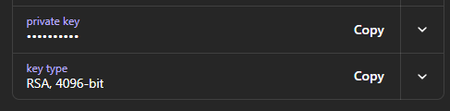
When creating a share link for an SSH key this is what I see as the recipient. if I click copy, I get nothing moved to the clipboard, I have to select reveal, tripple click the start of the key which highlights all of it including the part I can't see, and then I can paste it somewhere. I tested on windows 11, Chrome, Firefox, and Brave Copying the public key or the fingerprint work fine. It would be nice to be able to optionally "export" the key the same way the 1pass application can, but I would settle for the copy button working.49Views0likes1CommentRemote Linux machine opens GUI
Setup: Linux Machine that I directly connect to when in the office. Has 1Password installed. Works great. ~/.ssh/config file has ``` Host * IdentityAgent ~/.1password/agent.sock ``` Windows Machine that I directly connect to when in the office or working remotely. Has 1Password installed. Works great. C:/Users/Me/.ssh/config file has ``` Host mypc User me HostName mypc.local ForwareAgent yes ``` The OpenSSH Authentication Agent service has been Disabled and Stopped so that my computer is listening to `\\.\pipe\openssh-ssh-agent` Issue: When sshing into the Linux machine from the Windows machine, git does not work. `git pull` when sshed will open the GUI on my Linux machine (I have watched both screens to test this) I want my WINDOWS machine to open its GUI for me to log in. There's no point to remote in if I can't use the Windows 1Password.48Views0likes0Comments
Chrome Extension Causes Unwanted Vertical Scrollbar by Injecting 1p-live-region Element
Title: 1Password Chrome Extension (v8.11.14.24) Causes Unwanted Vertical Scrollbar by Injecting 1p-live-region Element Hello 1Password Team, I’m encountering a layout issue triggered by the 1Password Chrome extension, which I believe was introduced in a recent update (within the last week or two). Below are the details: Environment: Device: MacBook Pro 15-inch, 2018 (macOS 15.6.1) Browser: Chrome 141 1Password Extension Version: 8.11.14.24 Issue Description: The page structure includes a root div inside the body with styles set to width: 100vw and height: 100vh, while the html element has width: 100% and height: 100%. Under normal conditions, the page renders correctly without any scrollbars. However, when an input field on the page is focused, the 1Password extension injects a new element into the body with the ID 1p-live-region. This element has a fixed height of 1px, which introduces an unwanted vertical scrollbar and breaks the intended layout. Steps to Reproduce: Load a page with a root div set to 100vw/100vh and html set to 100% height/width. Observe that the page displays correctly without scrollbars. Focus on any input field to trigger the 1Password extension. The 1p-live-region element is added, causing a vertical scrollbar to appear. Expected Behavior: The injected 1p-live-region element should not disrupt the page layout or cause scrollbars to appear. This issue seems to be a recent regression. I’d appreciate it if the team could investigate and resolve it. Thank you for your attention and hard work! Let me know if you need additional details or clarifications.1.4KViews11likes21Comments
Unable to Link Personal Account to Family Plan
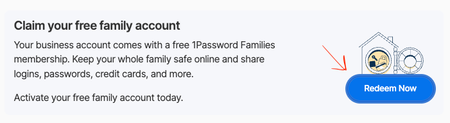
Seems similar to this issue: Unable to Link Personal Account Issue: When going through the process to link a family account to my business account, I am presented with a "We're unable to link your account" error. Even though the family account's billing section says it is connected to a business family plan, there is no indication of a connected account in the business account profile. What I expect should happen: The status on my business profile should change from "Redeem Now" to showing "Your family account is free" message and an "Unlink Account" button. What happens instead: While the family account claims to have been successfully connected, the business account view doesn't change from picture 1. Noteworthy details: - My colleague created a new family account to link, and suspected that it was the free trial that prevented them from connecting. - I unlinked my (several years old) family account to send some pictures of the process only to find myself stuck the exact same way. - We are now two people stuck with the same issue. pic 1: pic 2: pic 3: pic 4:86Views0likes1Comment