Level up your business security with free, on-demand training and certification. Explore 1Password Academy today →
discussion
37 Topics[new tool] varlock: schema-driven env vars
TL;DR: We've launched something new, it's called varlock. It's like DMNO but simpler and easier to get started. It's built on top of the .env files you're already using. It makes them safer to use and share. We'd love your feedback. >> 🧙♂️https://varlock.dev --- We've been heads down working on the next evolution of secrets and configuration tooling building on what we've learned so far creating DMNO. If you've used DMNO, varlock will feel familiar. But instead of writing schemas in TypeScript, we've created a lightweight DSL that sits on top of your .env files. We think this allows for much simpler onboarding (and offboarding!). And because it's all based on decorators in comments, it should play nice with your existing tools. For any tools that would like to make use of this new syntax, we've also created an open specification, we call it @env-spec, and there's an active RFC if you would like to get involved. >> RFC: https://github.com/dmno-dev/varlock/discussions/17 —- So why varlock? Varlock is a suite of tools built to improve the experience of working with environment variables, both in terms of security and developer experience. It provides: Validation - catch errors in development instead of production Type-safety - improved DX via detailed IntelliSense Security - secret redaction in stdout and global console methods Environments - Compose defaults, environment-specific .env files, and local git-ignored overrides Secrets - use any third party provider that has a CLI to load values What next? We're just getting started and we have big plans to expand the feature set of varlock. Coming soon you'll see: Local override encryption via a desktop app using biometrics Shared team vaults with trustless cloud storage GitHub App to track config changes with audit trails Deeper integration with providers like 1Password If you've read this far, thank you. Please check out varlock and let us know what you think by replying to this post, or joining us on Discord. Tools like this are only as good as the community that shapes them. >> 🧙♂️https://varlock.dev Thanks ✌️Solved395Views3likes1Comment1Password GitHub Actions (Post Webinar Chat)
Hi all, Thanks again for joining the webinar today about the 1Password GitHub Action, please feel free to use this discussion to ask any addition questions or if we missed your question, let us know! Here are some resources for your reference: Learn more about the 1Password GitHub Action: - (Marketplace Listing) https://marketplace.1password.com/integration/github-actions - (Docs) https://developer.1password.com/docs/ci-cd/github-actions/ Developer Documentation - https://developer.1password.com/ If you'd like to watch it again you are welcome to do so here: - https://1password.com/webinars/1password-github-actions?utm_ref=community Thanks again and we look forward to working with you soon! ~Phil66Views2likes0CommentsNew getting-started guides, AI search, and LLM-ready docs for 1Password dev tools at 1password.dev
Hi everyone! We've been investing in making 1Password's developer documentation genuinely useful from the first click, and we wanted to share what's now live over at 1password.dev. 📖 New getting-started guides We've published workflow-based getting-started guides across every major tool area: SSH & Git, 1Password CLI, SDKs (Go, JavaScript, Python), Environments, integrations, and more. Instead of jumping between reference pages, you can follow a clear path from setup to working integration, organized around how you actually build. 🔍 AI-powered search across the docs You can hit Ctrl+K on any page and ask a question in plain language. The built-in AI assistant searches the full documentation set and gives you a direct answer with links to the relevant pages. It’s a much faster way to find what you need, especially if you’re not sure which tool or section to look in. Try it: open 1password.dev, hit ⌘+K, and type “How do I set up git commit signing with multiple GitHub accounts?” 🤖 Docs built for AI dev workflows If you use AI coding assistants like Cursor, Copilot, Windsurf, or Claude, our docs are now natively consumable. Every page is available as Markdown (append .md to any URL), and we serve llms.txt and llms-full.txt at the site root so your tools can reference 1Password docs directly. Details here: Build with LLMs 🏗️ Refreshed docs structure The documentation is now organized around the way developers work, with clearer navigation across SSH & Git, CLI, SDKs, Environments, secrets management, and integrations. If you've found our docs hard to navigate in the past, it's worth another look. 📌 One practical note: our developer docs now live at 1password.dev. All your existing developer.1password.com links and bookmarks redirect automatically, so nothing breaks. We'd love your feedback If you run into any issues or have suggestions, let us know in this thread. You can also reach us in the 1Password Developers Slack. Happy building! 🔐60Views1like0CommentsIntroducing 1Password Developer Office Hours
1Password Developer Office Hours - Announcement Introducing 1Password Developer Office Hours We're launching a new live series for developers who build with 1Password. Every month, we'll go deep on a developer tool, feature, or workflow - live demos, product deep-dives, and open Q&A with the people who build and support these tools. No registration. No slides-only presentations. Just drop in, ask questions, and leave with something useful. Session 1: 1Password Environments - From Development Through to Production Thursday, March 19 at 1:00 PM ET / 10:00 AM PT Our first session covers 1Password Environments end to end: CLI, SDKs, Service Accounts, conventions, and practical tips for managing secrets across your development, staging, and production workflows. We'll be joined by a guest from the 1Password Solutions team for a live walkthrough and Q&A. What we'll cover: Setting up and organizing Environments for multi-stage workflows Working with the CLI and SDKs to manage secrets across environments Service Account patterns for CI/CD and production Tips and common pitfalls How to join: https://1password.zoom.us/j/95230687587?pwd=eAI6KzzRdEV5nZmGc8TlfBBFInGg7a.1&jst=3 No registration required. Just click the link at session time. What's coming next: April: Securing AI Agents with 1Password SDKs May: SSH Keys Done Right - 1Password SSH Agent Have a topic you'd like us to cover? Drop it in the comments / thread below. See you on March 19.184Views1like2Comments📣 - Local App Authentication in the SDKs
Hi all, Just wanted to drop a quick note about the updated SDKs for Python, Go and Javascript. We recently introduced another beta enabling desktop applications to request an item from 1Password and then 1Password presents an authentication to the end user. Learn more here 👉 https://developer.1password.com/docs/sdks/desktop-app-integrations What do you all think about this? How is it going for you? Have you had a chance to give it a try? Here's a quick video, I recorded introducing the idea and giving a quick example of it in action! Let us know what you think! Thanks! Phil & the 1Password Team! Video not displaying? Watch it here.330Views1like2Comments.env accessed?: Lesson learned from a drained crypto wallet
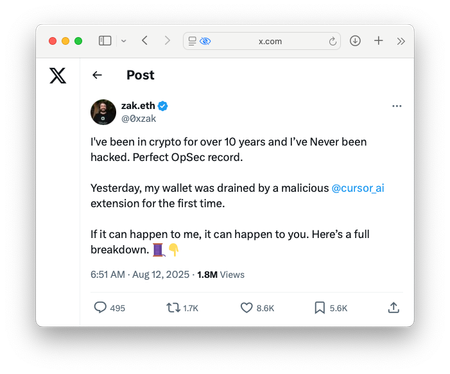
A user on X recently lost their entire crypto wallet after installing a malicious extension in Cursor.ai. The extension accessed their .env file, extracted private keys, and sent them to an attacker’s server. The wallet was drained within 27 minutes. Sadly a hard lesson to learn from. What steps would you recommend to secure their setup? Read - https://x.com/0xzak/status/1955265807807545763?s=46&t=WQd8UVBBGk_pyHB3pNwGsA77Views1like1Comment