Our community is getting an upgrade on July 2nd! Learn more in the FAQs →
feature request
82 Topics
Feature Request - MCP Limiting Controls
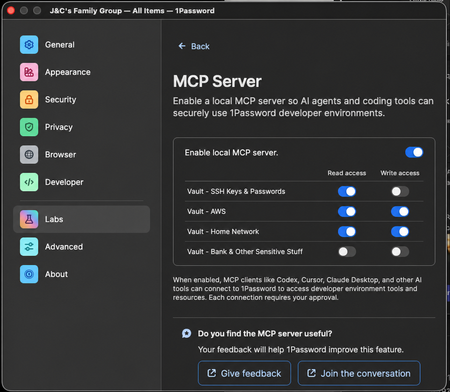
I really love using the MCP service with Claude CLI on my Mac, but it bothers me that it can somewhat easily see all my Vaults. Feature Request Please implement in the 1password App's MCP Settings: 1. Ability to toggle read access for individual vaults 2. Ability to toggle write access for individual vaults Mock-up Here's what I'd like in the 1Password App settings - This would be great for easing my mind specifically not that I don't accidentally give it keys to my kingdom (like the bank) (Props @ GPT and my ability to write a simple prompt) Failed Work-Around Attempt I tried creating another family member account in my family org and just shared the Vaults that I wanted my Claude to use with that, but the desktop app won't let me sign in to multiple accounts in the same org at the same time and I'm not really sure this would have been a good enough work-around for me anyway. The feature I'm requesting above would solve this perfectly. Successful Work-Around Attempt - But sucks So as it stands, the best that I guess I can do is login to my 1password desktop app with only to the dedicated account I made for Agentic access. This would not give any read-only support either, which is not epic.22Views0likes0Comments
Feature Request: Can we get a gh auth login style flow for the CLI?
Hi 1Password team, I’m hitting a major wall with the CLI when trying to use it with AI coding agents (like Claude Code, Cursor, or Linear Agents). Right now, op seems to assume that the person running the "op run" command is always sitting right there at a TTY with a keyboard. But when I’m running an agent in a headless container or a remote environment, the CLI just hangs because it’s waiting for a password or a biometric prompt that it can’t reach. I really don't want to use Service Accounts for this. Giving an autonomous agent a long-lived, static token feels like a massive security step backward. I want the agent to be able to "ask" me for permission. What I'm looking for: A way to do something like op login --browser. It would give me a URL/code (exactly like how aws sso login or the GitHub CLI works), I click it on my host machine, auth in my browser with TouchID, and the agent gets its session token. Are there any plans to support an OIDC-style "Device Authorization" flow?163Views3likes3Comments
Service Accounts in the GUI?
Are service accounts supposed to be manageable in the GUI/desktop app? I'm running Linux, and I don't see them in my account, despite being on the subscription that has them and them being available on the website. And if not, is this a feature that is coming soon? Because it's fairly impractical to manage them through the website. I'd also add that it's annoying having to recreate the service account every time I want to change permissions on it (add a vault, remove a vault, adjust a vaults permissions, rename it, etc). I understand that you've made it this way for additional security, but I don't think it's actually buying much added security in most circumstances, and I think it should at least be opt-out.17Views0likes0Comments
Add more detail to CLI access request modal
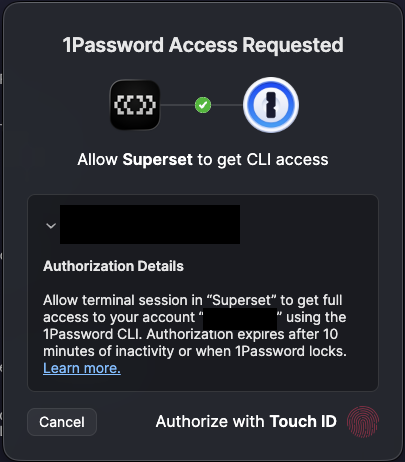
The CLI access request modal could reveal more information about exactly what is being requested: Currently, I don't know if I'm granting access to my bank details or an SSH key. Ideally this modal would display the command that triggered it.14Views0likes0Comments
Feature Request: Remote approval for op CLI / desktop prompts to support Agentic Workflows
Hey team, Claude Code just release a new https://code.claude.com/docs/en/remote-control feature that lets you send prompts and commands to your desktop (or remote sandbox) directly from a mobile app. You might already be using it I have a feeling a lot of devs are going to run into the same need for "remote 1Password auth" because of this. I really love how smooth 1Password handles secret and env management. I keep all my dev keys in 1P, and a lot of my scripts are tightly coupled with the op CLI. For pure local development, this setup is flawless. I tossed Claude Code into a local Docker sandbox for security reasons. Whenever it needed a 1Password key (like for git SSH), I just used SSH forwarding to my host machine for biometric auth. That worked fine since I was sitting right there. But this new mobile remote control feature completely breaks that workflow. I'm not at my desk to scan my fingerprint. Sure, we could generate static tokens to let the agent grab what it needs, but that’s way too inflexible—agents need dynamic access to different resources. If we could get a feature to approve desktop/CLI secret requests directly from the 1Password mobile app (maybe with some specific allow/deny rules and auth timeouts), it would be a massive help for agent-driven development. This applies to both local remote control and fully remote sandboxes. Honestly, this would be a killer feature for me. Would love to know if this is something the team could consider.298Views3likes2Comments1Password Environments should enable grouping environments by service
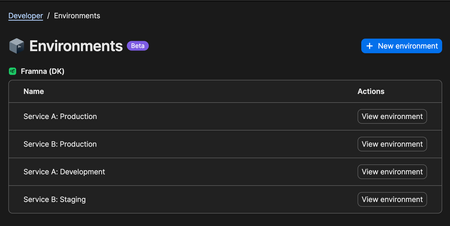
Hi, The new .env management feature in 1Password is incredibly handy, and I can definitely see us adopting it for our backend services. It makes working with environment variables much more convenient. That said, I’d like to share some concerns regarding scalability. We have several services, each with multiple environments such as development, staging, production, and feature-specific environments. In 1Password Environments, these all of these environments appear side by side in a single list, regardless of which service they belong to. This results in naming schemes like "[Service]: [Environment]". While workable, this approach becomes harder to manage as we scale across multiple services. To illustrate, I’ve included a screenshot below showing what I anticipate the structure to look like in our setup. In this case, Service A and Service B have no relation to each other, yet their environments are intermingled. A way of grouping services would make this much clearer and easier to navigate. Best regards, Simon B. Støvring201Views2likes3CommentsFeature request: Path-aware login suggestions for multiple credentials on the same domain
I'd like to file a feature request and share a use case where the current "domain-only" matching makes day-to-day autofill noticeably worse, and to ask whether path-aware matching could be reconsidered as an opt-in option Up front: I can see from a quick search that this is clearly a much-requested feature, with threads going back what feels like several presidential administrations. Normally I'd just add a thumbs-up to the canonical request rather than start a new thread - but without a feature-request tracker (more on that at the end), I genuinely couldn't tell which of the many overlapping discussions is the "live" one the team is actually watching, vs. the ones now being slowly reclaimed by the forum equivalent of moss. So I'm posting fresh rather than guessing wrong and shouting into a tomb. Apologies for the duplication; please feel free to merge this into whichever discussion is currently canonical. ## The situation I have multiple distinct logins on the same domain, distinguished only by path. For example: - https://[example.com]/[teamA]/login -> Login A - https://[example.com]/[teamB]/login -> Login B - https://[example.com]/[admin]/login -> Login C Because 1Password matches on eTLD+1 and ignores the path for suggestions, all three credentials surface every time I land on any of these pages. There is no way to tell 1Password "when the URL path starts with /teamA, prefer Login A," which means every login attempt is a small multiple-choice quiz I am demonstrably bad at. ## Why this matters The "pick from a list" flow is fine for an occasional ambiguity, but in this scenario it happens on every single login. I autofill the wrong credential maybe 1 in 3 times, which - and I cannot stress this enough - triggers the account lockout flow on at least one of these systems. My password manager and I are, in effect, collaborating to lock me out of my own accounts. Favoriting helps for exactly one of them; the others remain a coin flip with worse odds. I understand from past forum threads that 1Password removed path matching some years ago because it complicated things for typical users, and that the team is (rightly) conservative about adding options. I'm not asking for the old behavior back as a default - I'm asking whether a per-item, opt-in path constraint could fit the existing model: - Today's "Fill anywhere on this website" -> unchanged default - Today's "Only fill on this exact host" -> already path-blind - New: "Only fill when URL path starts with ..." (per Website entry) That mirrors the existing exact-host option, just one level deeper. No regex, no globs, no Turing-complete URL DSL - just a path-prefix string on the Website field when the user explicitly opts in. Items without the new option behave exactly as they do today, so there's no impact on users who don't need this. ## Alternatives I've tried - Favoriting: only helps one of N items. - Exact-host: doesn't help because the host is identical. - Splitting into separate Website entries: doesn't help because the path is dropped from matching. - Open-and-fill from the 1Password app: works, but defeats the purpose of an in-browser password manager for daily logins - at that point I'm essentially using 1Password as a fancy bookmarks menu. ## A small meta note This connects to the situation I described at the top. I understand the team's reasoning for not running a formal voting system - that vote counts don't capture the "why" behind a request, and that discussion surfaces better signal. Both of those things are true. But the current setup also means there's no way for users with the same underlying problem to converge on a single canonical request, no visible signal of how widespread an issue is, and no acknowledgement loop telling requesters whether something is even on the radar. The current incentive structure rewards starting yet another duplicate thread (hi!) over piling onto an older one nobody can confirm is still being read. A lightweight feature-request tracker - even one without public vote counts, if that's the concern - would make it easier for users like me to contribute signal without worrying we're duplicating a thread buried three pages deep. Worth considering alongside the substantive request above. Happy to discuss the use case further or test a beta if this is something the team is open to exploring. Thanks for considering it, and apologies again to whichever poor soul at 1Password has to read the seventeenth version of this request.47Views1like2CommentsWe need a way to disable password prompts for a period of time
It would be better if we could disable the password prompt on a particular item for a period of time, rather than unlocking the whole thing. For when automated agents access op:// passwords, it's currently dangerous because then they can access any other credentials for a period of time. Instead, it would be more ideal to say: "Do not ask again for X hours for this password".33Views0likes0CommentsSSH Agent should support host-to-key mapping to avoid MaxAuthTries exhaustion
The 1Password SSH agent currently offers all keys in the vault sequentially for every SSH connection, regardless of which key is relevant to the target host. This triggers an error for a number of hosts: Too many authentication failures Servers configured with MaxAuthTries below the number of SSH certs on in 1Password run the risk of being unreachable thanks to the way that the agent presents the keys. Best practice (https://linuxize.com/post/ssh-hardening-best-practices/) suggests 3-4 for the setting, and according to the man page for sshd indicates that the default is 6 (https://unix.stackexchange.com/questions/418582/in-sshd-config-maxauthtries-limits-the-number-of-auth-failures-per-connection) To reproduce: Have 6+ SSH keys in your 1Password vault Connect to a server with MaxAuthTries 3 (or default) configured The correct key in vault order is greater in count to the setting on the host Result: Received disconnect from [host]: Too many authentication failures Evidence from verbose SSH output: debug1: Offering public key: GitHub ED25519 ... agent debug1: Offering public key: GitLab ED25519 ... agent debug1: Offering public key: K8sFrontEnd ED25519 ... agent Received disconnect: Too many authentication failures The correct key (4th in vault) was never reached since the MaxAuthRetry was set to 3. Workaround: Save the relevant public key to disk and use IdentitiesOnly yes + IdentityFile in ~/.ssh/config to pin a specific key to a host. This works but defeats much of the convenience of the agent. Feature request(if the devs are looking here): Allow users to associate a key with one or more hostnames directly in the 1Password vault item or SSH Agent UI. The Bookmarks tab suggests this infrastructure may already be in progress. If bookmarked hosts could drive key selection, that would solve this entirely. This is a natural extension of what 1Password already does well: matching credentials to their intended destination.22Views0likes0Comments