Level up your business security with free, on-demand training and certification. Explore 1Password Academy today →
feature request
744 Topics
Show the requested credential
I'm heavily using 1password now for agentic usage. All of my business is set up on it now, and all of my credentials are locally using op://, or service accounts. I've put in a lot of effort to try and isolate systems using least privilege, but one problem is that when agents (or applications) request a credential from the system, it doesn't say WHAT credential is being requested. Half the time it doesn't even say the correct name for the application making the request, either. This is a big problem, because I'm starting to get into the habit of just spamming "Accept" blindly. But the whole reason I have set up this whole pipeline is so I can catch malicious programs trying to gain access - for example, supply chain attack infections. Without seeing what credential is being requested, and the process information that is requesting it, I'm finding it's not actually adding much protection at all, because it's putting me into a false sense of security and promoting bad habits. If I'm running multiple agents in parallel, which is often the case, it might just say "Terminal requests access to your vault" or something similar. Which terminal is that? What is the underlying entity being requested? What credential? What is the process ID or terminal title, so I can isolate it to a terminal/agent? Etc. I think this is something that urgently needs to be added. Otherwise, as it stands, it's not really offering much protection because users will just go "oh, it's probably just that agent running - I'm sure it's fine" and accept everything. If that agent happened to have installed a malicious npm package, you'd probably catch it too late.6Views0likes0Comments
Please, please, could you separate these options?
I would like to reiterate alexgreyhead’s suggestion in https://www.1password.community/discussions/1password/chrome-extension-resetting-autofill-settings-to-full-annoyance-mode---every-day-/32711 that the options to fill and save passwords be separate, but for the reason opposite to the one he/she gave. Alex “would prefer just to be able to tick "Offer to save passwords" and leave the rest to him/her to do manually.” I, on the other hand, would like 1Password to offer to fill passwords and leave the saving of updates to me. The reason why, in a nutshell: I’m a QA tester for a suite of software applications. For one of these applications, I have over 75 accounts across my company’s more than half a dozen environments. I have to reset the passwords for all 75+ every three months. For some reason, 1Password lumps all of my accounts from Environments A and B (67 total accounts) together whenever it offers them for selection on login or when changing a password. Many of the accounts in Environment B mirror those in Environment A, so my usernames between the two are very similar. (It also lumps my accounts for Environments C and D together, but there isn’t as much similarity in the usernames across those two environments.) So, if I choose to make use of the option to update an existing password—which is given five times during the password update process for each account—for an Environment A or B account, I have to be VERY careful to choose the right one. If I accidentally save a password to the wrong account in 1Password, I have to go through an even lengthier and more painful process that makes me kind of grouchy to even think about, to fix the situation. This is why I prefer to update each password directly in 1Password. In addition, three out of the five times the option is given to save a new password, the dropdown/modal covers up the control that I want to use next. So I have to either move my left hand from the Ctrl+C/V position to press the Tab key, or perform an extra mouse click, more than 225 times during this already tedious process, when I’m just trying to get all these accounts updated as efficiently as possible. Could you help a girl out?19Views1like0CommentsmacOS AutoFill is now in public beta!
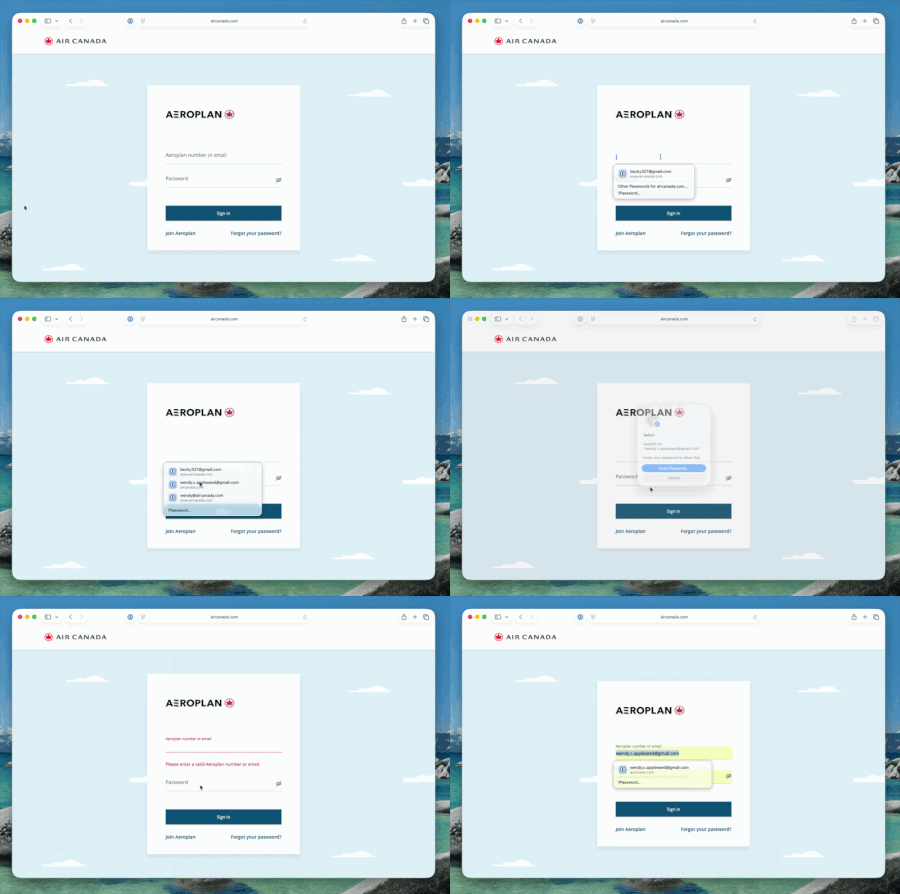
Hey everyone! We're excited to share that native macOS AutoFill is now available in public beta for 1Password. This has been one of the most requested features for years, and we're now at a point where you can test it out and give us feedback! What's new in beta: By adopting Apple's Passwords API, 1Password functions as a native Credential Provider on macOS for logins. You can view autofill suggestions directly within Safari and other supported desktop apps. Passkey support is included in this beta as well. Fill, create and update passkeys easily through macOS autofill. The 1Password Safari extension can be used alongside macOS AutoFill to access additional features not currently supported by the Passwords API. Coming later in Beta, you can set up one time codes using the same integration. How to try it: Update to 1Password for macOS 8.12.22 or later from the beta channel. Make sure you’re on macOS 14 (Sonoma) or later on Apple silicon. Go to 1Password for Mac Settings > Autofill > Set up macOS AutoFill, then select "Turn On" from the macOS permission prompt. You'll see "Active" status once it's enabled. Try filling logins and passkeys and let us know how it goes! We're happy to be one of the first credential managers to adopt these APIs and we want to get it right for you. Drop your feedback in the comments below!417Views1like15CommentsI Generate my 1pw Password by misstake
I am facing a issue accessing my personal account. By mistake, I changed my account password using the password generator inside the app, which logged me out of all devices. Currently, I do not have the new password or the recovery code, but I do have my Secret Key and my Emergency Kit. This account contains all of my important email and service passwords, so losing access is a major problem. Could you please advise me on the official steps I can take to restore access, or confirm if there are any recovery options available given that I have the Emergency Kit and Secret Key? I’ve tried every possible method, but unfortunately I still can’t access my 1Password account. I don’t have the Recovery Code, and I logged out of my phone because it was asking for the new password that was generated through your app and saved inside it — which I can no longer access. I’m fine with deleting the account. However, I want to keep the subscription I already paid for on my old account and have it transferred to the new one after deletion. Thank you very much for your support.33Views0likes1Comment
Merging Duplicates
I know that the general response is to manually do this, but doing this with 1000+ objects is impractical to say the least. Some were created because when I migrated to 1Password, some duplicate/corrupt entries already existed in my profiles on Avast, Google, etc, which I did not notice at the time. Unfortunately, some have been created since then by either less tech-savvy family members on their own accounts or how 1Password is asking more often regarding site/app trust & permissions ("Allow fill once") and is thus creating duplicates of its own accord. The fact that merging wasn't already added a while back, considering how many people have asked about it over the years, is interesting to say the least. And yes, I have been attempting to create my own tool for quite some time, but it is difficult to find time to work on it lately, on top of not being successful in general.148Views1like4Comments
Alphabet index when viewing All Items
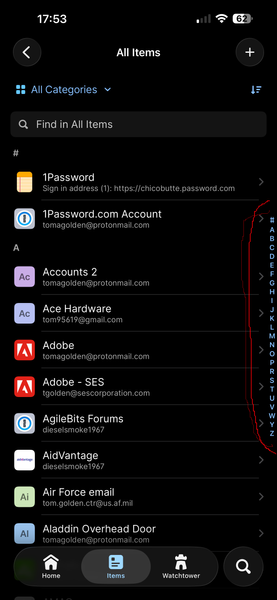
Not sure exactly how to describe what I am talking about in words, so have attached a picture from my iOS 1Password app (see right hand edge, area in red circle). Several years ago, this "alphabet" on the side of the All Items view was available in the desktop app, but has been missing for a long time. I am unable to find it in any Settings. This is extremely helpful to jump right to the general part of my 300+ item long vault. Is this still available in the desktop app, or can it be brought back? Thank you31Views0likes3CommentsFeature Request - Send me a password securely
I had a look for this feature request and couldnt see it... I would like the ability for people that dont have 1password to share passwords securely with me. Perhaps I could send them a link to an empty 1Password item which they can then update, hit save and I get the password securely in my vault. Links expire within x days, and can only be saved once. Once its saved, the link expires immediately and the person who updated it cannot access it.Solved2.2KViews9likes26Comments
Feature Request: Better security for MFA codes in records...
I posted this at 1Password at home, but I actually think this would be well suited for at home users or at work. So I post here as well - - Currently, storing both a password and its corresponding Multi-Factor Authentication (MFA/TOTP) seed within the same 1Password item creates a "single point of failure." If a device or 1Password session is left unlocked, an unauthorized user gains immediate access to both factors. I am requesting a feature that allows administrators (or individual users) to require a secondary validation (such as re-entering the Master Password, using Biometrics, or confirming a 1Password-level MFA prompt) before 1Password will reveal or autofill specific TOTP codes. The Problem While storing MFA codes in 1Password is incredibly convenient, it inherently violates the core principle of MFA (combining something you know with something you have). If an attacker gains access to the 1Password vault, the security benefit of MFA is effectively neutralized for that account. Proposed Solution Introduce a Step-Up Authentication / Conditional Access policy specifically for MFA fields. MFA Vault Lock: When a user attempts to copy, view, or autofill a TOTP code, 1Password should challenge the user for authentication. Customizable TTL (Time-to-Live): Users or admins should be able to configure how often this challenge occurs. Options could include: Every time the MFA code is accessed. Once per session / Once a day. After X minutes of inactivity. Administrative Control (1Password Business): Enforce this via Policies in the Admin Console, allowing organizations to mandate that all stored MFA codes require a secondary check, mitigating the risk of compromised employee endpoints. Use Case Example An employee opens a shared vault to log into a critical infrastructure tool. 1Password autofills the username and password normally. When the employee clicks the MFA field to copy the token, a biometrics prompt (Touch ID/Face ID) or a 1Password MFA prompt appears. Once validated, the token is revealed/filled, and the validation remains active for the next 8 hours (or whatever limit the admin set). Benefits Enhanced Security: Preserves the integrity of two-factor authentication even when stored in a single password manager. Enterprise Compliance: Helps businesses meet strict compliance frameworks (like SOC2 or ISO 27001) that frown upon storing passwords and MFA tokens together without isolating controls. User Flexibility: Maintains the convenience of 1Password's autofill while adding a vital speedbump for sensitive data.13Views0likes0Comments