Our community is getting an upgrade on July 2nd! Learn more in the FAQs →
linux
608 Topics
Face recognition unlock for 1Password
I found the exact topic of my issue as well - not sure why the post was closed without ever posting any response other than some diagnostics... https://1password.community/discussion/138500/howdy-facial-recognition-doesnt-integrate-with-1password-in-fedora-37 I'm also running the latest RPM-based version. I've followed the thread mentioned to add the schema line to my settings file, and I do get a fingerprint button. When tapping it, I just get the password entry. To enable howdy, you need to add the howdy PAM authenetication step to the polkit service's authentication: add the line to /etc/pam.d/polkit-1 : auth sufficient pam_python.so /lib64/security/howdy/pam.py and restart polkit: sudo systemctl restart polkit.service 1Password Version: Not Provided Extension Version: Not Provided OS Version: Fedora 39 Browser: Not Provided255Views0likes2Comments
TPM support for Linux
The TPM/Touch ID support 1Password has on Windows and MacOs is a great mix between security and usability and it's the biggest disparity I notice when switching to my Linux machine. There is an old post with a reply saying it was not on the roadmap but since then there were other posts talking about the reboot issue and TPM on Linux so maybe the roadmap changed?26Views1like1Comment
1Password for Linux 8.12.22 Show in Large Type display issue
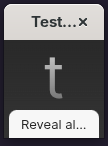
I just updated to the latest 1Password for Linux 8.12.22 (81222017) Production channel (stable) on Fedora 44 Workstation, GNOME 50. When opening a password with the "Show in Large Type" option, the new window that is created in GNOME desktop is tiny, only shows a single letter rather than previously showing all of the password in a grid. When I click the "Reveal al" text that can be read. the grid then expands vertically down the screen, rather than a rectangle grid box. It's not clear why it has started doing this, or when. I don't use the "Show in Large Type" option very much.29Views0likes1Comment
Linux Nightly Client No Longer Connects With Browser
The current Linux nightly client as of a week or so ago no longer connects with the browser extensions, I have tested on a handful of browsers (Firefox stable/beta/nightly and and chrome stable/dev, all system installed, not flatpak) with both the stable and dev extension and they are longer talking at all, browser extensions act as if no client is installed and want to login with the web. Another machine running the same os (Pop OS) with the stable client continues to work as expected. This started around a week or so ago, just wanted to make sure it was a known issue.202Views1like15CommentsLinux desktop client crashes on startup
Since updating to the latest version of the client, the Linux desktop client consistently crashes on first startup, and sometimes crashes again after already running. I have the browser extension and desktop app integration enabled, and I use my system unlock method as the unlock option for the desktop app (local account password popup instead of biometrics). This crash happens regardless of triggering unlock via the extension, launching the desktop app directly, or triggering the app's global search shortcut (ctrl-alt-space for me). This happens on both Kubuntu 24.04.1 LTS and Pop!_OS 22.04 LTS. In both cases, the desktop app is installed via apt. Quick edit: I originally wrote this for desktop client version 8.10.48. I updated to version 8.10.50 and the issue does still exist.Solved5.2KViews13likes105Comments
Unable to use Yubikey with 1Password desktop client in Ubuntu 26.04
Hello all, I'm not able to use my Yubikey to sign into the 1Password desktop app running on Ubuntu 26.04. I've tried installing the client using the instructions for setting up apt and installing it that way but haven't been able to get it working. I've also installed it using the RPM as a direct download. I don't see any guides on the site that explain how to do the PAM config but I've done a number of versions of that config with no luck as well. There is no "Unlock using system authentication" option in Settings either. I just get prompted to touch my Yubikey and it doesn't flash and when I touch it nothing happens. I'm also not prompted for my UV pin. I can sign into my 1Pass account in a browser with no issue and use my Yubikey with everything but the 1Password app which I'm trying to get going so I can use the browser extension. Is there anyone that can offer help or point me to detailed technical documentation about how 1Password expects systems to be configured to support the same authentication methods the website supports? I've tried the following three authentication flows on the desktop app. QR code scanned with my mobile device Clicking the "Sign in on 1password.com" option Manually typing my login credentials, etc. 1Password version in all attempts is 8.12.21.39Views0likes1Comment
Integration between Linux app and Snap Firefox
Some days ago it was released the support for Native Messaging (still experimental) with Snap Firefox. I checked, but the integration between Linux app and Snap Firefox still doesn't work. I was wondering if the integration uses Native Messaging or other way to implement, and if it is using other way, if it could be ported to use Native Messaging, so Linux app could work with Snap Firefox. We are discussing this matter here 1Password Version: 8.9.0~1.BETA Extension Version: 2.3.7 OS Version: Ubuntu Kinetic Browser:_ Firefox4KViews6likes44CommentsPlease make the system tray icon customizable to comply with OS design standards (monochrome)
1Password has been flip-flopping between colorful and monochrome system tray icons and is now in an inconsistent state across operating systems. Please let us select between the colorful icon and the monochrome one. By catering to one set of users, you have isolated others. Your "evolving our design language across 1Password to create a more consistent experience." reasoning is flawed by the mere fact that you do not have a consistent design across OSes. A more "cohesive and predictable experience" would be an app that actually looks like it belongs in the OS you are using, rather than standing out as the sole exception. Regarding consistency, on MacOS, you follow the OS standard of a monochrome tray icon which looks native: But on Linux and Windows, we are forced to use the colorful option, which at least on KDE does not align with the design standards. Frankly the colorful icon does not comply with Windows design standards either: While we're on the topic of native integration, the Safari plugin also ditches the native monochrome icon, again diverting from OS design standards, which was a strange decision considering it used to be compliant on older versions: Current: Compliant: This was the behavior of 1Password 7, but ever since 8 you have forced the full color icon down our throats, design guidelines be damned. This was brought up years ago, but for some reason my account was deactivated, so my comment is now marked as "anonymous". Choices are good, for those who would rather focus on visibility they can opt-in to the color icon, for those who prefer consistent design, the monochrome icon should be available - arguably by default.42Views0likes1Comment
Issue with the copy buttons
I am running 1password from the Flathub. No copy buttons works. There is no notification or visual feedback. Here is the error message I gathered by launching 1password from the command line (via `flatpak run -v`) ERROR 2026-04-01T13:11:12.901+00:00 runtime-worker(ThreadId(12)) [1P:ffi/op-core-node/src/lib.rs:136] AppError at /mnt/ephemeral/builds/dev/core/core/service/op-service-field-action/src/lib.rs:425:13 OpeningClipboard(ClipboardError(An unknown error occured during a clipboard operation)) Stack backtrace: 0: op_service_field_action::field_action::{{closure}} 1: op_app::app::backend::<impl op_app::app::App>::invoke_external::{{closure}} 2: <op_invocation::WithCallback<F> as core::future::future::Future>::poll 3: tokio::runtime::task::raw::poll 4: tokio::runtime::scheduler::multi_thread::worker::Context::run_task 5: tokio::runtime::scheduler::multi_thread::worker::run 6: tokio::runtime::task::raw::poll 7: std::sys::backtrace::__rust_begin_short_backtrace 8: core::ops::function::FnOnce::call_once{{vtable.shim}} 9: std::sys::thread::unix::Thread::new::thread_start 10: <unknown> 11: clone Version Info:290Views0likes13Comments