Our community is getting an upgrade on July 2nd! Learn more in the FAQs →
scim
215 Topics
curl: (35) error:14094438:SSL routines:ssl3_read_bytes:tlsv1 alert internal error When testing SCIM
I'm in the last stage of testing my SCMI bridge but I keep getting the error: curl: (35) error:14094438:SSL routines:ssl3_read_bytes:tlsv1 alert internal error After checking the op-scim-config file I had noticed that there was a typo in the FQDN address I was using. I've corrected the typo and re-deployed the bridge but I can't seem to be able to get a successful connection test. I'm totally clueless as to what the issue could be here and any help would be extremely appreciated. 1Password Version: Not Provided Extension Version: Not Provided OS Version: Not Provided3KViews0likes3CommentsCannot get https to work
I installed scim Bridge in Azure using the instructions provided. My AKS was set up to use my own configured v-net. Everything appears to be working fine via http but I can't get it to load via https. I am wondering if there is some additional instructions surrounding exposing the app for TLS while using your own vnet. How do I configure my load balancer to forward https traffic to the scim bridge?2.7KViews0likes2CommentsSCIM Bridge Setup
Hello, I am trying to set up the scim bridge through docker-compose and the server is in a private subnet and it's not publicly exposable. When I configure it to the DNS, I get the below error. solving challenge: scim-bridge.integrate-events.com: [scim-bridge.integrate-events.com] authorization failed: HTTP 400 urn:ietf:params:acme:error:dns - no valid A records found for scim-bridge.integrate-events.com; no valid AAAA records found for scim-bridge.integrate-events.com Please do let me know Whether we can setup scim bridge between 1password to okta in the private subnet or if it needs to be set up only in a public subnet. If we are going with a load balancer setup what is the path which we need to set in the health check? 1Password Version: Not Provided Extension Version: Not Provided OS Version: Not Provided Browser: Not Provided1.8KViews0likes6Commentserror: failed to create secret secrets "scimsession" already exists
Brand new deployment as of 4/10/23 Deployment instructions do not include what I assume is a method to update the scimsession after regenerating credentials. After regenerating the credentials it says to go here: https://support.1password.com/scim-deploy-azure/ I assumed I would upload the new scimsession file and follow the same commands, but get this error: ``` ~$kubectl create secret generic scimsession --from-file=scimsession=/home/$USER/scimsession ~$error: failed to create secret secrets "scimsession" already exists ``` Are there instructions to do this procedure? Thanks! 1Password Version: Not Provided Extension Version: Not Provided OS Version: Not Provided Browser:_ Not Provided1.8KViews0likes1CommentUnable to login to SCIM Bridge [GCP]
Hello! We recently set up a 1Password SCIM Bridge on Google Cloud Platform (GCP) through marketplace. It had been working fine up until today, when the bearer token no longer worked. The error we're getting is: Error occured when logging in. failed to create session We have health monitoring turned on, and the status is good and actively checking. However, new users being added to a managed group aren't being added to 1Password and, as mentioned, we also can't login to the SCIM bridge to look at logs/syncs. 1Password Version: Not Provided Extension Version: Not Provided OS Version: Not Provided Browser:_ Not Provided1.8KViews0likes16CommentsSCIM bridge provisioning gives 500 Internal Server Error
Hi, I have recently upgraded from 1Password Teams to 1Password Business and today I started setting up the automated provisioning. I would like to have connected to EntraID, and, as we are primarily on the Microsoft 365 platform, I was happy to see that the Azure Kubernetes SCIM bridge option was offered. I followed the instructions and successfully set up the Kubernetes instance. I updated the DNS records, and now I can see the status page at https://scim.%7Bourdomainname%7D.com/app/status. (I masked it for privacy, but I don't use the curly brackets, of course - same goes for the rest of the explanation) The manual described creating an Azure Enterprise application, and this is where I get stuck. Filling out the tenant URL https://scim.%7Bourdomainname%7D.com and the bearer token - exactly the same one as I successfully use to access the status page above - gives me an error message: ``` You appear to have entered invalid credentials. Please confirm you are using the correct information for an administrative account. Error code: SystemForCrossDomainIdentityManagementCredentialValidationUnavailable Details: We received this unexpected response from your application: Received response from Web resource. Resource: https://scim.%7Bourdomainname%7D.com/Users?filter=userName+eq+%22651022bd-56a1-4345-%7Bsome other numerics}" Operation: GET Response Status Code: InternalServerError Response Headers: Content-Security-Policy: default-src 'none'; connect-src 'self' https:; script-src 'self'; img-src 'self' data: https://w3.org; style-src 'self'; frame-ancestors 'none'; form-action 'none'; manifest-src 'self' Referrer-Policy: no-referrer Request-Id: cl2d9d9pvf4s73d90gbg X-Content-Type-Options: nosniff X-Frame-Options: DENY X-Robots-Tag: none X-Xss-Protection: 1; mode=block Date: Fri, 03 Nov 2023 11:08:38 GMT Response Content: {"detail":"500 (Internal Server Error)","schemas":["urn:ietf:params:scim:api:messages:2.0:Error"]} Please check the service and try again. ``` I am not sure how to proceed, as I would deduct this as something that has to do with the image I deployed to Kubernetes. Could it be that there's something wrong with that, or am I missing something? Thanks in advance. -- Mark 1Password Version: Not Provided Extension Version: Not Provided OS Version: Not Provided Browser: Not Provided1.7KViews0likes2CommentsAzure SCIM Tenant URL
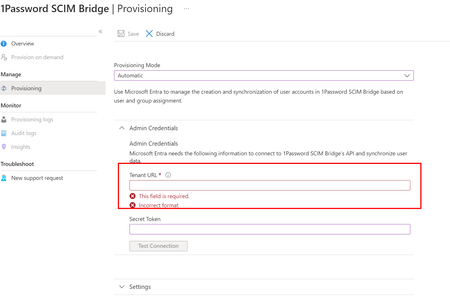
I am trying to setup Azure user provisioning. However, I am unable to find the Tenant URL needed with Azure enterprise application for Automatic provisioning configuration. I am following this guide - https://support.1password.com/scim/ I choose Azure Active directory from the list of identity providers and that configures the SCIM on 1password. I can get my token bearer but cant seem to find the Tenant URL. I also went through this guide: https://support.1password.com/scim-azure-ad/ but cant seem to locate the Tenant URL. Thanks. 1Password Version: Not Provided Extension Version: Not Provided OS Version: Not Provided Browser: Not Provided1.6KViews0likes3Commentsre-send invite to users
We're using the SCIM bridge and a provisioning manager account to automate the user additions and access to shared vaults. I know that if I invite someone as my personal account I can see the - resend invite link in my account, but this isn't the case with the provision manager account that we're using with the SCIM bridge. Is there a way to resend the invites sent from it? 1Password Version: Not Provided Extension Version: Not Provided OS Version: Not Provided Browser:_ Not Provided Referrer: forum-search:https://1password.community/search?Search=ressend%20invitation1.4KViews0likes2CommentsAzure Kubernetes setup
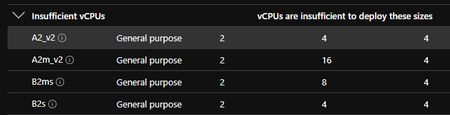
I'm putting this here to help others and also have something to reference later in case I have to re do the work! So I've been through the process of setting up the SCIM bridge recently and found that by default Azure will not let you select the B2s at cluster creation and the lowest you can select is B4ms. The cost of the B4ms is £87.60 for a single VM without storage costs which is above what we wanted to pay for a user sync solution. We found that once the cluster was created we could edit the VM size down to a B2s, change the cluster size to 2, let the VM initialize and then turn off the B4 VM and reduce the nodes back to 1. This reduced the VM cost down to £21.83. What we then found was the OS disk was using a premium SSD (as donated by the s in B2s) and was 128GB. This was then going to cost us £17.69 a month. As I hadn't deleted the previous VM it was actually going to cost us £35 as we had two disks. Removing the first B4 VM removed the extra cost. The £17.69 was, again, more than we wanted to pay for a user sync service. I could find a way of changing the OS disk type from premium disks to standard which would drop the cost to £7.84 nor could I find a way of shrinking the OS disk once it had been created. Shrinking the disk to the minimum 30GB size would result in a monthly cost of £4.74 even on the premium SSDs! Then the load balancer that sits in front of the cluster was going to cost another £13~ a month. This defaults to 'standard' and I couldn't find a way of changing this but, to be fair, I didn't waste a lot of time looking. The 'Basic' SKU is free to use and as far as I can see works fine. This brought the total cost of the SCIM bridge to around £50 a month. I went searching around to see if the price of this could be reduced and from what I did find the cluster HAS to be created with the correct settings from the start. I found https://staffordwilliams.com/blog/2020/05/13/optimising-for-cost-in-aks/ VERY useful in creating the best priced cluster and once the cluster was created the rest of the instructions from 1Password worked as expected. I highly suggest reading though the link above but I will summarize here: The B2s VM can be selected when creating the cluster using the CLI but not in the GUI The load balancer can be set to 'Basic' which is free! The disk defaults to 128GB, the minimum is 30GB so selecting 32GB seems to work just fine. The B2*s* defaults to premium SSD, I still don't know how to change this. So with the above, when you get to step 3 on https://support.1password.com/scim-deploy-azure/ don't follow the instructions and use the GUI, use the CLI with the following commands: ``` az login az aks create -n CLUSTERNAMEHERE \ --node-count 1 \ --node-vm-size Standard_B2s \ --load-balancer-sku basic \ --node-osdisk-size 32 ``` I actually had to specify my subscription and resource group I wanted to use as we have multiple subscriptions and resource groups. I also had to specify the command --generate-ssh-keys as I didn't have a private key already set. So my command looked like this: ``` az login az aks create -n CLUSERNAMEHERE --subscription SUBNAMEHERE --resource-group RESOURCEGROUPHERE --node-count 1 --node-vm-size Standard_B2s --load-balancer-sku basic --node-osdisk-size 32 --generate-ssh-keys ``` This has resulted in a SCIM bridge costing around 90p a day, much more manageable! This could probably be reduced if the VM was only turned on when the Azure provisioning is due to run OR if the bridge was only turned on for an hour or 2 in the morning and evening but I haven't gone that far into it yet. I'm not sure that the Azure Enterprise App provisioning will recover on it's own if the bridge isn't available for hours on end. TL;DR - the default Azure pricing will set you back around £100/m if you create the cluster via the GUI. You can edit the GUI created cluster but you will still be stuck with a load balancer costing £13 and 128GB Premium SSD for the OS disk costing £17. Creating the cluster via the GUI with the above commands will result in the cheap VM being used from the start, no Load Balancer cost and a 32GB Premium SSD costing £4 instead. 1Password Version: Not Provided Extension Version: Not Provided OS Version: Not Provided1.4KViews0likes3Comments