Level up your business security with free, on-demand training and certification. Explore 1Password Academy today →
sdk
25 TopicsIntroducing 1Password SDKs for Desktop Integrations
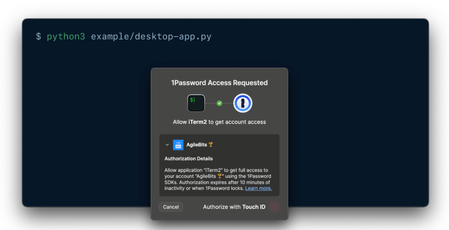
We’re excited to announce new authentication capabilities in the 1Password SDKs! Developers can now build integrations that authenticate directly through the 1Password desktop app using the same trusted methods users already know —Touch ID, their account password, or other supported options. 🏗️ What this unlocks: Native and seamless integrations: Build integrations that connect directly with the 1Password desktop app using the SDK. It’s a secure, native way to integrate with 1Password — no extra setup or dependencies required. Human-in-the-loop workflows: Enable user-scoped authentication in your integrations to support secure, approval-based workflows that keep users in control. Easy to build and adopt: Simplifies integration setup and makes authentication effortless for end users. Now available in public beta for macOS and Linux in the SDKs for Go, JavaScript, and Python. Video not displaying? Watch it here. 💬 Share feedback, get swag We’d love to hear how this feature performs in your integrations — is it reliable and easy to use in your workflows? What would you like to see next? 📖 Read the docs to get started 🧢 The first 10 developers to share feedback on the 1Password Developer Community Hub by November 30th will receive exclusive 1Password swag. Be sure to tag your post with #beta-sdk-desktop-integrations.314Views3likes0Comments
Env var loading and validation for 1Password (open source!)
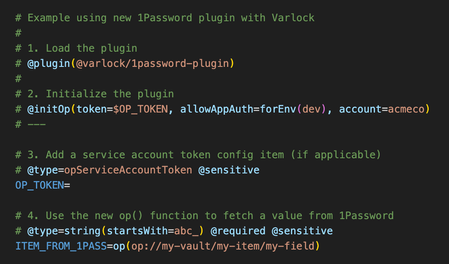
If you are using 1Password to manage any dev/application secrets, you might be interested in our open source tool - https://varlock.dev We just released a new update that introduces a plugin system and our first plugin is for 1Password (of course) - see https://varlock.dev/plugins/1password/ Our tool lets you define a .env.schema file, which can contain decorator style comments to add additional metadata to your env. This is then used to do validation, generate types, etc. The tool also introduces a new function call syntax, and while you can talk to any external cli using the exec() function, the new 1Pass plugin also adds a new op() function which fetches items from 1Password. So how is this different from using `op run`? Uses the SDK and service account tokens for deployed environments, and (optionally) uses op CLI for local dev (with biometric auth via the desktop app) Adds validation and coercion Automatic type generation (right now just for TypeScript, more to come) Understands which items are sensitive, and adds leak detection when possible Supports loading multiple env-specific files (.env.local, .env.production, etc) Supports explicit imports to break up files however you like Drop in integrations for many frameworks You can also use Varlock alongside the new environments beta by syncing your environment to a local file (such as `.env.local`) and varlock will automatically load those values, and apply its validation on top. Would love for y'all to take a look, and to hear what you think! Oh and please give us a ⭐ on GitHub @ https://github.com/dmno-dev/varlock --- An example .env.schema file using the new 1Password plugin106Views2likes0CommentsNew getting-started guides, AI search, and LLM-ready docs for 1Password dev tools at 1password.dev
Hi everyone! We've been investing in making 1Password's developer documentation genuinely useful from the first click, and we wanted to share what's now live over at 1password.dev. 📖 New getting-started guides We've published workflow-based getting-started guides across every major tool area: SSH & Git, 1Password CLI, SDKs (Go, JavaScript, Python), Environments, integrations, and more. Instead of jumping between reference pages, you can follow a clear path from setup to working integration, organized around how you actually build. 🔍 AI-powered search across the docs You can hit Ctrl+K on any page and ask a question in plain language. The built-in AI assistant searches the full documentation set and gives you a direct answer with links to the relevant pages. It’s a much faster way to find what you need, especially if you’re not sure which tool or section to look in. Try it: open 1password.dev, hit ⌘+K, and type “How do I set up git commit signing with multiple GitHub accounts?” 🤖 Docs built for AI dev workflows If you use AI coding assistants like Cursor, Copilot, Windsurf, or Claude, our docs are now natively consumable. Every page is available as Markdown (append .md to any URL), and we serve llms.txt and llms-full.txt at the site root so your tools can reference 1Password docs directly. Details here: Build with LLMs 🏗️ Refreshed docs structure The documentation is now organized around the way developers work, with clearer navigation across SSH & Git, CLI, SDKs, Environments, secrets management, and integrations. If you've found our docs hard to navigate in the past, it's worth another look. 📌 One practical note: our developer docs now live at 1password.dev. All your existing developer.1password.com links and bookmarks redirect automatically, so nothing breaks. We'd love your feedback If you run into any issues or have suggestions, let us know in this thread. You can also reach us in the 1Password Developers Slack. Happy building! 🔐65Views1like0Comments📣 - Local App Authentication in the SDKs
Hi all, Just wanted to drop a quick note about the updated SDKs for Python, Go and Javascript. We recently introduced another beta enabling desktop applications to request an item from 1Password and then 1Password presents an authentication to the end user. Learn more here 👉 https://developer.1password.com/docs/sdks/desktop-app-integrations What do you all think about this? How is it going for you? Have you had a chance to give it a try? Here's a quick video, I recorded introducing the idea and giving a quick example of it in action! Let us know what you think! Thanks! Phil & the 1Password Team! Video not displaying? Watch it here.336Views1like2Comments