Level up your business security with free, on-demand training and certification. Explore 1Password Academy today →
sdk
25 Topics
1Password Connect
This week I have been working with 1Password Connect. I've been writing a C# library for 1Password Connect to support niche build targets for some of our legacy code. I was disappointed to find that: The documentation both on the website and GitHub is not up to date: https://github.com/1Password/connect/issues/111 The API is not properly versioned: https://github.com/1Password/connect/issues/112 Is 1Password Connect still supported and planned to be in the long term? I was expecting an API service of its maturity to be well polished.34Views0likes0Comments
Loading 1Password credentials inside a Docker Container from an Environment.
I have a Docker container that runs a server application, and I’m using 1Password Environments to store all of the credentials for this service. What I’d like to do is load all secrets from a specific 1Password Environment into the container’s runtime environment only when I start the server, not at build time and not as long‑lived plain env vars on the host. In other words, I want something like: Start command (or entrypoint) pulls secrets from a given 1Password Environment Those secrets are exposed as environment variables inside the container The server process then reads them as normal env vars Once the server stops, the secrets are no longer present I’ve seen references to using op run to inject env vars for a command, and also to using 1Password Environments / Connect for runtime secret delivery, but I’m not sure what the recommended pattern is for a simple Docker container scenario.53Views0likes1CommentNew getting-started guides, AI search, and LLM-ready docs for 1Password dev tools at 1password.dev
Hi everyone! We've been investing in making 1Password's developer documentation genuinely useful from the first click, and we wanted to share what's now live over at 1password.dev. 📖 New getting-started guides We've published workflow-based getting-started guides across every major tool area: SSH & Git, 1Password CLI, SDKs (Go, JavaScript, Python), Environments, integrations, and more. Instead of jumping between reference pages, you can follow a clear path from setup to working integration, organized around how you actually build. 🔍 AI-powered search across the docs You can hit Ctrl+K on any page and ask a question in plain language. The built-in AI assistant searches the full documentation set and gives you a direct answer with links to the relevant pages. It’s a much faster way to find what you need, especially if you’re not sure which tool or section to look in. Try it: open 1password.dev, hit ⌘+K, and type “How do I set up git commit signing with multiple GitHub accounts?” 🤖 Docs built for AI dev workflows If you use AI coding assistants like Cursor, Copilot, Windsurf, or Claude, our docs are now natively consumable. Every page is available as Markdown (append .md to any URL), and we serve llms.txt and llms-full.txt at the site root so your tools can reference 1Password docs directly. Details here: Build with LLMs 🏗️ Refreshed docs structure The documentation is now organized around the way developers work, with clearer navigation across SSH & Git, CLI, SDKs, Environments, secrets management, and integrations. If you've found our docs hard to navigate in the past, it's worth another look. 📌 One practical note: our developer docs now live at 1password.dev. All your existing developer.1password.com links and bookmarks redirect automatically, so nothing breaks. We'd love your feedback If you run into any issues or have suggestions, let us know in this thread. You can also reach us in the 1Password Developers Slack. Happy building! 🔐65Views1like0Comments
Automated bi-directional sync between 1Password and AWS Secrets Manager — is this actually possible?
Hey everyone, SRE at a small startup here. We've been using 1Password for a while and overall love it, but we're running into a friction point with our AWS setup that I'm hoping someone has solved. What we're trying to achieve: We want a proper bidirectional sync between 1Password vaults and AWS Secrets Manager. Specifically: 1Password → AWS SM: When someone on the team updates a credential in 1Password, it should automatically propagate to AWS Secrets Manager so our workloads pick it up without anyone having to manually copy-paste things. AWS SM → 1Password: We use AWS Secrets Manager's native auto-rotation for some credentials (RDS passwords, API keys, etc.). When AWS rotates a secret automatically, we'd want that updated value to flow back into 1Password so our employees can always go to 1Password as the single source of truth and get the current credential. On the new "Environments" feature (beta): We noticed the new Environments feature and got excited — it looked like exactly what we needed. But after digging in, it seems pretty limited right now. From what we can tell: There's no SDK support for managing environments programmatically There's no CLI support either (`op` doesn't seem to have environment management commands yet) Everything has to be done through the UI wizard This makes it really hard to automate. We provision new environments dynamically as part of our infrastructure-as-code workflows (Terraform), so we need to be able to create and configure environments programmatically. Is this on the roadmap? Are there any workarounds people are using? The SAML IdP requirement in Environments: Related to the above — the Environments setup wizard seems to require a SAML Identity Provider to be configured for each environment. We use Azure Entra ID as our IdP (federated through AWS Cognito), and we have a single IdP setup that covers all our environments. Is it actually required to have a separate SAML IdP per environment, or is there a way to reuse a single IdP across multiple environments? The wizard flow makes it seem like each environment needs its own IdP configuration, which would be a significant blocker for us — we can't dynamically spin up new IdP configurations every time someone creates a new environment in our platform. If this is a hard requirement, it basically rules out Environments for our use case entirely, since we'd need to automate IdP provisioning as part of environment creation, which is a whole other can of worms. Summary of questions: Has anyone built a reliable bidirectional 1Password ↔ AWS Secrets Manager sync? Especially the AWS SM → 1Password direction for auto-rotated secrets? Is there any programmatic/API access for Environments (SDK, CLI, REST API) that isn't documented yet, or is it genuinely UI-only right now? Is a separate SAML IdP per environment actually required, or can you reuse one IdP across environments? Thanks!173Views0likes3Comments1password as a podman secrets backend
Work uses podman for running containers. Podman provides a secrets API for ... storing secrets. It it written in go, and has a pluggable backend for secrets, although today it only ships with: file shell gpg We'd love to have a 1Password-enabled podman secrets backend as well. Usage Assume we are running multiple containers, A, B, C, each with their own 1Password Service Account, and its corresponding token. Each secret that a given container wishes to access, is defined via: podman secret create --driver 1password \ --driver-opts path=op://myVault/someItem/theKey,token=OP_SERVICE_ACCOUNT_TOKEN \ THE_KEY \ < /dev/null Note that because we are relying on 1Password, the secret is not directly specified here, so just pass /dev/null in, if podman absolutely requires some input. The container is then defined: podman create ... --secret THE_KEY,type=env ... And at runtime when the container is (re)started each time 1Password is used to fetch THE_KEY secret, and podman will need the `OP_SERVICE_ACCOUNT_TOKEN` in the system environment to perform the fetching. References https://www.redhat.com/en/blog/podman-kubernetes-secrets https://github.com/containers/podman/discussions/24186 https://www.redhat.com/en/blog/new-podman-secrets-comman https://developer.1password.com/docs/service-accounts https://docs.podman.io/en/latest/markdown/podman-secret-create.1.html27Views0likes0Comments
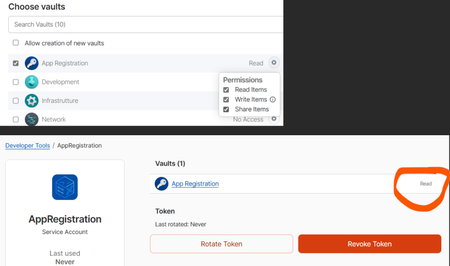
Service Account Permissions Issue: Vault Access Restricted to Read-Only
Hi all, I'm having trouble with the permissions of the service account. Even though I grant it read, write and share permissions on a vault when creating the service account, the account is actually created with read-only permissions. This is evident both from the attached image and from the code I am running (Python SDK) which can access the vault for reading, but not for writing. The error I am getting is: you do not have the right permissions to perform this action: not sufficient permissions for the item update operation I also tried to create the service account again with all the necessary permissions, but the problem persists, even though I grant it permission to create vaults. I have no idea what it could be or what else I could try. ThanksSolved461Views0likes5CommentsDeveloper Doc "bugs"
As we are starting to develop utilizing 1Password SDK, I have been finding some "bugs" in the documentation. I would love to see these updated (to help other people). We have been having to create our own internal documentation. From: https://developer.1password.com/docs/sdks/manage-items/#update-an-item Update an item To update an item, fetch the item you want to update, specify the changes you want to make, then pass the updated item to the client.Items.Put function. # Update a field in your item item.fields[0].value = "new_value" item.websites.append( Website( label="my custom website 2", url="https://example2.com", autofill_behavior=AutofillBehavior.NEVER, ), ) updated_item = await client.items.put(item) Website is not a data type: NameError: name 'Website' is not defined From the page: https://developer.1password.com/docs/sdks/concepts/#field-types There is no Data Type "Website", but there is a Data Type "Url", which I also tried, and it does not work either: NameError: name 'Url' is not defined I finally, looking at the source code figured out that I had to do yet another "import": from onepassword.types import ItemField, Website, AutofillBehavior to make this work. Is there other documentation pages that go over all the other parts of "types.py" that tell us when they are used, where it is used, and how to do import for them? Same goes for other code pages (secrets, items, errors, vaults, etc..)121Views0likes4CommentsMeet the 1Password team at KubeCon Europe
KubeCon + CloudNativeCon Europe is coming up on March 23–26 in Amsterdam. A few folks from the 1Password team will be there and we'd love to meet you! If you rely on 1Password for your development work – the CLI in your terminal, Service Accounts in CI/CD, or 1Password Connect in a Kubernetes cluster – we’d love to know if you’re attending and if you’d like to meet the team. We want to hear more about how you’re using 1Password Developer tools, what’s working (and what’s not), and what you’d like to see next. Tell us about the awkward edge cases, security tradeoffs, and the problems you’re solving for today. If you’re a 1Password customer attending KubeCon Europe and you’re up for a short chat with the 1Password team, please let us know using this form: Let us know if you'll be at KubeCon. Not traveling this time? Reply here with what you’re building and how you’re managing human and machine credentials.66Views0likes0CommentsWhat is an Agent Chassis?
Jeff Malnick’s post is confident. It’s also detached from how developers actually ship code today and made me furious.“Agent chassis” boils down to: the script that runs your agent. Fine. But the security layer argument collapses when the tooling underneath is fragmented.Right now you pick between CLI, shell plugins, service accounts, connectors, environments — each with different auth models, rate limits, edge cases, and silent failures. None cleanly support a headless agent workflow. I’ve built workarounds for my workarounds.Agentic coding made this obvious. Agents need real credentials at runtime. Not desktop popups. Not biometric prompts in a terminal.The community built unofficial MCP servers. Anthropic shipped 50+ connectors. 1Password isn’t there.The spec is public. It’s buildable. So—who’s shipping it?76Views0likes1CommentPython 3.14 and SDK example.py
The python example.py script worked with python 3.13 after following the setup instructions. For python 3.14 the following error occurs: # Connects to 1Password. client = await Client.authenticate( auth=token, # Set the following to your own integration name and version. Exception has occurred: NameError name 'Client' is not defined Has the example.py script been run under python 3.14? Should the script not have this error with python 3.14?Solved121Views0likes5Comments