Our community is getting an upgrade on July 2nd! Learn more in the FAQs →
security tips
57 Topics
Did 1Password get hacked? The Disney Employee said hackers got into his 1password account.
Hey Folks, Decade+, happy 1password user here, however, my underpants clenched up when I read this on the WSJ today A Disney Worker Downloaded an AI Tool. It Led to a Hack That Ruined His Life. - WSJ At the heart of it, was them gaining access to his 1Password's. I didn't think folks could get access to your passwords without having the Secret Key you need in addition to the username/pw. Would love to hear from folks and 1Password (post-mortem/RCA), about what happened, and what we can do to secure our 1Password so this can't happen to us! I have just enabled 2FA for the first time, but it looks like you only need it to get updated PW's? and that you can still see the old ones. Scary! Thanks, KyleSolved6.1KViews8likes25Comments
1Password's stance on Canada's Lawful Access Bill C-22?
I'm sorry if these touches in a topic that bends to the political, but this is something that I don't think we as keepers of people's most important and sensitive information should be just standing by and not getting into the discussion before it is too late. As a Canadian and a 1Password being a Canadian based "Electronic Service Provider", based on the law's very loose definition of what an ESP is, I have very grave concerns that just like Apple and Meta the data that is contained within 1Password could be subject to this "unlawful" bill. Even my own company as small as it may be is caught up in the legal definition of an ESP. There is no scope at what an ESP is and what the government has defined and what their level of Systemic Vulnerability will be. 1Password in its current wording is caught up in this definition The powers can be extended through regulations an minimal future debate No Guardrails Secret ministerial orders requiring system modifications or re-engineering that could be demanded of 1Password with a gag order No mandatory oversight Limited ability for 1Password to challenge orders or redefine vulnerabilities Extensive Realtime access & retention 1Password would have to build the capability (at its expense) the ability to intercept, decrypt & hand over data Access to metadata, geolocation, in realtime and stored for retroactive access for all users for up to one year (with talk from law enforcement of wanting this to be even longer in the future). Basically eroding privacy and security, and weakens encryption and creates a permanent surveillance state power and, because of the conflicting sections of the Bill, the "so called" protections can be overridden by a secret request, 1Password won't be allowed to ever tell us that it had to do any of this for the government, law enforcement, or the Canadian security (spy agencies). Now I hear that because of the growing pushback on this bill, that the debate on this bill is going to be now limited to 3 days and a goal of having this law by the end of the month. Has your legal team been studying this bill? What is the 1Password stance on this invasive bill that even Apple, Meta and US Congress are voicing their concerns of this bill in its current form? If Both Apple and Meta, with huge legal and resources, are concerned that this could force them to weaken encryption, how is 1Password a Canadian company going to be able to ethically stand ground to weakened privacy, security and increased enduring real-time surveillance? I remain unconvinced that all the data and access that we all store within 1Password would not be a prime target for access requests. All we have is a verbal promise that the government would never make these kinds of requests. If not now, as Micheal Geist says, in the setting ready and waiting for a "Turnkey Totalitarianism"? I think this warrants a response and a position from 1Password before the company no longer has the legal right to do so, don't you? https://www.michaelgeist.ca/2026/05/wilful-blindness-how-the-lawful-access-charter-statement-skips-bill-c-22s-most-constitutionally-vulnerable-provisions/ https://openmedia.org/press/item/civil-society-to-parliament-kill-bill-c-22Solved432Views3likes5CommentsRandom but Memorable 16.8: World Password Day special!
It’s that time of year again! May 7th marked World Password Day, giving us the perfect opportunity to discuss passwords, passkeys, and authentication. We’re also offering three lucky winners a free year of 1Password -- check out the episode to learn how to enter! Listen now Watch now Episode summary In Watchtower Weekly, we reveal how people are using AI tools to generate passwords… and why that might not be a great idea. Then, in Crash Course, you’ll learn about entropy -- what it actually means, and what makes a password truly strong. 🔤 Jacob DePriest, CISO at 1Password, joins the show later on to talk about identity security and the future of authentication. We cover password hygiene, MFA, passkeys, and the security challenges associated with ensuring AI agents access and use credentials securely. What did you think of this episode? Let us know in the thread below!24Views2likes0CommentsRandom but Memorable 15.9: Why you need a digital estate plan (and where to start) with Erin Bury
Hey everyone! 👋 A new episode of 1Password's Random but Memorable podcast has dropped! Listen now Watch on YouTube Episode summary Ever wondered what happens to your online accounts when you’re gone? 💭 This week, we’re joined by Erin Bury, CEO of Willful, to talk about the importance of digital estate planning — what it is, why it matters, and how to make it easier. Erin breaks down how to protect your online accounts, manage your digital legacy, and give your loved ones control of the information that matters most. 📝💙 In Watchtower Weekly, we uncover the rise of AI impersonator scams including fake ChatGPT tools and malicious “AI upgrades” that trick people into giving up their data. ⚠️ Don't have time to watch or listen? Read the interview highlights on 1Password Community. You can chat about anything discussed in the episode in the thread below!135Views2likes4CommentsRandom but Memorable: BONUS EPISODE – Answering YOUR listener questions
Hey everyone! 👋 A new BONUS episode of 1Password's Random but Memorable podcast has dropped! Listen now Watch on YouTube Episode summary You asked, we answered! 🎙️🔐 In this bonus episode of Random but Memorable, we’re tackling listener questions from Reddit and the 1Password Community. We cover everything from why some people are still skeptical of passkeys, to the role 1Password will play in a future where AI agents sign in and complete tasks on our behalf. Plus, we dig into 1Password Environments and how it helps developers securely manage secrets. Allie, Matt, and Wade also reveal the cybersecurity misconceptions they’d love to retire for good. Short, practical, and packed with listener questions — keep them coming at [email protected] You can chat about anything discussed in the episode in the thread below!9Views1like0CommentsRandom but Memorable 17.0: How to start vibe coding without compromising security
Millions of people are leveraging AI to write code at work and in their spare time. Jeff Malnick, 1Password’s VP of Engineering for Developer & AI, joins Random but Memorable to discuss how to vibe code without introducing vulnerabilities or exposing confidential information. Listen now Watch now Episode summary In Crash Course, Roo breaks down what vibe coding actually means, why it’s suddenly taken off, and how people are using AI tools to build apps, websites, and more. Then, in Watchtower Weekly, we look at the security risks, including exposed data and leaked API keys, and why AI-built apps still need real software guardrails.📲 Later, Wade sits down with Jeff Malnick, 1Password’s VP of Engineering for Developer & AI, to discuss how to start vibe coding without creating a security risk. This conversation is packed with practical advice for anyone experimenting with AI and code.🤖👨💻 Do you have a security tip or question about vibe coding? Let us know in the thread below!34Views1like0CommentsFeature request: auto-fill history
Hello 1Password Team, Most of the time, I use Apple Pay for online shopping, but today my credit card is locked because it's detecting abnormal transactions, I must have auto-filled the credit card detail in some fake shopping websites. It is not 1Password's fault, but I see opportunity for improvement, because I don't remember which website I've auto-filled my credit card. I would like to suggest a new feature for 1Password: Auto-Fill History. This feature would allow users to see a log of websites and apps where 1Password has auto-filled credit card information or other credentials. This would be particularly helpful for: Auditing where sensitive data has been used. Identifying websites or services where outdated or compromised credit cards might have been stored. Improving personal security by giving users better visibility and control over their data. A possible implementation could include a chronological history view for each credit card or login item, showing: Website or app name Date and time of auto-fill Option to delete entries from the history This feature would greatly enhance security, transparency, and usability for users who rely on 1Password to manage sensitive financial information. Thank you for considering this suggestion! Best regards, Joe83Views1like3Comments
Password at registration may contain username
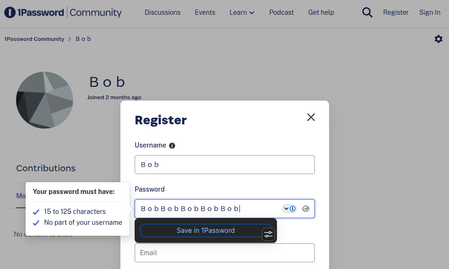
When registering for an account here, the restrictions on passwords are 15 to 25 characters No part of the username however pasting nothing but the username, Bob, gets a check ✔️. I suspect that the validation code fails to understand character encoding. It's a tricky subject.35Views1like0CommentsRandom but Memorable 14.8: World Password Day Special
Hey everyone! 👋 A new episode of 1Password's Random but Memorable podcast has dropped! Listen now Watch on YouTube Episode summary It’s our World Password Day Special! 🌎🔤 Tune in as we answer all your burning questions about passwords, passkeys, multi-factor authentication and more. 🔥 In Watchtower Weekly, we debate why your next security hire might be an algorithm. We then discuss why Gen Z still reuse passwords despite being aware of the security risks. If that wasn’t enough, in Alternative Security Questions we ask Roo, Sara, and Matt what they would hoard in a zombie apocalypse. 🧟♀️ You can read a transcript of the interview here! Want to chat about anything we discussed on the episode? Let us know in the thread below!88Views1like1Comment