Level up your business security with free, on-demand training and certification. Explore 1Password Academy today →
watchtower
41 Topics
Password breach report question
Hi I saw some recent massive breach news on the websites but I couldn't find a single breach entry on Watchtower reports. Does this really mean my accounts were really never breached or Watchtower is not doing its job? https://discuss.privacyguides.net/t/16-billion-apple-facebook-google-and-other-passwords-leaked-act-now/28475 https://cybernews.com/security/billions-credentials-exposed-infostealers-data-leak/ https://www.forbes.com/sites/daveywinder/2025/06/20/16-billion-apple-facebook-google-passwords-leaked---change-yours-now/ https://www.forbes.com/sites/daveywinder/2025/05/23/184162718-passwords-and-logins-leaked---apple-facebook-snapchat/ https://www.tomshardware.com/tech-industry/cyber-security/16-billion-accounts-exposed-in-one-of-the-largest-data-breaches-in-history-enormous-data-haul-holds-two-accounts-for-every-human-alive https://www.tomsguide.com/news/live/16-billion-passwords-data-breach https://time.com/7296254/passwords-leaked-data-breach/431Views0likes5Comments
Duplicate entries after imports
I'm new for 1password. I imported my passwords from Bitwarden and my Google account and now I have dozen of duplicated entries. I tried to use a Watchtower but it doesn't see any duplicates at all. The duplicated items are different in tags and time of editing and might that is the problem. Any way to delete the duplicates despite of the differences? Can I define to the Watchtower search the fields that are relevant for comparison (or event better the fields that aren't relevant)? Thanks ahead for the help!250Views0likes6Comments
Password strength: fantastic vs. excellent for same password
I have accounts on Wikipedia and Wikimedia. They have the same password. 1Password rates that password as fantastic for the Wikimedia entry but only excellent for the Wikipedia entry. Any thoughts on this? I would love to turn on 2FA for these accounts but 2FA seems only available to certain classes of users on these sites.Solved242Views0likes5Comments
Is there a way to re-identify all accounts that offer passkey?
I'm a newbie to 1P. When I imported all my passwords from Lastpass, I noted that many of them had a banner saying "Passkey available". I didn't really know what a passkey was and deleted that banner on many of the accounts as I updated passwords. Now, I'm thinking I would like to use passkeys in a lot of situations. Is there a way to have 1Password look through my accounts and re-assess which ones might allow passkeys? Or, I notice that Watchtower has a tile to see all accounts where Passkey is available. Could it be the ones where I killed the banner are still found by clicking on that? Thanks!Solved219Views0likes3Comments
Business Watchtower Report not updating Shared Vaults
We have run into an issue where the Business Watchtower Report for Shared Vaults are showing 0 issues listed in the Admin console, but when we review with Users on their machines who have access, the vault shows multiple issues. Is there any issue with Reporting?202Views0likes1Comment
How To Remove Duplicates in v8.11.20
I researched removing duplicate entries in 1Password, and most articles talk about using the remove duplicate entries item in Watchtower. However, that tab doesn't exist anymore. How do I remove duplicate entries in 1Password? I am using Windows 11 Pro with the latest edition of the 1Password app.Solved200Views0likes12Comments
Add intelligent deduplication during import process
In the last couple months, I have helped over half a dozen clients migrate their passwords from browsers to 1Password. In doing so, I have found that when exporting from a browser to CSV, each record that contains multiple URLs is broken apart into separate records. As a result, when importing to 1Password, a ton of manual cleanup is required. Sadly, the app lacks an easy way to complete this. It would be nice if 1Password included an easier ability to discover duplicates, separate from Watchtower's Reused Passwords section. However, as 1Password is capable of storing login records with multiple URLs, the app should be intelligent enough to recognize and unify such rows in a CSV import. Please add a capability. This would save users lots of time and might also prevent some of them from being discouraged about making the switch in the first place. It shouldn't be so tedious to transition from browser-based password management to 1Password.Solved170Views3likes4Comments
Confusion on PassKeys with MS
I am confused as to why 1PW shows me that a Passkey is available for OneDrive, which is linked to a paid 365 account, yet OneDrive has a Passkey. I can see only so many Passkeys in my MS Account Settings, which I assume is separate from what I can see on 1PW. One additional note, where the heck can I see my Passkeys or what logins on 1PW have Passkeys? If it is there, it isn't simple to get to, or is it? Passkeys are great, but I am still skeptical about how they are administered between organizations like Microsoft, 1PW, etc. It feels like a cryptic, unorganized nightmare.Solved140Views2likes4Comments
Watchtower score not identical
Hi All, I have 1Password installed on my Mac, Windows PC and iPhone. The Watchtower score on my Mac and iPhone is 1190. The Watchtower score on my Windows PC is 1150. (A difference of 40 points) Given I am logged into the same 1Password account on all three devices, shouldn't the Watchtower score be the same across all three? I've checked and there are no un-synced changes or anything... Can anyone suggest what the problem/issue is? Mac OS 26.0.1 1Password for Mac 8.11.12 (81112027) --- Windows 11 24H2 (OS Build 26100.6725) 1Password for Windows 8.11.12 (81112027) --- iOS 26.0.1 1Password for iOS 8.11.12 (81112027)132Views0likes6Comments
WatchTower suggest Passkey
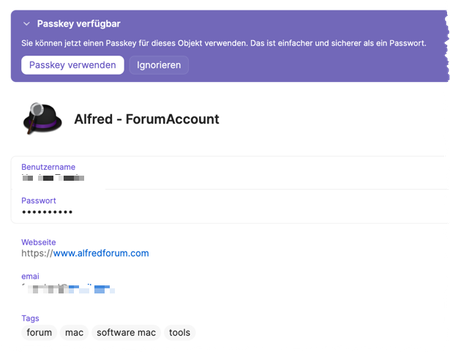
Hej, My Watchtower suggests that I use Passkey on https://www.alfredforum.com. I logged in there to change to Passkey, but they do not support Passkeys... I contacted the admin of Alfred and asked him where I can switch to Passkey, but the admin informed me that they do not support this. So maybe there is some wrong information in 1Password... But how can I fix it? Or can you - 1Password developers - change this?Solved124Views0likes3Comments