Level up your business security with free, on-demand training and certification. Explore 1Password Academy today →
windows
3271 Topics
Passkeys on Desktop vs Mobile (Discord App)
Hello, I just registered the 1-Password app as a passkey for my Discord app on my iPhone. When I registered it, the Discord app said "Use 1-Password - available everywhere that 1-Password is available". I set it up and it worked well on my iPhone. However, I had trouble on my Desktop PC. It has the 1-Password app installed on it, so I expected to be able to use that as a pass key, but it only allowed me to use a hardware security key, and not the 1-Password app. Does logging in with 1-Password app as a passkey on Windows not work? 1Password Version: 8.10.35 Extension Version: Not Provided OS Version: iOS 17.5.1 / Windows 10 Browser: Not Provided1.1KViews1like2Comments
Show the requested credential
I'm heavily using 1password now for agentic usage. All of my business is set up on it now, and all of my credentials are locally using op://, or service accounts. I've put in a lot of effort to try and isolate systems using least privilege, but one problem is that when agents (or applications) request a credential from the system, it doesn't say WHAT credential is being requested. Half the time it doesn't even say the correct name for the application making the request, either. This is a big problem, because I'm starting to get into the habit of just spamming "Accept" blindly. But the whole reason I have set up this whole pipeline is so I can catch malicious programs trying to gain access - for example, supply chain attack infections. Without seeing what credential is being requested, and the process information that is requesting it, I'm finding it's not actually adding much protection at all, because it's putting me into a false sense of security and promoting bad habits. If I'm running multiple agents in parallel, which is often the case, it might just say "Terminal requests access to your vault" or something similar. Which terminal is that? What is the underlying entity being requested? What credential? What is the process ID or terminal title, so I can isolate it to a terminal/agent? Etc. I think this is something that urgently needs to be added. Otherwise, as it stands, it's not really offering much protection because users will just go "oh, it's probably just that agent running - I'm sure it's fine" and accept everything. If that agent happened to have installed a malicious npm package, you'd probably catch it too late.18Views0likes2Comments
Missing add browser button
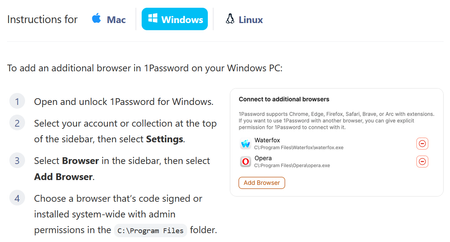
Apparently, to add an unsupported browser, I can click "Add Browser". But there is no "Add Browser" button: The log file goes on an on about "Verifying browser", followed by, "Additional error context: Process is not cmd.exe" It does note that the browser is signed by OSSign, which is correct for Librewolf, and it is looking at the correct copy of librewolf.exe. The parent process of that being cmd.exe is up to Microsoft. I would think that since I've clicked on it, the parent process would be explorer.exe in the normal case. I did try launching a cmd.exe terminal window and running librewolf from there, but that did not help.75Views0likes12Comments
UniFi 2FA Automatic Filling Fail
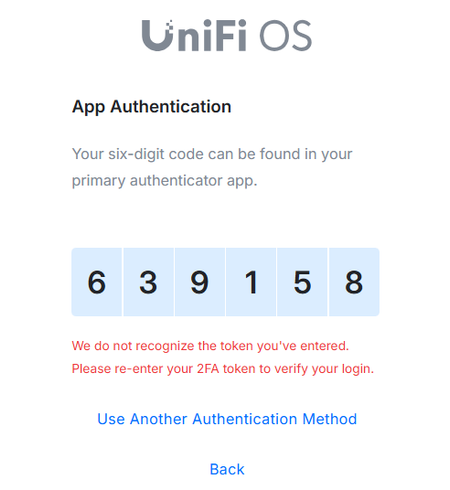
Hello, I did some research and found people with the same issues but couldn't resolve my problem. Basically, when I log in to UniFi, the autofill works as expected BUT the 2FA is not working. If I copy and paste the code, then it works. Anybody dealing with the same issue? I tried deleting all the browser hostory including literally everything but it does not work. I have the same issue with Chrome and Edge. I have attached the printscreen. It used to work before but for some reason stopped a few weeks ago. Any input would be appreciated. Thank you!55Views0likes3CommentsCtrl + alt + c generates copyright icon instead of copying OTP-code
Hi, I'm having exactly the same issue as described here: Unable to use copy one-time password shortcut in 1Password 8 | 1Password Community. The ctrl + alt + c shortcut generates a copyright icon (©) when using the US international keyboard layout (which is very common in The Netherlands) and thus blocks me from being able to use the shortcut to copy the OTP verification. I couldn't find any update on the previous issue, but I see it has already been mentioned a few times on the forum. Would it be possible to lookup this ticket internally and see if there has been an update on this? Or... would it be possible to give it a higher priority? Best, Luuk17Views0likes1CommentFeature request: suggestions based on nearby locations first
Hi, I'm working for multiple clients which use the same tools. For a set of website, I have multiple credentials, one for each client environment. The urls are the same, so there is no client indication in the url. I added the location of each client to the items in 1Password. I expected the suggestions to show in order of closely they are to my current location. When working at a client, I'd prefer to have that suggestion at the top, while working at another client, I'd expect that client to show up at the top based on my current location. That way I can click enter without having to manually select the right item from the list of suggestions. Is it possible to implement anything like that? Best, Luuk9Views0likes1CommentI Generate my 1pw Password by misstake
I am facing a issue accessing my personal account. By mistake, I changed my account password using the password generator inside the app, which logged me out of all devices. Currently, I do not have the new password or the recovery code, but I do have my Secret Key and my Emergency Kit. This account contains all of my important email and service passwords, so losing access is a major problem. Could you please advise me on the official steps I can take to restore access, or confirm if there are any recovery options available given that I have the Emergency Kit and Secret Key? I’ve tried every possible method, but unfortunately I still can’t access my 1Password account. I don’t have the Recovery Code, and I logged out of my phone because it was asking for the new password that was generated through your app and saved inside it — which I can no longer access. I’m fine with deleting the account. However, I want to keep the subscription I already paid for on my old account and have it transferred to the new one after deletion. Thank you very much for your support.45Views0likes2Comments
1Password does not stay unlocked
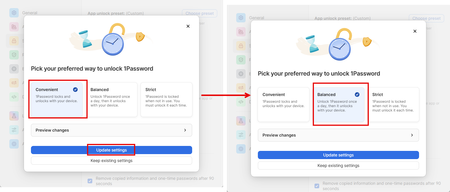
I want to keep 1Password unlocked on my Firefox browser but no matter the setting, it locks: In Security, I have "Automatically Lock 1Password" - turned Off (button is to the left) but if I leave my laptop for a few hours, when I return, it is locked. In Security, I have "Automatically Lock 1Password" - turned On (button to the right). Next, "Lock after system is idle for" , I've tried 8 hours or Never, and "Lock when device goes to sleep" is turned off (button to the left). However, after I've been away for less than 8 hours, 1Password still locks. Thanks for any help on what I'm doing wrong. Microsoft Surface Pro 11 Windows 11 Firefox 151.0258Views0likes1CommentMay 2026 at 1Password: Native macOS AutoFill, a new developer site, and more!
In May, we introduced new features for Autofill on macOS and Android, as well import/export enhancements, and a way to create items more efficiently. We also relaunched our developer documentation hub with new quick start guides, powerful search features and a fresh domain change to match. In case you missed it macOS native AutoFill in beta We know you've been waiting for this one! In the latest 1Password for Mac beta release (version 8.12.22) we've integrated 1Password with Apple's native Passwords API. This allows your password manager to act as a system-level Credential Provider on macOS. Using the native Passwords API, alongside Universal Autofill and 1Password in the browser, will give you a more consistent filling experience across macOS. This is one of our most requested features, and we’re working hard to bring it to the production channel after the beta release. Follow these steps to try macOS AutoFill for yourself: Install the latest version of the 1Password for Mac beta. Navigate to 1Password Settings > Autofill > Set up macOS AutoFill. Select “Turn On” from the macOS permission prompt. If you’re using Safari, confirm Safari Settings > AutoFill > User names and passwords is enabled. * This feature requires macOS 14 Sonoma on Apple silicon. We’d love to hear your feedback on the update in our announcement post! Updated developer documentation Interested in setting up a service account for your AI agent, securely provisioning secrets, or managing your project’s environment variables? You’ll find in-depth guides covering all this and more on 1Password.dev, our new developer documentation hub. Our team has refreshed and reorganized the documentation to make it even easier to get started with our developer tools. We’ve also added some new get-started guides for developers, admins, and partners, as well as enhanced search functionality that lets you ask questions in plain language. 👉Read the full announcement in the Developer Community. More product updates announced this quarter If the macOS update wasn’t enough, May also brought a number of product updates including: the Autofill health check, Credential Exchange Protocol (CXP), and smarter login creation. You often need to tweak multiple system settings in multiple menus to ensure a consistent autofill experience on Android. If you miss a setting, or your device changes something without telling you, it can be tough to track down and fix the issue. Our new Autofill health check brings these settings into one place and highlights any settings that need to be changed. You might recall that we’ve been working on a new way to import and export data. This work is part of an industry wide effort to better facilitate credential migration across different systems with the CXP. That new process is now live in iOS and Android, making it easier to move everything including passkeys (yes, you can now export passkeys!) between different password managers. Last but not least: instead of starting with a blank login item, you can now type the name of widely used websites, like Reddit or Steam, into the title to prefill key fields. This not only means you can create items faster, but also helps ensure your items are filled where you use them. Random but Memorable May 7th was World Password Day! To mark this special day, we sat down with 1Password CISO Jacob DePriest to talk about the future of identity security. If you want to know where the cybersecurity industry is going, this one's for you!". In our latest episode, Gerald Auger, founder of Simply Cyber, shares his tips to stay secure during the summer travel season. The future of identity security | World Password Day special! Cybersecurity tips for the modern traveler Don’t forget to subscribe to the Random but Memorable YouTube channel! Release note highlights Browser Extension Creating a new item in the 1Password browser extension now opens a pop-up window instead of opening the full 1Password app window. Fixed an issue where you weren’t prompted to update a saved login after you changed your username on a site but kept the same password. Fixed an issue where the 1Password could lock unexpectedly after you switched tabs. Fixed an issue where 1Password in Safari could show an endless loading state when it couldn’t connect to the desktop app. Mac, Windows, and Linux You can now use Codex to interact directly with 1Password Environments using a local MCP server (currently in beta). We’ve improved support for importing your data from Bitwarden using CSV files. Secondary windows of the 1Password app will now open on your active display instead of your primary display. You’ll no longer see the option to share an item if item sharing is turned off for your 1Password account. iOS, and Android [iOS only] You can now control whether or not you’re prompted to unlock 1Password when you see prompts to save items in 1Password for Safari. [iOS only] Fixed an issue where you could see two prompts to unlock with Face ID when you selected a login to fill above your keyboard. [Android only] Fixed an issue where dates wouldn’t be localized according to your system locale settings if your in-app language was set to “Use system defaults”. [Android only] Fixed an issue where similar Identity items would be hidden from Autofill suggestions.105Views1like0Comments