
dfibuch
August 27, 2026

Feedback: Universal sign-in, a new Autofill Experience

  • August 27, 2026
  • 166 replies
  • 424 views

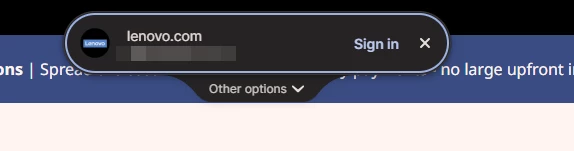
Noticed this morning this Sign in prompt when I go on a site that is stored in my 1P. Can’t find any info about it. Anyone got any ideas when it was released and do we have any control over it?



Pinned Reply By 1P_Dave

Hello folks! 

Thanks for all the feedback everyone has shared about 1Password’s new universal sign-in experience. 1Password now brings password, passkey, and other sign-in options into a single and convenient prompt for all of your logins. 

As we continue refining the new experience, based on feedback and reports from customers, the new experience has been temporarily turned off for 1Password Business users. If you use 1Password through your employer, you’ll see the classic experience for now. We plan to re-enable the new experience for business customers soon and will share updates as they become available.

If you use a personal 1Password account, and you’d like to use the classic experience too, you can follow these steps: 

  1. Right click the 1Password icon in your browser’s toolbar and select Settings.
  2. Choose Autofill & save from the side menu.
  3. Toggle off Use universal sign-in for logins.

-Dave

166 replies

August 29, 2026

Ddi someone test this before they released it?

1P_Dave
1Password Employee
1Password Employee
September 1, 2026

@ekf 

Hello! I’ve replied to your post here

-Dave

August 29, 2026

Mistakes happen in software development but lack of communication is by choice.

1P_Dave
1Password Employee
1Password Employee
September 1, 2026

@dexmot74 

I’m sorry the new feature came as a surprise. Please see my post here

-Dave

September 2, 2026

@dexmot74 

I’m sorry the new feature came as a surprise. Please see my post here

-Dave

Dave, from reading here in the 1Password community as well as places like Reddit, it seems pretty clear that communication (lack of) is one of the bigger complaints and I hope that 1Password takes this to heart. It’s not the feature. And, hopefully, the folks at 1Password will take this as constructive feedback. As an enterprise-level solution… mentions in blog post are not an appropriate level of communication for feature updates that change workflows across organizations that have hundreds (or thousands) of users.

Don’t get me wrong, I’m a huge fan of 1Password. It was my first choice when I sold the idea of an EPM to leadership. And I don’t usually engage in places like ‘communities’ but I felt like this was a valuable opportunity to share some constructive feedback. Hope y’all take it into consideration for the next feature change :)

lysander
August 30, 2026

This unannounced release seems like a covert beta test of the entire user base.

1P_Dave
1Password Employee
1Password Employee
September 1, 2026

@lysander 

I’m sorry the new feature came as a surprise. We’re rolling it out gradually, and you should see a notification the first time you use it:

Last week, we mentioned Universal Sign In in our new blog here: 1Password product enhancements: Smarter autofill, phishing prevention, and more

We’re planning additional announcements as soon as we’ve finished rolling out the feature to everyone. Stay tuned! 

-Dave

August 31, 2026

Who thought that showing this at an entirely different location that the website element that the user is currently focusing on is a good idea? Horrible UX.

September 1, 2026

That’s what I was coming here to say. It’s great if this works for apps other than the browser, but don’t enable this on the browser. Put the selection right next to the input. 

I am tech support for my 80+ year old family. I am dreading having to explain to them that this thing is going to pop up at the top of the screen now. It is hard enough getting them to find the “save new login” popup when it is all the way over in the upper right corner.

August 31, 2026

Hello,

I am at version 8.12.36.31 (beta channel) of the browser extension on macOS, Chrome 153.

In the extension settings, I deliberately disabled the horror show called “Universal Sign-In”, which, by many accounts in this forum, is one of the worst UI/UX decisions 1Password has ever made.

Anyway, despite it being turned off, it now pops up for all passkey prompts. This is new; up until very recently, passkeys used the old sign-in. 

To make matters worse, this somehow triggers an event on macOS, forcing me to enter my macOS password every single time. Literally every time I sign in with a passcode, I have to enter my OS password first (macOS password prompt, not a 1P prompt). 

I am not sure if this is a bug, or a deliberate design choice, or something Apple enforces, but whatever it is, I don’t really care. Please make it stop, and please respect my extension settings, which have the entire universal sign-in thing disabled. It should never be used. 

Thanks


lysander
September 1, 2026

Yes, I see the same behavior. If the feature is supposed to be OFF we should NOT see any indication that it exists. More substandard coding.

September 1, 2026

On windows, my autofill options are nothing like the sceen shot that was displayed. I do not have controls to turn off this unwanted new mechanism. 


September 1, 2026

On windows, my autofill options are nothing like the sceen shot that was displayed. I do not have controls to turn off this unwanted new mechanism. 


Please look in the browser extension settings, not the app settings :)

September 1, 2026

Oh, that’s even worse UX. This is just the UI for the browser? I assumed that the put it at the top of the page because it was a universal login that worked across all types of apps - not just the browser. If this is just the browser, why oh why is it at the top of the screen???? 

Oh, and don’t get me started about how hard I had to look for the settings menu choice for the browser extension. I didn’t even know it had its own settings page and finding it was no easy feat.

September 1, 2026

I found it to be a little confusing yesterday. I was setting up my laptop to make sure my daughter can take it to school as a separate user, and now we have two separate login experiences. I went back several times to figure out that we have the same browser extension version and yet they act differently. I’m not a fan of the gradual rollout thing. Let beta testers be the beta testers.

1P_Dave
1Password Employee
1Password Employee
September 1, 2026

@noise-rising-never-speak 

I’m sorry the gradual rollout caused confusion. For a release of this size, we rolled it out carefully so we could identify and address any issues, and pause the release if necessary. I’ll share your feedback with the team to help us improve future rollouts.

-Dave

lysander
September 1, 2026

@1P_Dave

What really should be done is:

  1. Withdraw the update and restore 1Password to the prior  state.
  2. Complete your beta testing
  3. Write and test COMPLETE documentation on how the feature works and how to disable it if undesired.
  4. Announce the feature through all channels including email.
  5. Release new feature in complete form with documention

Thank you.

LordBusiness
September 1, 2026

I like the idea of the new “experience”, but unfortunately the execution seems to cause more problems than it solves.

1. On many sites I am being presented with the new login prompt (or whatever you want to call it) on every page I visit, despite already being logged in.

2. Again, on some sites, after logging in the prompt then changes to “Finish signing in on this page” even though the page behind has refreshed and I am logged in.

I may try it again it the future, but it’s just too buggy and inconsistent now to be of any use.

1P_Dave
1Password Employee
1Password Employee
September 2, 2026

@LordBusiness 

I’m sorry that you ran into issues when signing in. Are you able to share the websites where you saw these issues so that we can investigate further and get them fixed? 

-Dave

LordBusiness
September 3, 2026

@1P_Dave Thanks. I’ll send you a DM with one site I can remember, but the others were over the past few days and I can’t remember what they were.

One more thing I’ve run into with this new experience is that it doesn’t seem to be honoring subdomains correctly.

For example, I have separate and disticnt credentials for two or more subdomains on the same domain. Each is subdomain is explicitly specified for each credential stored in 1Password.

A) sub1.samedomain.com
B) sub2.samedomain.com

However, when I'm on subdomain B, every page I visit with a form is triggering the new experience to display and trying to log me log in using the credentials from A. This is tremendously annoying.

September 1, 2026

As an enterprise customer I wasn’t very happy finding out about this new 'feature’ (that has been toggled on for me and all of our users by default) when I got the first weird pop-up in the top-middle of my screen. Not to mention, I can’t seem to find any way to disable it via admin policy which, mid-rollout/deployment of 1Password in my company, is a real PITA.

With such a heavy emphasis on 1Password being an enterprise password manager, features like this should be communicated far ahead of deployment, and admin/org-wide control should be prioritized.

It’s possible I missed an email from 1Password but I don’t think so… and please tell me there’s a way to turn this off for everyone.

September 2, 2026

I am in the same boat as you. Its a total mess for my users.

September 2, 2026

I didn’t read all 71 replies. I just disabled it. On my Mac, I could previously just get my login information autofilled. With the new Universal thing, I first get a popup to put in my Mac password and then I start getting boxes to click that cover up the actual login boxes on the website. Sometimes I get the login information autofilled, and sometimes not. What a mess. Seems like a Beta test was rolled out.

1P_Dave
1Password Employee
1Password Employee
September 3, 2026

@stevezoller 

I’m sorry the new experience didn’t work well for you. If you decide to try it again in the future and encounter the same issues, please let us know so we can investigate further.

-Dave