Level up your business security with free, on-demand training and certification. Explore 1Password Academy today →
Forum Discussion

Anonymous
4 years ago‘Never’ option removed from Require Master Password?
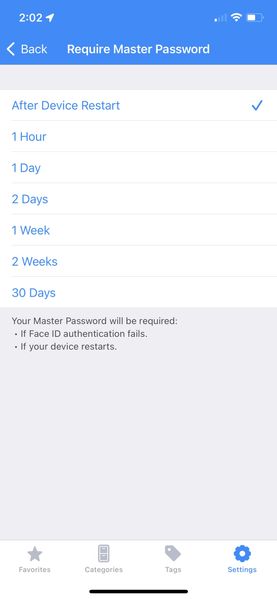
Has the option to select ‘never’ for requiring a master password (if Face ID is active) been removed on iOS for iPhones? Three weeks ago it was there, and now the option is missing. Oddly and fortuna...
Anonymous
4 years agoI noticed a bug - the screen text does not match actual behaviour (at least on an iPhone.)
I just restarted my iPhone and was surprised not to be challenged for the Master password.
The screen says "Your Master Password will be required after 2 weeks, after device restart, or if Face ID authentication fails.
What I am saying is that the description on the settings screen does not marry with what is actually happening because I was not asked for a password on reboot - tested on another iPhone and iPad to be sure before posting here.
I am in the camp that wants to be asked for the master password on restart, and a little disgruntled that this was changed without letting people know.
I was once mugged and forced to unlock my phone at knifepoint, just for the sake of stealing my iPhone so that they could then switch it off to prevent it being tracked by 'Find my phone'.
It was a terrible experience, however I felt comforted knowing that 1Password had my back, and that on reboot even if they somehow hacked my phone they would not get into 1Password and my bank accounts.
I started receiving fake text messages (on my new phone) purporting to be apple having found the location of my phone, and asking me to login with my Apple ID on a website to track the location - so they had managed to hack into my phone to some degree.
I am definitely in the camp of wanting an extra level of security so that an extra password is required and not just relying on Fingerprint / Face ID.
Incorrect information displayed under 'Face ID' toggle.




