Level up your business security with free, on-demand training and certification. Explore 1Password Academy today →
Forum Discussion

AgingKeeper
3 years agoDedicated Contributor
1Password for the iPad Safari extension not working.
Trying to login to a website.
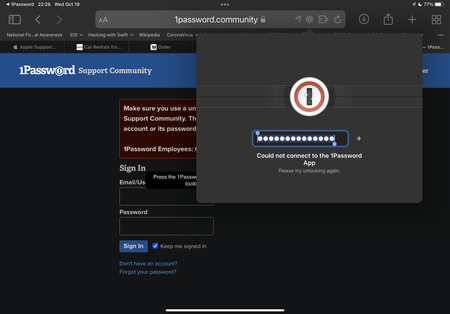
I have added a screenshot of the response that I got. I attempted to use the extension and this is what happened. I even opened 1Password on the iPad and copie...

GreyM1P 1Password Team
3 years ago1Password TeamHi there AgingKeeper
I'm sorry to hear you've had trouble with 1Password in Safari on your iPad. I notice in your screenshot that there's another Safari extension showing in the address bar – it appears to have an icon that looks like a dolphin. (It's not one I recognise, I'm afraid).
Try tapping the 🧩 extensions icon in the address bar of Safari and turn off all extensions except 1Password, just to make sure that nothing else is preventing 1Password from working as expected.
If that still doesn't work, try turning off any VPNs or proxies that might be in use. And if you're still having a problem, I'd like to ask you to create a diagnostics report from your iPad:
Sending Diagnostics Reports (iOS)
Attach the diagnostics to an email message addressed to support+forum@1password.com.
⚠️ Please don't post your diagnostics report here.
With your email please include:
- A link to this thread: https://1password.community/discussion/134677/1password-for-the-ipad-safari-extension-not-working
- Your forum username:
gct3o
You should receive an automated reply from our BitBot assistant with a Support ID number. Please post that number here.
I look forward to hearing how you get on either way. :)
— Grey


