Level up your business security with free, on-demand training and certification. Explore 1Password Academy today →
Forum Discussion

ThePaleKing
1 month agoNew Contributor
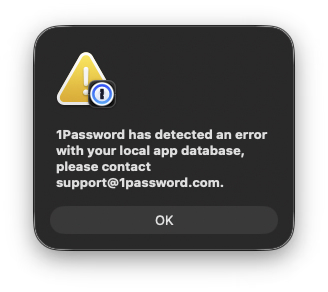
1Password has detected an error (macOS Tahoe)
Hi there, I recently migrated information from an external SSD to a new macOS Tahoe installation, and this prompt occurs upon each login. Could I have some support with this? Should I simply ju...
- 1 month ago
I'm sorry that those steps didn't work with your situation, please try these alternative steps:
🚨 Before proceeding, make sure that you have a copy of your Emergency Kit, that you know your account password, and that you're signed into 1Password on another device and see all of your items there.
- Close all browsers.
- Right-click the 1Password icon in the menu bar (if it's there) and click Quit.
- Open Finder, and click the Go menu > Go to Folder...
- In the box that appears, copy and paste the following exactly: ~/Library/Group Containers/
- and press ⮐ Return.
- You'll see a folder called 2BUA8C4S2C.com.1password. Rename it to 2BUA8C4S2C.com.1password.old
- Wait a few moments and then open 1Password. You'll be taken through the first setup process. Add your 1Password account back to the 1Password app.
- Follow the prompts to setup 1Password and configure any settings that you had configured before.
Let me know if you run into any issues.-Dave

1P_Dave Moderator
1 month agoModeratorHello ThePaleKing! 👋
I'm sorry that you're seeing an error message when attempting to launch 1Password on your Mac. This issue can indeed occur when moving 1Password's local cached database from one Mac to another, you can resolve it by resetting the app:
🚨 Before proceeding, make sure that you have a copy of your Emergency Kit, that you know your account password, and that you're signed into 1Password on another device and see all of your items there.
- Reset the 1Password app: How to reset the 1Password app on a specific device
- Add your 1Password account back to the 1Password app: How to add your 1Password account to the apps
- Follow the prompts to setup 1Password and configure any settings that you had configured before.
Let me know if you run into any issues.
-Dave
- ThePaleKing1 month agoNew Contributor
Hi Dave,
I cannot complete step 1, as I do not have a `settings` option underneath 1Password on the menubar.
- 1P_Dave1 month ago
I'm sorry that those steps didn't work with your situation, please try these alternative steps:
🚨 Before proceeding, make sure that you have a copy of your Emergency Kit, that you know your account password, and that you're signed into 1Password on another device and see all of your items there.
- Close all browsers.
- Right-click the 1Password icon in the menu bar (if it's there) and click Quit.
- Open Finder, and click the Go menu > Go to Folder...
- In the box that appears, copy and paste the following exactly: ~/Library/Group Containers/
- and press ⮐ Return.
- You'll see a folder called 2BUA8C4S2C.com.1password. Rename it to 2BUA8C4S2C.com.1password.old
- Wait a few moments and then open 1Password. You'll be taken through the first setup process. Add your 1Password account back to the 1Password app.
- Follow the prompts to setup 1Password and configure any settings that you had configured before.
Let me know if you run into any issues.-Dave
- ThePaleKing1 month agoNew Contributor
Thank you Dave, that worked perfectly! I have it all up and running now.


