Protect what matters – even after you're gone. Make a plan for your digital legacy today.
Forum Discussion

ThePaleKing
27 days agoNew Contributor
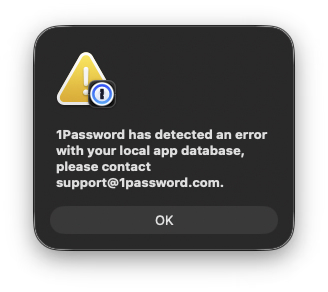
1Password has detected an error (macOS Tahoe)
Hi there, I recently migrated information from an external SSD to a new macOS Tahoe installation, and this prompt occurs upon each login. Could I have some support with this? Should I simply ju...
- 24 days ago
I'm sorry that those steps didn't work with your situation, please try these alternative steps:
🚨 Before proceeding, make sure that you have a copy of your Emergency Kit, that you know your account password, and that you're signed into 1Password on another device and see all of your items there.
- Close all browsers.
- Right-click the 1Password icon in the menu bar (if it's there) and click Quit.
- Open Finder, and click the Go menu > Go to Folder...
- In the box that appears, copy and paste the following exactly: ~/Library/Group Containers/
- and press ⮐ Return.
- You'll see a folder called 2BUA8C4S2C.com.1password. Rename it to 2BUA8C4S2C.com.1password.old
- Wait a few moments and then open 1Password. You'll be taken through the first setup process. Add your 1Password account back to the 1Password app.
- Follow the prompts to setup 1Password and configure any settings that you had configured before.
Let me know if you run into any issues.-Dave

ThePaleKing
24 days agoNew Contributor
Hi Dave,
I cannot complete step 1, as I do not have a `settings` option underneath 1Password on the menubar.

1P_Dave Moderator
24 days agoModeratorI'm sorry that those steps didn't work with your situation, please try these alternative steps:
🚨 Before proceeding, make sure that you have a copy of your Emergency Kit, that you know your account password, and that you're signed into 1Password on another device and see all of your items there.
- Close all browsers.
- Right-click the 1Password icon in the menu bar (if it's there) and click Quit.
- Open Finder, and click the Go menu > Go to Folder...
- In the box that appears, copy and paste the following exactly: ~/Library/Group Containers/
- and press ⮐ Return.
- You'll see a folder called 2BUA8C4S2C.com.1password. Rename it to 2BUA8C4S2C.com.1password.old
- Wait a few moments and then open 1Password. You'll be taken through the first setup process. Add your 1Password account back to the 1Password app.
- Follow the prompts to setup 1Password and configure any settings that you had configured before.
Let me know if you run into any issues.
-Dave
- ThePaleKing24 days agoNew Contributor
Thank you Dave, that worked perfectly! I have it all up and running now.
- 1P_Dave24 days ago
I'm happy that the alternative steps helped!
-Dave


