Level up your business security with free, on-demand training and certification. Explore 1Password Academy today →
Forum Discussion

GBRP
6 months agoNew Contributor
All devices offline
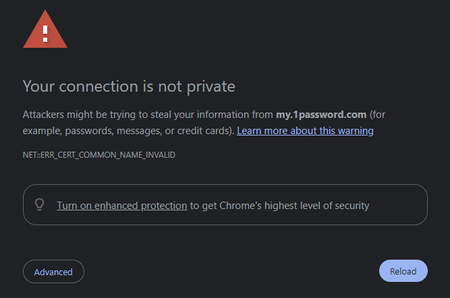
Hi, all our devices are offline and unable to connect to 1password and sync. On Android devices we are seeing a red cloud with a line through it, on 1Password app on windows constant spinning wheel ...
 6 months ago
A reboot of the windows machine has fixed the app issue, so everything back in operation now.

1P_Dave Moderator
6 months agoModeratorHello GBRP! 👋
It looks like our automated spam filter caught your posts as a false positive. I've released the post now and merged it together with your second post, I'm sorry for any confusion caused.
There were intermittent issues yesterday but they're now resolved, you can read more here: Intermittent performance issues with 1Password.com
So that I can better understand the situation can you tell me the following:
- Does the issue persist even after restarting your devices?
- Have you tested to see if you see the same issue on another network? Like a cellular hotspot?
- Can you reproduce the issue when signing in to your 1Password account on 1Password.com using the link in this post?
-Dave
GBRP
6 months agoNew Contributor
Hi Dave, thanks for the swift response. Yes, it did persist on restart of devices. Switching wifi off on the phone resolved it however, so i just rebooted the router and now we are back in business. Any ideas what the issue would have been? Seems to have started misbehaving sometime yesterday.
- 1P_Dave6 months ago
I'm glad that restarting both your router and your devices resolved the issue. I took a look and I didn't see any other recent reports of this behaviour so I can't say exactly why it might have occurred in your case. Since the issue didn't occur on another network for you, it sounds like something might have been not working on the network side of things.
If you experience any other issues then don't hesitate to let us know.
-Dave
- GBRP6 months agoNew Contributor
Actually I spoke to soon, still having issues with the application on windows machines even after rebooting wifi router, although i can now access through a browser.
- GBRP6 months agoNew Contributor
A reboot of the windows machine has fixed the app issue, so everything back in operation now.


