Level up your business security with free, on-demand training and certification. Explore 1Password Academy today →
Forum Discussion

sjmoll
6 months agoOccasional Contributor
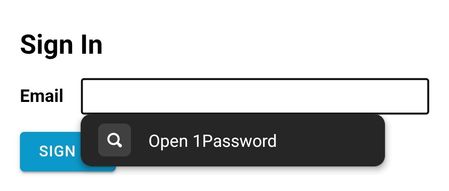
Autofill suggestions only show "Open 1Password"
Dave, I've noticed something new over the last few days. Autofill is still working, but sites that used to prompt with specific logins now prompt only with "open 1password". It works to choose th...

jaas666
5 months agoNew Contributor
Having the same problem. It won't offer any suggestions at all.. only the "Open 1Password" button. If you click the button it opens the app with the correct suggestion showing. Clicking on the suggestion will sometimes fill the credentials, sometimes it returns to the site without filling anything, haven't found any pattern to it.
This is on an Android device. Performed same tests on both Chrome and Edge browsers.
I tought it was because ofnthe keyboard so I tried:
- Samsung Keyboard
- gBoard keyboard
Then I changed the setting to show suggestion under the field to rule out the keyboard. The only thing this changed was the location for the "Open 1Password" button.
I tried on actual apps and its showing the same behavior, not noticed this earlier because if the app was configured to use passkey (most of the ones I use daily are) those work correctly, you get the passkey prompt and it works. But if the app asks for username and password the only suggestion from 1Password is to "Open 1Password"

1P_Timothy Community Manager
4 months agoCommunity ManagerHi jaas666, thanks for writing in. I'm sorry for any trouble with this issue. I've gone ahead and added you as an impacted user.
As a workaround, could you try disabling and re-enabling autofill? Here are those steps:
- Open and unlock 1Password for Android.
- Tap the account or collection icon.
- Select Settings > Autofill.
- Turn Autofill off, then confirm your choice.
- Select "None" as the Preferred service, then confirm your choice.
- Tap back to 1Password, then turn Autofill on and confirm your choice.
- Select 1Password as the Preferred service, then confirm your choice.
- Tap back to 1Password and check that Autofill, as well as Show filling suggestions are on.
Next could you try signing into one of you accounts? If you're still only seeing "Open 1Password" could you try repeating those steps 1 or 2 times? Let us know how that goes, and thank again.
- jaas6664 months agoNew Contributor
I've tried that solution a few times before, and just tried it again now. It doesn't fix the problem.
I've noticed something else recently: there's an icon at the top of the home screen that says I'm offline. It appears between the search bar and the 1Password icon, and looks like a cloud with a diagonal slash through it. (I can't take a screenshot of that screen to show you.)
When I tap the icon, it "reconnects" and the symbol disappears. However, my phone is always connected to the internet, so I'm not sure why this keeps happening. If I don't tap the icon, the app stays "offline" until I completely close and reopen it. Even when I tap the icon to reconnect, it doesn't fix the original problem I'm experiencing.
I never saw this offline icon before these issues started, so I thought it might be related.
- 1P_Dave4 months ago
Moderator
It sounds like you might be running into a couple of different issues. So that we can help further, I'd like to ask you to create and share a 1Password diagnostics report from your Android device:
Send a diagnostics report (Android)
Attach the diagnostics to an email message addressed to support@1password.com
With your email please include:- A link to this thread: https://www.1password.community/discussions/1password/autofill-suggestions-only-show-open-1password/164607/replies/166202
- Your forum username: jaas666
You should receive an automated reply from our BitBot assistant with a Support ID number. Please post that number here. Thanks very much!-Dave
- jaas6664 months agoNew Contributor
Sent.
I'm seeing on the report a lot of `IndeterminateOffset" errors right next to the `FailedToSerialize` ones.
Maybe related?




