Level up your business security with free, on-demand training and certification. Explore 1Password Academy today →
Forum Discussion

BobBarker
3 years agoOccasional Contributor
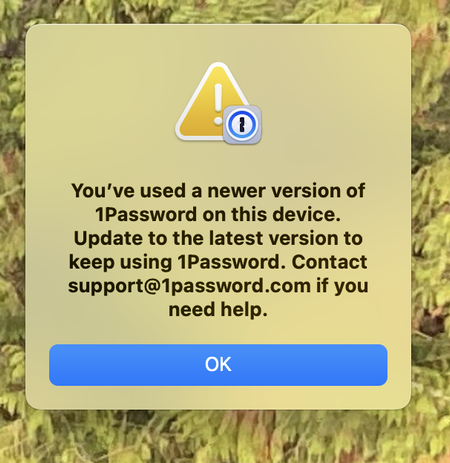
Cannot install Password 8 - Current I Mac with Apple Chips and Ventura 13.2.1 (22D68)
After working on my system this morning, I switched off and switched on a couple of hours later. The message attached displayed. I have absolutely no idea why this is displayed, between swit...

1P_Tommy Moderator
3 years agoModerator@BobBaker
The following should help with that by allowing you to create a new database and pull in your information from 1Password.com
- Make sure you have your Emergency Kit and know your account password and all data is contained on 1Password.com.
Double check that ALL data is on 1Password.com! We do not want you to experience any data loss. If needed, manually copy data to 1Password.com from the 1Password 8 application to ensure no data loss.
If your local copy has data that is not present on 1Password.com you would need to manually copy it over to 1Password.com to prevent data loss.
- Quit 1Password and all browser for good measure. Right-click 1Password in the menu bar (If it's there) and click Quit.
- Open Finder, and click the Go menu > Go to Folder... In the box that appears, copy and paste the following exactly:
~/Library/Group Containers/2BUA8C4S2C.com.1password/Library/Application Support/1Password/
Press Return.
You'll see a folder called
Data– right-click on the folder and select Compress "Data".Drag the original
Datafolder to the Trash.Drag 1Password from the Applications folder to the Trash.
Download a new copy of 1Password from here and install it - https://downloads.1password.com/mac/1Password.zip
Wait a few moments and then open 1Password 8. You'll be taken through the setup process.


