REMINDER: the community will be in read-only mode from tomorrow until July 2nd. This is part of our platform upgrade! Learn more in the FAQs →
Forum Discussion

ptab
2 years agoNew Contributor
Chrome passkey dialog shows up instead of 1Password one
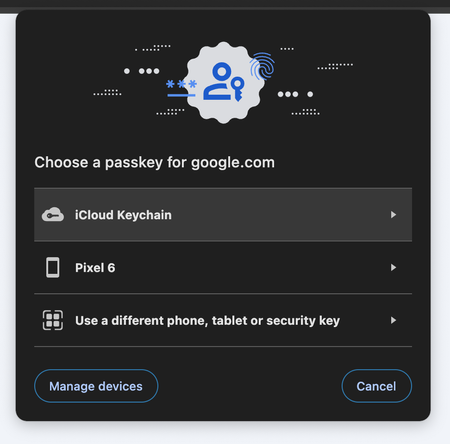
Using Chrome desktop, when I try to login to any of my passkey-enabled accounts (e.g. Google) using a passkey, I only get offered the standard Chrome dialog:
If I do the exact same thing on...

ptab
2 years agoNew Contributor
Hi Dave, thanks for the tips. I already had all your suggestions correctly configured so they didn't fix my problem, but they did lead me to eventually finding the reason why this doesn't work.
Something I did not mention in my original message is that I am on a company laptop, and my Google and Chrome accounts are managed by my employer who uses Keeper for secret management. Aside from the 1Password extension, I also have the Keeper extension (installed remotely by the system administrator, and cannot be disabled). Despite having every single autofill setting in Keeper disabled, never having seen a popup from their extension (for passwords or passkeys), and having my Chrome delegating all password management duties to 1Password:
It looks like simply having the Keeper extension enabled makes Chrome choose to show its own passkey prompt instead of the 1Password one. I'm able to easily reproduce this in Incognito mode: disabling the Keeper extension makes the 1Password passkey prompt work as expected, and enabling it makes Chrome show its default one.
Since I am not able to disable this extension in non-Incognito mode (due to remote administration settings), is there something I can do? Is this something 1Password can address on their end, or a Chrome bug?


